
planifolia
speedrunning sodium via mixins
Screenshots
About this Mod
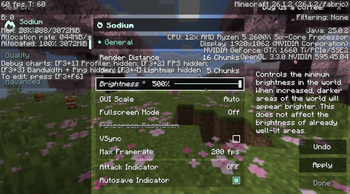
implements the some of the changes made in the speedrunning fork of sodium in the form of an add-on mod, to bring important vanilla parity fixes & functionality to later version runs that use upstream sodium.
this includes:
- showing the vanilla video settings menu when in a world
- e counter saying -1 when entity culling is on
- right side of subchunk counter showing static capacity instead of generated chunks
- leaves having black pixels with fast graphics on pre 1.21.11
- minimizing sodium f3 changes
- reverting resource pack and datapack changes in menus and world files
- adding options for entity culling and fog occlusion to the vanilla video settings menu
- disabling lithium optimizations that break pie-ray
- adding back filterempty and renderLayer profiler entries
- removing weather and leaves independent quality options
- fixing crashes
additionally, with or without sodium:
- allows the use of gamma 5 on 1.19+ (can only set from title screen or options.txt)
this mod is only intended to work with the latest version of sodium for any subversion of minecraft.
Available Versions
How to Install planifolia on Your Client
Install the Mod Loader Locally
Install fabric for your local Minecraft version.
Download the Matching File
Choose the planifolia file for fabric and Minecraft 26.1.2.
Install Mod
Place the .jar file in your local .minecraft/mods folder and restart Minecraft. No server-side installation is required.
Compatibility
Mod Loaders
Minecraft Versions
26.1.2, 26.1.1, 26.1 (+29 more)
Server-side
✗ UnsupportedRecommended RAM
4 GB(min. 3 GB)Frequently Asked Questions
Does planifolia need to be installed on the Minecraft server?
No. Modrinth marks planifolia as unsupported on the server side. Install it only in your local Minecraft mods folder. Your server can remain unchanged unless the mod page lists an additional dependency.
Which version and loader does planifolia require?
Use a file for fabric and your exact Minecraft version. Supported versions include 26.1.2, 26.1.1, 26.1. Files for different loaders are not interchangeable.
planifolia is not working – what should I check?
First check the Minecraft version, loader version and required dependencies. Put the .jar file in your local .minecraft/mods folder and remove older duplicates. Because this mod is client-side, adding server RAM will not fix it.
Similar Mods


Minecraft Server for Your Group
planifolia stays on your client. Host a compatible world for your group.