NameChanger
PlayerSettingChanger lets you customize how online players look, sound, and appear on your client with per-player nicknames, skin URL overrides, voice mutes, and a premium themed GUI.
Screenshots
About this Mod
PlayerSettingChanger
About
PlayerSettingChanger is a client-side Minecraft mod that gives you a clean, modern menu for managing how other online players appear and sound only on your client.
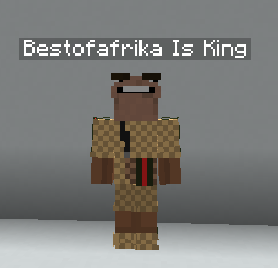
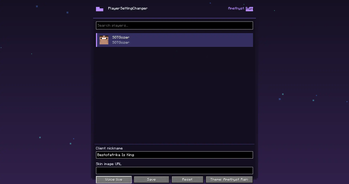
Open the mod from Mod Menu and you’ll see every online player listed in a premium styled GUI with their player head and username. From there, you can set a custom client-side nickname, add a skin image URL override, mute them through Simple Voice Chat support, or reset their settings back to normal.
Features
- Modern player settings GUI
- Shows all online players
- Player head and username cards
- Client-side nickname changer
- Client-side skin URL override
- Per-player Simple Voice Chat mute
- Reset button to restore a player back to original
- Settings are saved per player UUID
- 50 custom themes
- Animated theme effects
- Flapping cat-ear style header
- Custom mod logo
- Works through Mod Menu
Important
This mod is client-side only.
Custom names, skins, and mute settings are only visible or active for you. Other players will not see your changes.
Skin overrides require a direct PNG image URL, usually a Minecraft skin image in 64x64 format.
Simple Voice Chat Support
If Simple Voice Chat is installed, PlayerSettingChanger can mute selected players locally by silencing their incoming voice audio on your client.
Dependencies
Required:
- Fabric Loader
- Fabric API
- Minecraft 1.21.11
Recommended:
- Mod Menu
- Simple Voice Chat, for voice mute support
Author
Made by BestOfAfrika
Available Versions
How to Install NameChanger on Your Client
Install the Mod Loader Locally
Install fabric for your local Minecraft version.
Download the Matching File
Choose the NameChanger file for fabric and Minecraft 1.21.11.
Install Mod
Place the .jar file in your local .minecraft/mods folder and restart Minecraft. No server-side installation is required.
Compatibility
Mod Loaders
Minecraft Versions
1.21.11
Server-side
✗ UnsupportedRecommended RAM
4 GB(min. 3 GB)Frequently Asked Questions
Does NameChanger need to be installed on the Minecraft server?
No. Modrinth marks NameChanger as unsupported on the server side. Install it only in your local Minecraft mods folder. Your server can remain unchanged unless the mod page lists an additional dependency.
Which version and loader does NameChanger require?
Use a file for fabric and your exact Minecraft version. Supported versions include 1.21.11. Files for different loaders are not interchangeable.
NameChanger is not working – what should I check?
First check the Minecraft version, loader version and required dependencies. Put the .jar file in your local .minecraft/mods folder and remove older duplicates. Because this mod is client-side, adding server RAM will not fix it.
Similar Mods



Minecraft Server for Your Group
NameChanger stays on your client. Host a compatible world for your group.