
PMW Optimizations
PMW Optimizations is a server-side mod that aims to optimize a bunch of ProtoManly's Weather Mod
Screenshots
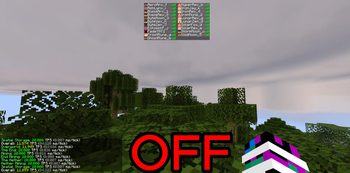
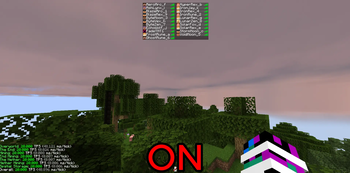
About this Mod
PMWeather Optimizations 1.2.1
PMWeather Optimizations is a server-only mod designed to improve TPS and make higher player counts more playable.
Built for ProtoManly’s Weather 0.16.4 on Minecraft 1.21.1.
Chunk and Surface Processing
Reduces PMWeather’s expensive chunk scanning while preserving wildfire, scorching, extinguishing, thermal shock, and dead-log behavior.
Modified Precipitation Budget
Limits optional PMWeather precipitation work per level to prevent large weather events from overwhelming the server thread.
Biome and Chunk-Loading Protection
Uses already-loaded chunk and biome data wherever possible, preventing precipitation checks from generating or synchronously loading missing chunks.
Precipitation Optimizations
Reuses repeated precipitation calculations and skips atmospheric values that are not needed by the precipitation system.
Rain Query Caching
Caches identical isRainingAt checks during the same server tick, reducing repeated PMWeather rain calculations.
Wind Optimizations
Reduces unnecessary terrain collision rays, duplicate heightmap queries, cyclone calculations outside their effective range, and repeated fire-intensity lookups.
Entity Wind Safety
Entity movement and wind effects remain entirely on the Minecraft server thread. No entities are asynchronously ticked or modified.
Moisture Networking
Sends moisture and fire updates only to players already tracking the affected chunk.
Smaller Optimizations
Reuses storm identifiers and removes several repeated object allocations and lookups.
Experimental Thermodynamic Optimization
Disabled by default.
This feature is purely experimental and has shown a regression in TPS during testing. It should not be enabled by default or treated as a recommended performance improvement.
It remains available only for additional testing and development.
Experimental Multithreading
Disabled by default.
Experimental atmospheric calculation workers are available only when both multithreading and thermodynamic optimization are manually enabled.
The server thread never waits for worker results, and all live Minecraft world access remains on the server thread.
Because the thermodynamic system currently shows a TPS regression, experimental multithreading is also not recommended for normal servers.
Runtime Controls
All commands require Minecraft permission level 2 aka OP only:
/pmw-optimizations on
/pmw-optimizations off
/pmw-optimizations status

/pmw-optimizations thermodynamic on
/pmw-optimizations thermodynamic off
/pmw-optimizations thermodynamic status
Available Versions
How to Install PMW Optimizations on Your Server
Order Server
Order a Minecraft Java server with at least 3 GB RAM (4 GB recommended).
Set neoforge Loader
In the panel under "Egg", select the neoforge loader and matching Minecraft version (1.21.1).
Install Mod
Open the mod browser in the dashboard and search for "PMW Optimizations". Click "Install" – done! Alternatively, upload the .jar via SFTP to the /mods folder.
Compatibility
Mod Loaders
Minecraft Versions
1.21.1
Server-side
✓ RequiredRecommended RAM
4 GB(min. 3 GB)Frequently Asked Questions
PMW Optimizations server crashes on startup – what to do?
Most common cause: wrong neoforge version or insufficient RAM. Check the server log (latest.log) for "OutOfMemoryError" or "Mixin" errors. With Mado Hosting: ensure at least 3 GB RAM is allocated and the loader matches the mod version (1.21.1). You can switch loaders with one click in the panel.
Is PMW Optimizations compatible with neoforge?
PMW Optimizations officially supports neoforge for Minecraft 1.21.1. The Mado dashboard automatically detects incompatible loader combinations.
Server lagging with PMW Optimizations – how to optimize performance?
Recommended RAM: 4 GB (per 8 players). Use /spark profiler to check if PMW Optimizations consumes the most tick time. Common fixes: reduce server view-distance to 8-10, install "performant" or "starlight" as supplementary mods on Forge. With Mado Hosting, your server runs on NVMe SSDs with dedicated CPU cores for minimal latency.
Similar Mods


Rent Modded Server
Install PMW Optimizations with just one click on your server.