
Propane
A simple, light-weight optimization mod for Minecraft Java.
Screenshots
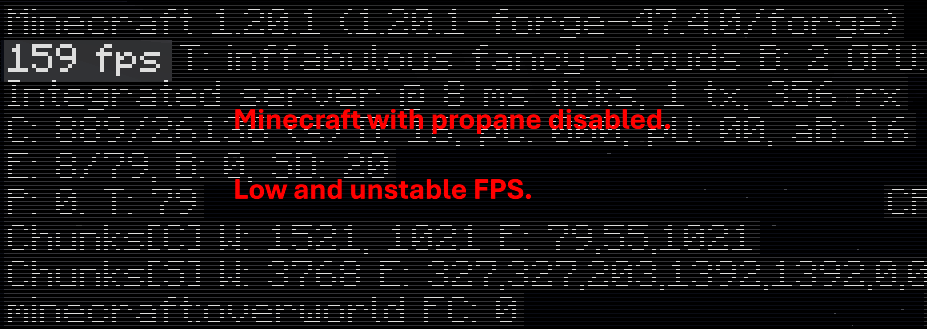
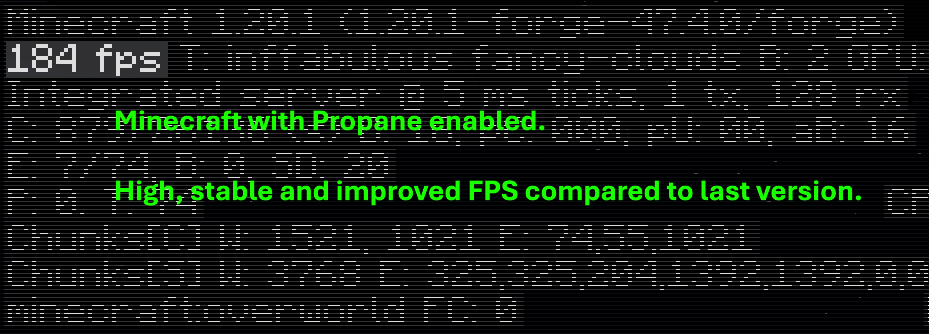
About this Mod

🧪 What is Propane?
Propane is a performance-focused Minecraft optimization mod built to minimize CPU and memory overhead without altering visuals or breaking vanilla mechanics.
It's goal is to serve as a drop-in solution to improve frame stability, reduce latency in heavily changed environments, and help low-end systems run Minecraft smoother.
Unlike more aggressive mods that cut corners, Propane prioritizes accuracy and compatibility, ensuring a seamless gameplay experience.
🚀 Key Features
- Occlusion Culling Enhancements
Only processes what's visible — reduces CPU usage in large builds and underground bases.
- Lazy Tick System for Tile Entities
Dynamically delays updates for non-critical blocks (like hoppers, furnaces, etc.) without affecting behavior.
- Multithreaded Pathfinding
Offloads mob pathfinding to background threads for smoother mob AI in large worlds.
- Memory Leak Patches
Prevents common sources of memory bloat in vanilla and modificated environments.
- Minimal Visual Impact
Keeps Minecraft looking almost the same. Removed particles, clouds and lower chunk rendering in extreme cases.
🔄 Compatibility
Propane is built with Forge (Fabric version planned) and is built to be compatible alongside other server-side mods and some client-side mods.
🎯 Use Cases
- Heavily modded packs
- Survival servers suffering from TPS drops
- Low-end PCs that struggle with chunk ticking or entity lag
- Players who want better performance without visual compromise
💬 Why the name?
Because Propane is a fuel, and it boosts your game! (and because naming performance mods chemicals is very popular)
Available Versions
How to Install Propane on Your Client
Install the Mod Loader Locally
Install forge for your local Minecraft version.
Download the Matching File
Choose the Propane file for forge and Minecraft 1.20.1.
Install Mod
Place the .jar file in your local .minecraft/mods folder and restart Minecraft. No server-side installation is required.
Compatibility
Mod Loaders
Minecraft Versions
1.20.1
Server-side
✗ UnsupportedRecommended RAM
4 GB(min. 3 GB)Frequently Asked Questions
Does Propane need to be installed on the Minecraft server?
No. Modrinth marks Propane as unsupported on the server side. Install it only in your local Minecraft mods folder. Your server can remain unchanged unless the mod page lists an additional dependency.
Which version and loader does Propane require?
Use a file for forge and your exact Minecraft version. Supported versions include 1.20.1. Files for different loaders are not interchangeable.
Propane is not working – what should I check?
First check the Minecraft version, loader version and required dependencies. Put the .jar file in your local .minecraft/mods folder and remove older duplicates. Because this mod is client-side, adding server RAM will not fix it.
Similar Mods


Minecraft Server for Your Group
Propane stays on your client. Host a compatible world for your group.