
Quilt Loading Screen
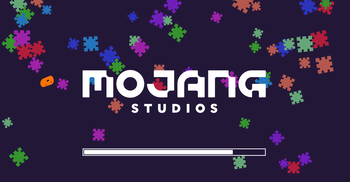
A loading screen based off of The Quilt Community's server banner.
Screenshots
About this Mod
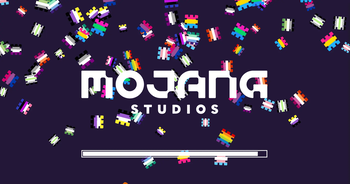
Screenshots in the Gallery tab above!
Requires Quilt Loader and QSL.
This is a loading screen based off of The Quilt Community's (former) server banner.
Not sure what Quilt is? Check it out! --> https://quiltmc.org
The mod consists of several patches from the Quilt logo falling like snow, which then rapidly fall off the screen once loading ends.
This also applies with the F3-T resource pack reload.
Every June, Quilt Loading Screen turns on Pride Mode and the patches consist of pride flags instead! You can also turn this on manually all the time via a config option if you have Mod Menu installed.
简体
截图在上面的 "Gallery"(图库)标签中!
需要Quilt Loader和QSL。
这是一个基于The Quilt Community(前)服务器横幅的加载画面。
不知道Quilt是什么?看看吧! --> https://quiltmc.org
该模型由Quilt标志的几个补丁组成,像雪一样落下,然后在加载结束后迅速从屏幕上掉下来。
这也适用于F3-T资源包的重新加载。
每年六月,Quilt加载屏幕都会开启骄傲模式,补丁由骄傲的旗帜组成! 如果你安装了Mod Menu,你也可以通过一个配置选项手动一直打开它。
任何人都可以把我的mods上传到mcmod.cn。我不会说中文,所以我不能自己做这个! 如果你想了解更多信息,请发邮件给我 [email protected]。
Available Versions
How to Install Quilt Loading Screen on Your Client
Install the Mod Loader Locally
Install fabric for your local Minecraft version.
Download the Matching File
Choose the Quilt Loading Screen file for fabric and Minecraft 1.20.1.
Install Mod
Place the .jar file in your local .minecraft/mods folder and restart Minecraft. No server-side installation is required.
Compatibility
Mod Loaders
Minecraft Versions
1.20.1, 1.19.3, 1.19.2 (+13 more)
Server-side
✗ UnsupportedRecommended RAM
4 GB(min. 3 GB)Frequently Asked Questions
Does Quilt Loading Screen need to be installed on the Minecraft server?
No. Modrinth marks Quilt Loading Screen as unsupported on the server side. Install it only in your local Minecraft mods folder. Your server can remain unchanged unless the mod page lists an additional dependency.
Which version and loader does Quilt Loading Screen require?
Use a file for fabric, quilt and your exact Minecraft version. Supported versions include 1.20.1, 1.19.3, 1.19.2. Files for different loaders are not interchangeable.
Quilt Loading Screen is not working – what should I check?
First check the Minecraft version, loader version and required dependencies. Put the .jar file in your local .minecraft/mods folder and remove older duplicates. Because this mod is client-side, adding server RAM will not fix it.
Similar Mods

![[ETF] Entity Texture Features](https://cdn.modrinth.com/data/BVzZfTc1/af683d206d50b05258d865b0d6e4aa2f2cee12f2_96.webp)
![[EMF] Entity Model Features](https://cdn.modrinth.com/data/4I1XuqiY/6e5bbd0d06b1741bfdab6c0cfab6de8fdaf0064c_96.webp)



Minecraft Server for Your Group
Quilt Loading Screen stays on your client. Host a compatible world for your group.