
Reflex AntiLag
Eliminates render queue latency using NVIDIA Reflex architecture. Works on ANY GPU!
Screenshots
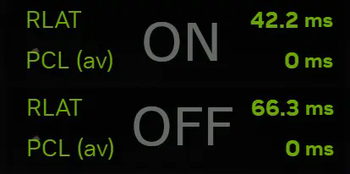
About this Mod
⚡ Reflex AntiLag
NVIDIA Reflex Dynamic Low-Latency Engine for Minecraft — for ANY GPU.
在 Minecraft 中深度实现 NVIDIA Reflex 低延迟引擎 — 支持任意显卡。


Client-Only • Fabric & NeoForge • Compatible with NVIDIA, AMD & Intel
⚡ What is Reflex AntiLag? / 这是什么?
In GPU-bound scenarios (especially with heavy shaders or high render distance), the game engine over-buffers draw calls, creating 1~3 frames of driver queue delay.
Reflex AntiLag paces the CPU frame start to wake up right when the GPU is ready, completely eliminating driver queue backlog and giving you lightning-fast mouse responsiveness without sacrificing a single frame of FPS.
在显卡高负载场景下(尤其是开启光影或高视距时),传统引擎会导致渲染指令在显卡驱动中积压 1~3 帧,产生明显的鼠标迟滞感。
Reflex AntiLag 智能推迟帧启动时机,做到“即提即渲”,从根本上彻底消灭渲染队列积压,在不牺牲任何帧率的前提下大幅提升操作跟手度。
🌟 Highlights / 核心亮点
- 🎯 Zero Driver Queue (消灭积压排队): Drains driver queue latency from 3ms+ down to near 0ms.
- 🖱️ Fresh Input Polling (最新输入对齐): Paces frame sleep strictly before input polling, ensuring maximum mouse precision.
- 🧠 Auto Adaptive Margin (全自动自适应闭环): Built-in hardware feedback loop auto-tunes itself. Zero manual tweaking required!
- 📊 In-Game F3 Timeline Diagram (F3 实时时序甘特图): Press F3 to view real-time CPU simulation, submission, and GPU execution pipelines.
- 🚀 Universal Compatibility (全显卡与全后端): Works on NVIDIA, AMD & Intel. Native support for modern OpenGL & Vulkan (including 26.2 / 26.3 RenderPearl).
❓ Frequently Asked Questions / 常见问题
Q: Do I need to configure anything? / 需要手动调参吗?
A: No! Just install and play. The adaptive closed-loop controller handles everything automatically.
完全不用! 安装即处于最佳低延迟状态,内置自适应算法全自动调节。Q: Compatible with Sodium & Iris shaders? / 兼容“钠”和光影包吗?
A: 100% Yes. In fact, latency reduction is most noticeable when shaders push your GPU to high utilization.
完美兼容! 与 Sodium、Iris、Embeddium 等主流优化及光影包无缝协同,高画质光影下延迟收益最明显。Q: Does it work on AMD or Intel graphics? / 非 N 卡能用吗?
A: Yes! Reflex AntiLag is a pure-timing architectural scheduler. AMD Radeon and Intel Arc/iGPU enjoy the exact same queue-draining latency benefits.
全显卡通用! AMD 显卡和 Intel 显卡同样能彻底消除排队延迟。
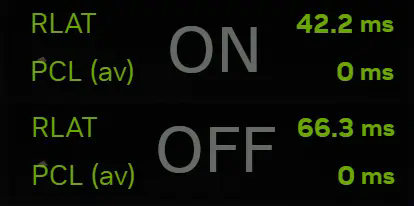
Give it a star on GitHub if you enjoy the responsiveness!
Available Versions
How to Install Reflex AntiLag on Your Client
Install the Mod Loader Locally
Install fabric for your local Minecraft version.
Download the Matching File
Choose the Reflex AntiLag file for fabric and Minecraft 26.3.
Install Mod
Place the .jar file in your local .minecraft/mods folder and restart Minecraft. No server-side installation is required.
Compatibility
Mod Loaders
Minecraft Versions
26.3, 26.2, 26.1.2 (+20 more)
Server-side
✗ UnsupportedRecommended RAM
4 GB(min. 3 GB)Frequently Asked Questions
Does Reflex AntiLag need to be installed on the Minecraft server?
No. Modrinth marks Reflex AntiLag as unsupported on the server side. Install it only in your local Minecraft mods folder. Your server can remain unchanged unless the mod page lists an additional dependency.
Which version and loader does Reflex AntiLag require?
Use a file for fabric, forge, neoforge and your exact Minecraft version. Supported versions include 26.3, 26.2, 26.1.2. Files for different loaders are not interchangeable.
Reflex AntiLag is not working – what should I check?
First check the Minecraft version, loader version and required dependencies. Put the .jar file in your local .minecraft/mods folder and remove older duplicates. Because this mod is client-side, adding server RAM will not fix it.
Similar Mods


Minecraft Server for Your Group
Reflex AntiLag stays on your client. Host a compatible world for your group.