
Reimagined World Menu
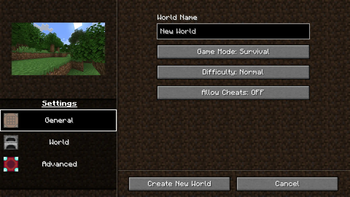
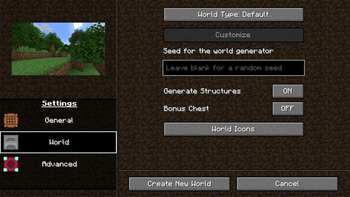
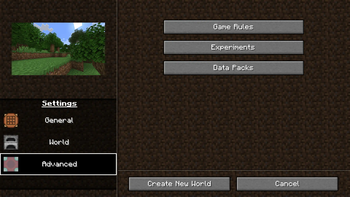
Completely re-design the Create World menu.
Screenshots
About this Mod
Reimagined World Menu
Completely Re-designs the Create World menu, as well as making some changes to the world list.
Features
Complete menu overhaul
Customizable image that represents each world type (default, flat, amplified, etc.)
Ability to add a custom icon to your world upon creation.
Increased resolution for world icons.
Translations for:
- Italian

- Spanish

- Japanese

- Portuguese

- Polish

- Russian

- German

- Serbian

- Bulgarian

- Czech

- Tatar

- Chinese

- Dutch

- Flemish
Resource packs
This mod allows you to customize two things with resource packs:
World type image
Tab icons
If you need exaples of what the pack should look like, then you can take a look in the source code's resource folder,
Everything here has been used in the mod's source.
World preset images
To add custom world preset images, you must first create a resource pack, and in the folder reimaginedmenus/textures/misc,
you must have an image with the name of the world preset identifier, for example,
an amplified world would need an image titled amplified.
Tab Icons
To add custom world preset images, in your resource pack, and in the folder reimaginedmenus/textures/misc,
create a json file titled tabicons.json, and in that file, put:
{
  "general_settings_icon": "modid:path/to/texture",
  "world_settings_icon": "modid:path/to/texture",
  "advanced_settings_icon": "modid:path/to/texture"
}
You can choose whatever texture you want, it can be vannila, modded, or a custom texture.
If you want a custom texture, then just the identifier should look like this: reimaginedmenus:path/to/texture,
then you just provide the textures in your resource pack.
Feedback
I'm entirely open to design changes and will consider adding your suggestion.
I'm also open to adding and/or editing translations for your language, you will have two options:
- Translate the text yourself

- Or have me use Google Translate (Which is prone to inaccuracy, but can be quicker)
Available Versions
How to Install Reimagined World Menu on Your Client
Install the Mod Loader Locally
Install fabric for your local Minecraft version.
Download the Matching File
Choose the Reimagined World Menu file for fabric and Minecraft 1.21.1.
Install Mod
Place the .jar file in your local .minecraft/mods folder and restart Minecraft. No server-side installation is required.
Compatibility
Mod Loaders
Minecraft Versions
1.21.1, 1.21, 1.20.6 (+7 more)
Server-side
✗ UnsupportedRecommended RAM
4 GB(min. 3 GB)Frequently Asked Questions
Does Reimagined World Menu need to be installed on the Minecraft server?
No. Modrinth marks Reimagined World Menu as unsupported on the server side. Install it only in your local Minecraft mods folder. Your server can remain unchanged unless the mod page lists an additional dependency.
Which version and loader does Reimagined World Menu require?
Use a file for fabric and your exact Minecraft version. Supported versions include 1.21.1, 1.21, 1.20.6. Files for different loaders are not interchangeable.
Reimagined World Menu is not working – what should I check?
First check the Minecraft version, loader version and required dependencies. Put the .jar file in your local .minecraft/mods folder and remove older duplicates. Because this mod is client-side, adding server RAM will not fix it.
Similar Mods

![[ETF] Entity Texture Features](https://cdn.modrinth.com/data/BVzZfTc1/af683d206d50b05258d865b0d6e4aa2f2cee12f2_96.webp)
![[EMF] Entity Model Features](https://cdn.modrinth.com/data/4I1XuqiY/6e5bbd0d06b1741bfdab6c0cfab6de8fdaf0064c_96.webp)



Minecraft Server for Your Group
Reimagined World Menu stays on your client. Host a compatible world for your group.