
SkinMC: Minecraft Capes
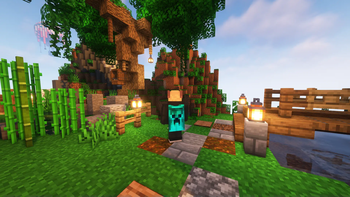
SkinMC Mod allows you to upload a custom Minecraft cape — completely for free. Visible for anyone using the mod in-game.
Screenshots
About this Mod

SkinMC-Mod: Free Minecraft Capes
Create your cape on SkinMC. Wear it in-game with the SkinMC Mod.
Requirements
- Minecraft 1.21.11, 1.21.4
- Fabric or NeoForge (choose one; use the matching mod build)
- https://modrinth.com/mod/architectury-api
Features

- Displays your SkinMC Minecraft Cape in-game in singleplayer and multiplayer
- Choose how capes are shown: SkinMC overrides default capes, default only, or SkinMC only
- Shift + right-click a player to open their SkinMC profile (optional, can be turned off)
- Works on both Fabric and NeoForge
Configuration
Settings are in Mod Menu (Fabric) or the mod list config button (NeoForge), under SkinMC Cape Settings. You can also edit config/skinmc_mod.json:
| Option | Description |
|---|---|
| Cape display | SkinMC overrides (default) — SkinMC capes replace Mojang/OptiFine capes when set; Default only — only show Mojang/OF capes; SkinMC only — only show SkinMC capes (hide default when no SkinMC cape) |
| Shift + right-click player | When enabled, shift + right-clicking a player opens their SkinMC profile |
How to install it
The SkinMC Mod is available for Fabric and NeoForge. Pick the loader that matches your setup.
- Download the latest release from https://skinmc.net/p/mod (choose the Fabric or NeoForge version).
- Install a mod loader:
- Put the SkinMC mod
.jarfile into your Minecraftmodsfolder.
How to get a cape
- Go to https://skinmc.net
- Sign up / Sign in
- Link your Minecraft account via Microsoft
- Go to Account, then choose SkinMC Capes
- Select a cape .png file and hit upload and use
You can also create your own cape in the SkinMC Cape Editor.
Links
- Upload a cape: https://skinmc.net/account/capes
- Discord: https://skinmc.net/go/discord
Where to get capes from?
You can find a large selection of Minecraft capes on the following pages, or make your own:
- https://skinmc.net/capes/custom
- https://www.planetminecraft.com/mob-skins/?op2=8
- SkinMC Cape Editor — create your own custom cape
- Feel free to add more here!
What format does it support?
Currently capes must be
- .png, .jpg, .jpeg
- 64x32px
Contribute
Contribute code on GitHub or submit your ideas for future versions!
License
This project is licensed under the GNU Lesser General Public License v2.1 (LGPL-2.1).
Credits
This mod is built with Architectury, which enables a single codebase to run on both Fabric and NeoForge.
Do you need support?
Please open a support ticket
Available Versions
How to Install SkinMC: Minecraft Capes on Your Client
Install the Mod Loader Locally
Install fabric for your local Minecraft version.
Download the Matching File
Choose the SkinMC: Minecraft Capes file for fabric and Minecraft 26.2.
Install Mod
Place the .jar file in your local .minecraft/mods folder and restart Minecraft. No server-side installation is required.
Compatibility
Mod Loaders
Minecraft Versions
26.2, 1.21.11, 1.21.4 (+4 more)
Server-side
✗ UnsupportedRecommended RAM
4 GB(min. 3 GB)Frequently Asked Questions
Does SkinMC: Minecraft Capes need to be installed on the Minecraft server?
No. Modrinth marks SkinMC: Minecraft Capes as unsupported on the server side. Install it only in your local Minecraft mods folder. Your server can remain unchanged unless the mod page lists an additional dependency.
Which version and loader does SkinMC: Minecraft Capes require?
Use a file for fabric, neoforge and your exact Minecraft version. Supported versions include 26.2, 1.21.11, 1.21.4. Files for different loaders are not interchangeable.
SkinMC: Minecraft Capes is not working – what should I check?
First check the Minecraft version, loader version and required dependencies. Put the .jar file in your local .minecraft/mods folder and remove older duplicates. Because this mod is client-side, adding server RAM will not fix it.
Similar Mods

![[ETF] Entity Texture Features](https://cdn.modrinth.com/data/BVzZfTc1/af683d206d50b05258d865b0d6e4aa2f2cee12f2_96.webp)
![[EMF] Entity Model Features](https://cdn.modrinth.com/data/4I1XuqiY/6e5bbd0d06b1741bfdab6c0cfab6de8fdaf0064c_96.webp)



Minecraft Server for Your Group
SkinMC: Minecraft Capes stays on your client. Host a compatible world for your group.