
Sulkan
Native Vulkan shaders for Minecraft 26.2. Client-side Fabric mod powered by Sodium, with a built-in shader pack and support for native Sulkan packs.
Screenshots
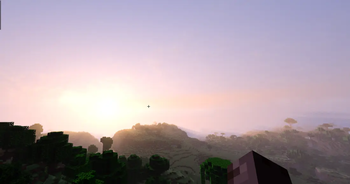
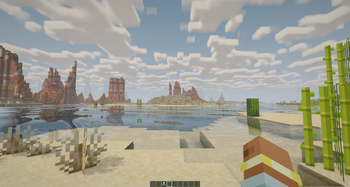
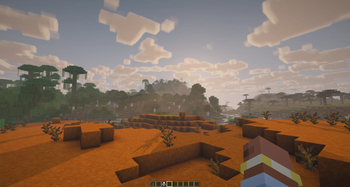
About this Mod
Sulkan
Sulkan is a client-side Fabric mod that adds native shader support to Minecraft's Vulkan renderer.
Built on Sodium, Sulkan provides a dedicated Vulkan shader pipeline, a built-in shader pack, and support for native Sulkan shader packs. It is designed for Minecraft 26.2 and requires a Vulkan-capable GPU and driver.
Features
- Native shader rendering on Minecraft's Vulkan backend
- Built-in Sulkan Realistic shader pack
- Shadows, ambient occlusion, water, clouds, atmosphere, bloom, and FXAA
- In-game shader settings and quality controls
- Support for native Sulkan shader packs
- Vulkan 1.2 shader compilation
- Client-side Fabric mod built on Sodium
Requirements
- Minecraft Java Edition 26.2
- Fabric Loader 0.18.4 or newer
- Fabric API 0.155.0 or newer for Minecraft 26.2
- Sodium 0.9.1 or newer for Minecraft 26.2
- Java 25 or newer
- A Vulkan-capable GPU with up-to-date drivers
Sulkan is client-side only and should not be installed on a dedicated server.
Installation
- Install Fabric for Minecraft 26.2.
- Install the matching versions of Fabric API and Sodium.
- Download Sulkan from Modrinth or CurseForge.
- Place the Sulkan JAR in your client's
modsfolder. - Launch Minecraft and open Video Settings → Shaders.
The built-in Sulkan Realistic pack is included with the mod and does not need to be installed separately.
Shader packs
Sulkan uses its own native shader-pack format. External packs must include a sulkan.json manifest and can be installed as a folder or ZIP directly inside the game's shaders/ directory.
See the shader-pack documentation before creating or installing a native Sulkan pack.
Unmodified Iris and OptiFine shader packs are not supported.
Compatibility
Sulkan is designed for Minecraft's Vulkan renderer and the Fabric/Sodium stack. Mods that depend on OpenGL behavior, replace the renderer, or make direct OpenGL calls may be incompatible.
Sodium is required and is not bundled with Sulkan.
If Minecraft falls back to OpenGL, Sulkan pauses its shader effects and explains the situation on the title screen. Driver updates, GPU selection, or Vulkan support may affect whether the renderer starts successfully.
Links
Reporting issues
Before reporting a problem, test with only Fabric API, Sodium, and Sulkan installed.
Please include:
- Minecraft, Fabric Loader, Fabric API, Sodium, and Sulkan versions
- GPU and driver version
- Operating system
- Full client log or crash report
- Steps to reproduce the issue
Available Versions
How to Install Sulkan on Your Client
Install the Mod Loader Locally
Install fabric for your local Minecraft version.
Download the Matching File
Choose the Sulkan file for fabric and Minecraft 26.3.
Install Mod
Place the .jar file in your local .minecraft/mods folder and restart Minecraft. No server-side installation is required.
Compatibility
Mod Loaders
Minecraft Versions
26.3, 26.2, 26.2-pre-3 (+4 more)
Server-side
✗ UnsupportedRecommended RAM
4 GB(min. 3 GB)Frequently Asked Questions
Does Sulkan need to be installed on the Minecraft server?
No. Modrinth marks Sulkan as unsupported on the server side. Install it only in your local Minecraft mods folder. Your server can remain unchanged unless the mod page lists an additional dependency.
Which version and loader does Sulkan require?
Use a file for fabric and your exact Minecraft version. Supported versions include 26.3, 26.2, 26.2-pre-3. Files for different loaders are not interchangeable.
Sulkan is not working – what should I check?
First check the Minecraft version, loader version and required dependencies. Put the .jar file in your local .minecraft/mods folder and remove older duplicates. Because this mod is client-side, adding server RAM will not fix it.
Similar Mods


Minecraft Server for Your Group
Sulkan stays on your client. Host a compatible world for your group.