
SwanSong Shaders
A shaders mod for 1.7.10 designed for maximum compatibility with other mods and modpacks.
Screenshots
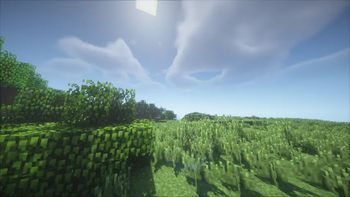
About this Mod
There's a swan song coming for you...
A breath of fresh air, a Right Proper shaders mod built from the ground up for Minecraft 1.7.10!
Designed with compatibility-first, around supporting modpacks old and new, tested against era-appropriate shaderpacks.
Compatibility
Compatible with most other popular client-side optimization and graphics mods, including but not limited to:
- FalseTweaks
- Beddium
- Right Proper Lighting Engine
- Right Proper MCPatcher
- HodgePodge
- FastCraft
- CoreTweaks
- ArchaicFix
- BugTorch
- NotFine
With expected incompatibilities with:
- OptiFine (any)
- Original ShadersMod
- MCPatcher: Forge (use Right Proper MCPatcher)
- Neodymium (use Beddium)
- Angelica (May work with certain modules)
- OptimizationsAndTweaks (O&T has very aggressive patches that break with most other graphics mods. Do not use it.)
Technical
SwanSong is a standalone replacement for ShadersMod, with initial support focused on shaders that already work with OptiFine 1.7.10_HD_U_E7.
It is not a backport of Iris, nor a direct descendant of ShadersMod or the GLSL Shaders mod. Outside of acting as an implementation of the specification pioneered by said mods.
A few other goodies such as threaded screenshots, OptiFine-like zooming, and a faster font rendering module are included as a bonus!
Licence
The mod was developed by Ven and FalsePattern, Copyright 2025, licensed under the Open Software License, version 3.0.
The mod logo was designed by Houstonruss, with some touchups by FalsePattern, Copyright 2025, All Rights Reserved.
For more information, see the LICENSE file. This readme section is not a replacement for the full license text.
Credits
Designed by Ven, written by FalsePattern
Initial testing done by, (alphabetic order):
- Bot
- Brandyn
- DarkShadow44
- Houstonruss
- Jss
- matt-159
- Rally
- UnicornBlood
Based on the work of:
- OG ShaderMod devs: (daxnitro, id_miner and karyonix)
Available Versions
How to Install SwanSong Shaders on Your Client
Install the Mod Loader Locally
Install forge for your local Minecraft version.
Download the Matching File
Choose the SwanSong Shaders file for forge and Minecraft 1.7.10.
Install Mod
Place the .jar file in your local .minecraft/mods folder and restart Minecraft. No server-side installation is required.
Compatibility
Mod Loaders
Minecraft Versions
1.7.10
Server-side
✗ UnsupportedRecommended RAM
4 GB(min. 3 GB)Frequently Asked Questions
Does SwanSong Shaders need to be installed on the Minecraft server?
No. Modrinth marks SwanSong Shaders as unsupported on the server side. Install it only in your local Minecraft mods folder. Your server can remain unchanged unless the mod page lists an additional dependency.
Which version and loader does SwanSong Shaders require?
Use a file for forge and your exact Minecraft version. Supported versions include 1.7.10. Files for different loaders are not interchangeable.
SwanSong Shaders is not working – what should I check?
First check the Minecraft version, loader version and required dependencies. Put the .jar file in your local .minecraft/mods folder and remove older duplicates. Because this mod is client-side, adding server RAM will not fix it.
Similar Mods

![[ETF] Entity Texture Features](https://cdn.modrinth.com/data/BVzZfTc1/af683d206d50b05258d865b0d6e4aa2f2cee12f2_96.webp)
![[EMF] Entity Model Features](https://cdn.modrinth.com/data/4I1XuqiY/6e5bbd0d06b1741bfdab6c0cfab6de8fdaf0064c_96.webp)



Minecraft Server for Your Group
SwanSong Shaders stays on your client. Host a compatible world for your group.