
Sword Utils
Real-time Java sword PvP feedback - recalibrated cooldown overlay, combo tracker, kill counter, auto sprint, reach display, damage immunity timer, and jump reset grader. 1.21.11 | Client-side only.
Screenshots

About this Mod
⚔️ SwordUtils
The ultimate client-side Java sword PvP toolkit for Minecraft 1.21.11.
No bloat. No cheats. Pure information — works on any multiplayer server with zero server-side installation.
🕐 Attack Cooldown Overlay
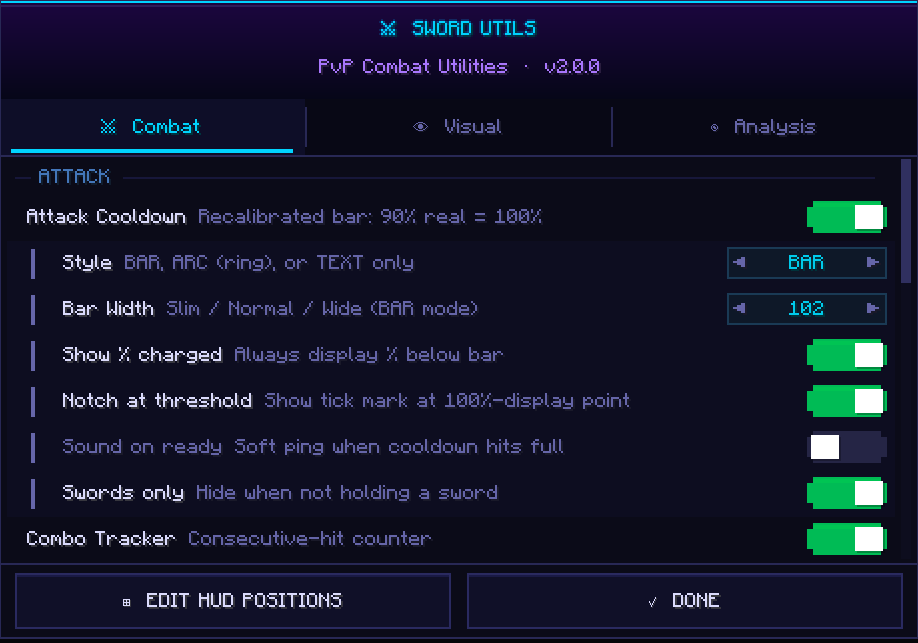
Forget the vanilla bar. SwordUtils recalibrates it so 90% real cooldown = 100% display — because 90% is the actual threshold for full damage, crits, sprint-KB, and sweeps. Choose between BAR, ARC, or TEXT style. Optional READY pulse and sound ping when you're good to go.
🔥 Combo Tracker
Counts every consecutive hit you land on a player. Configurable reset window, three display styles, three colour tiers, and independently toggleable resets on miss or on taking damage. Know your streak at a glance.
💀 Kill Counter
Tracks your session K / D / KD ratio with a +1 KILL flash on every credited kill. Four display styles to suit your HUD. Press K to reset between rounds.
🏃 Auto Sprint
Automatic forward sprint so you never drop it mid-fight. Optional cooldown-aware cancel for crit chains, sword-only mode, and a permanent sprint status badge on your HUD. Toggle on and off with V.
📏 Reach Display
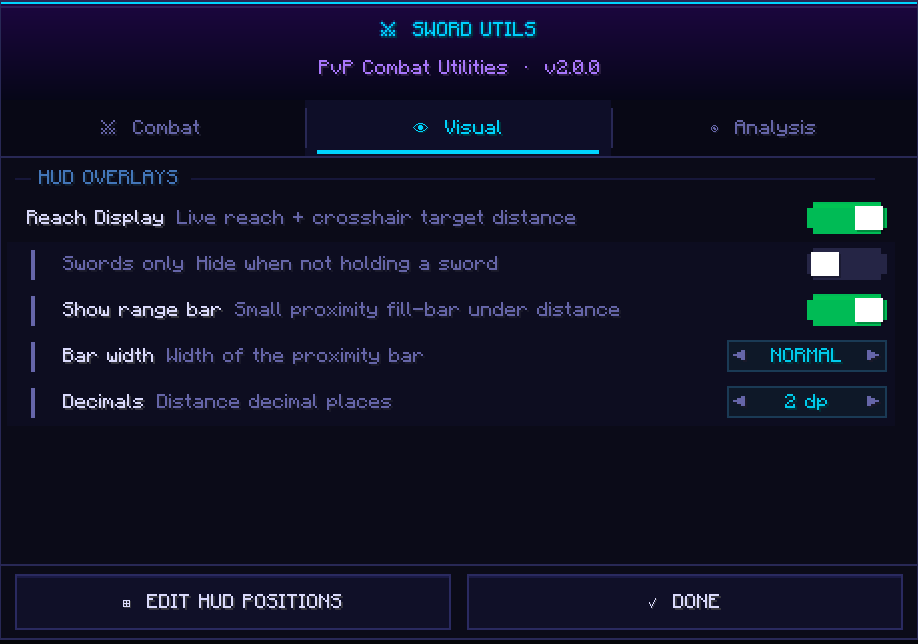
Shows your live reach attribute every tick and colour-codes your target distance — 🟢 green (in reach), 🟡 yellow (borderline), 🔴 red (out of reach). Optional proximity fill-bar. Can be set to only show while holding a sword.
⏱️ Damage Immunity Timer
After landing a hit, your target gets a 10-tick (0.5s) immunity window where follow-up hits deal zero damage. SwordUtils tracks this per target and shows draining HUD pips and optional world-space bars above nameplates — so you always know exactly when to swing again.
🎯 Jump Reset Accuracy Grader
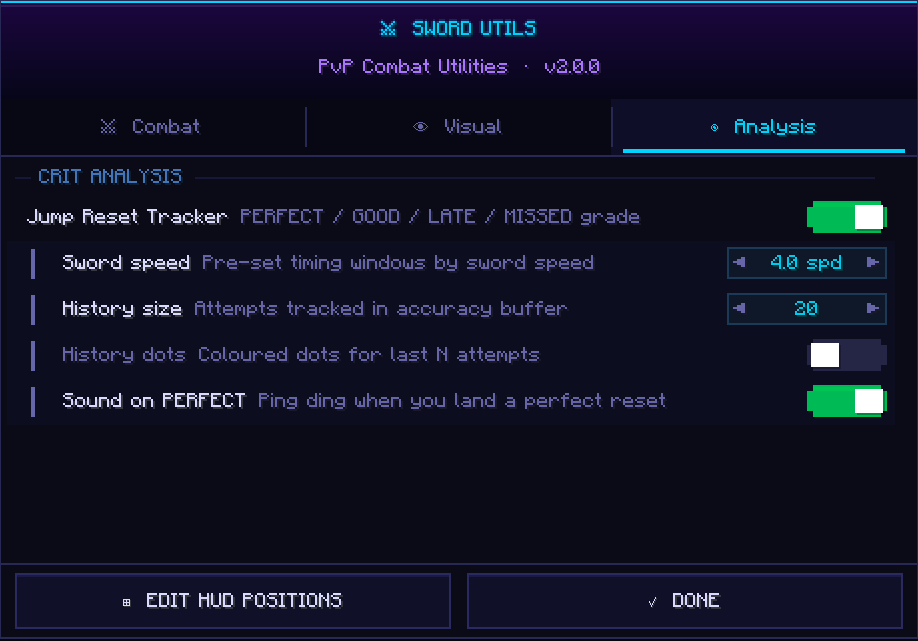
Grades the timing of every crit jump: PERFECT, GOOD, LATE, or MISSED. Pre-set windows for 4.0 and 3.6 speed swords, fully configurable otherwise. History dots show your last N attempts so you can see your consistency at a glance. Optional ping on PERFECT.
📦 Installation
Install Fabric Loader 0.18.1, drop in Fabric API 0.140.2+1.21.11 and the SwordUtils .jar into your mods/ folder, then launch Minecraft 1.21.11. That's it.
⚙️ Config
Press G in-game to open the full config screen — three tabs: Combat, Visual, Analysis. Every HUD element is drag-to-reposition. All settings auto-save to .minecraft/config/sword_utils.json.
Available Versions
How to Install Sword Utils on Your Client
Install the Mod Loader Locally
Install fabric for your local Minecraft version.
Download the Matching File
Choose the Sword Utils file for fabric and Minecraft 1.21.11.
Install Mod
Place the .jar file in your local .minecraft/mods folder and restart Minecraft. No server-side installation is required.
Compatibility
Mod Loaders
Minecraft Versions
1.21.11
Server-side
✗ UnsupportedRecommended RAM
4 GB(min. 3 GB)Frequently Asked Questions
Does Sword Utils need to be installed on the Minecraft server?
No. Modrinth marks Sword Utils as unsupported on the server side. Install it only in your local Minecraft mods folder. Your server can remain unchanged unless the mod page lists an additional dependency.
Which version and loader does Sword Utils require?
Use a file for fabric and your exact Minecraft version. Supported versions include 1.21.11. Files for different loaders are not interchangeable.
Sword Utils is not working – what should I check?
First check the Minecraft version, loader version and required dependencies. Put the .jar file in your local .minecraft/mods folder and remove older duplicates. Because this mod is client-side, adding server RAM will not fix it.
Similar Mods


Minecraft Server for Your Group
Sword Utils stays on your client. Host a compatible world for your group.