
Unify
Unify resources, items, tags, loot tables, recipes and advancements effortlessly. Fully configurable. And more ...
Screenshots
About this Mod

Unify Mod for Minecraft
The "Unify" Minecraft mod is designed to simplify gameplay by reducing item duplication. Here's a breakdown of how it works and its configuration options:
How It Works
Item Unification: The mod uses regex to search for items whose paths match specific patterns. Items are unified if they have the same path or belong to the same group of paths. If it finds duplicates, it selects one as the unified version and removes the others from various game elements like loot tables, tags, recipes, creative tabs, advancements and recipe viewers (REI, JEI, ...).
Inheritance: The unified version inherits tags, recipes, etc., from its duplicate versions, ensuring that functionality is preserved.
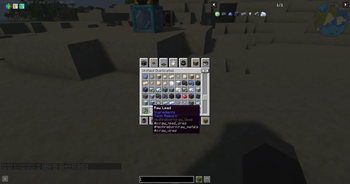
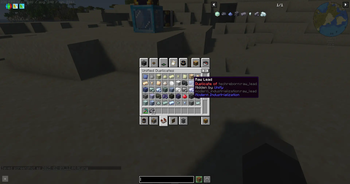
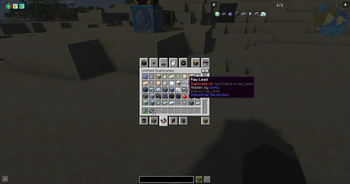
Creative Tab: You can find duplicate items in the Unify creative tab, with a tooltip indicating the unified version.
Replace on Right-Click: Duplicate items can be replaced with their unified version by right-clicking them.
Unification Recipes: Crafting recipes are added to replace duplicates with their unified version.
Configuration
The mod is highly configurable, allowing you to customize which items are unified and how duplicates are identified. Here's a detailed look at the configuration options:
globalSearch: This section allows you to set global rules for identifying duplicate items.
itemsToIgnore: List of items that the mod will ignore. These items won't be unified or considered duplicates.
"itemsToIgnore": [ "examplemod:lead_block" ]namespacePriorities: A prioritization list of namespaces. The mod will favor items from these namespaces in the order they appear to be the unified version.
"namespacePriorities": [ "techreborn", "modern_industrialization" ]pathStartsWith: Specifies patterns that the start of the item identifier path must match. This can be a string or a list of strings. When a list is provided, items matching any of the patterns in the list will be grouped together.
"pathStartsWith": [ "raw_" ]pathEndsWith: Specifies patterns that the end of the item identifier path must match. This can be a string or a list of strings. When a list is provided, items matching any of the patterns in the list will be grouped together.
"pathEndsWith": [
  "_ore",
  [
    "_block",
    "_storage_block"
  ],
  "_ingot",
  "_nugget",
  "_dust",
  "_plate",
  "_rod",
  "_gear"
]
itemsToUnify: This section allows you to manually specify which items should be unified. The key is the unified item, and the value is an array of duplicate items.
"itemsToUnify": { "modern_industrialization:lead_block": [ "techreborn:lead_storage_block" ] }replaceOnUse: Allows replacing duplicate items with their unified version by right-clicking.
"replaceOnUse": truegenerateUnificationRecipes: Adds crafting recipes to replace duplicates with their unified version.
"generateUnificationRecipes": truehideDuplicatesInItemGroups: Hide duplicates in Creative Item Groups.
"hideDuplicatesInItemGroups": truehideDuplicatesInRecipeViewers: Hide duplicates in recipes viewers (REI, JEI, ...).
"hideDuplicatesInRecipeViewers": true
Example Configuration
Here's an example configuration that demonstrates how you might set up the mod:
{
  "globalSearch": {
    "itemsToIgnore": [
      "examplemod:lead_block"
    ],
    "namespacePriorities": [
      "techreborn",
      "modern_industrialization"
    ],
    "pathStartsWith": [
      "raw_"
    ],
    "pathEndsWith": [
      "_ore",
      [
        "_block",
        "_storage_block"
      ],
      "_ingot",
      "_nugget",
      "_dust",
      "_plate",
      "_rod",
      "_gear"
    ]
  },
  "itemsToUnify": {
    "modern_industrialization:lead_block": [
      "techreborn:lead_storage_block"
    ]
  },
  "replaceOnUse": true,
  "generateUnificationRecipes": true,
  "hideDuplicatesInItemGroups": true,
  "hideDuplicatesInRecipeViewers": true
}
This configuration ensures that items like raw_lead from different mods are unified according to the specified patterns and priorities, while examplemod:lead_block is ignored. Items like lead_block and lead_storage_block will be grouped together, with one being the unified version and the other a duplicate.
By customizing these settings, you can tailor the mod to fit your specific needs and preferences, streamlining your Minecraft gameplay experience.
Available Versions
How to Install Unify on Your Server
Order Server
Order a Minecraft Java server with at least 3 GB RAM (4 GB recommended).
Set fabric Loader
In the panel under "Egg", select the fabric loader and matching Minecraft version (1.21.4).
Install Mod
Open the mod browser in the dashboard and search for "Unify". Click "Install" – done! Alternatively, upload the .jar via SFTP to the /mods folder.
Compatibility
Mod Loaders
Minecraft Versions
1.21.4, 1.21.1, 1.20.1
Server-side
✓ RequiredRecommended RAM
4 GB(min. 3 GB)Frequently Asked Questions
Unify server crashes on startup – what to do?
Most common cause: wrong fabric version or insufficient RAM. Check the server log (latest.log) for "OutOfMemoryError" or "Mixin" errors. With Mado Hosting: ensure at least 3 GB RAM is allocated and the loader matches the mod version (1.21.4). You can switch loaders with one click in the panel.
Is Unify compatible with fabric?
Unify officially supports fabric for Minecraft 1.21.4, 1.21.1, 1.20.1. The Mado dashboard automatically detects incompatible loader combinations.
Server lagging with Unify – how to optimize performance?
Recommended RAM: 4 GB (per 8 players). Use /spark profiler to check if Unify consumes the most tick time. Common fixes: reduce server view-distance to 8-10, install "performant" or "starlight" as supplementary mods on Forge. With Mado Hosting, your server runs on NVMe SSDs with dedicated CPU cores for minimal latency.
Similar Mods



Rent Modded Server
Install Unify with just one click on your server.