
VMD Animation Cache
Per-frame cache for SlashBlade MMD animation
Screenshots
About this Mod
Overview
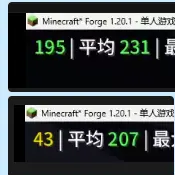
VMD Animation Cache eliminates redundant MMD motion computation in SlashBlade Resharped, giving you ~3.8x FPS improvement (50 → 190 FPS) when SlashBlade entities are on screen.
When SlashBlade renders MMD-based blade animations, VmdAnimation.setupAnim() is called 60–120 times per entity per frame — once for every bone, every time a transform is queried. But the tick and partialTick don't change within a frame. All 120 calls produce identical results, wasting ~20% of the render thread.
This mod adds a tiny per-frame cache: if setupAnim is called again with the same tick and partialTick, the entire MMD pipeline is skipped. 120 calls → 1 call per entity per frame.
Performance
| Scenario | Before | After |
|---|---|---|
| Third-person FPS (SlashBlade visible) | ~50 | ~190 |
Tested on Minecraft 1.20.1, Forge 47, SlashBlade Resharped 1.9.65. Single SlashBlade entity in view.
Requirements
- Minecraft 1.20.1
- Forge 47+
- SlashBlade Resharped 1.9.65
Installation
- Download the jar and drop it into your
mods/folder - Launch the game
Compatibility
Do not use with AntiEntropyCore — both mods inject into the same Mixin target (VmdAnimation) and will conflict.
How It Works
A single Mixin injects at the head of VmdAnimation.setupAnim(). It remembers the last (currentTick, partialTick) pair. Cache hit → method cancelled. Cache miss → update cache, run normally.
Only 32 lines of code. Client-side only. No coremod hacks.
Links
- Source: GitHub
- License: MIT
Available Versions
How to Install VMD Animation Cache on Your Client
Install the Mod Loader Locally
Install forge for your local Minecraft version.
Download the Matching File
Choose the VMD Animation Cache file for forge and Minecraft 1.20.1.
Install Mod
Place the .jar file in your local .minecraft/mods folder and restart Minecraft. No server-side installation is required.
Compatibility
Mod Loaders
Minecraft Versions
1.20.1
Server-side
✗ UnsupportedRecommended RAM
4 GB(min. 3 GB)Frequently Asked Questions
Does VMD Animation Cache need to be installed on the Minecraft server?
No. Modrinth marks VMD Animation Cache as unsupported on the server side. Install it only in your local Minecraft mods folder. Your server can remain unchanged unless the mod page lists an additional dependency.
Which version and loader does VMD Animation Cache require?
Use a file for forge and your exact Minecraft version. Supported versions include 1.20.1. Files for different loaders are not interchangeable.
VMD Animation Cache is not working – what should I check?
First check the Minecraft version, loader version and required dependencies. Put the .jar file in your local .minecraft/mods folder and remove older duplicates. Because this mod is client-side, adding server RAM will not fix it.
Similar Mods


Minecraft Server for Your Group
VMD Animation Cache stays on your client. Host a compatible world for your group.