WorldFarView
Mod that increases render distance by utilizing dynamic quad tree structure.
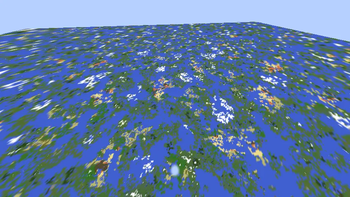
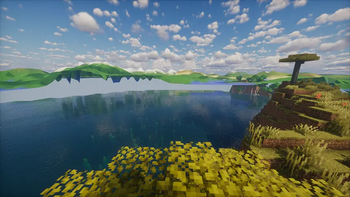
Screenshots
About this Mod
Inspired by FarPlane2, this mod enhances render distance using Quad trees.

Installation & Usage
- Install the mod on both client and server.
- Join a world - the mod activates automatically.
- Note: High resolutions may require longer loading times.
- Currently supports only noise-based chunk generators (vanilla-compatible).
- The mod will notify you if any compatibility issues arise.
⚠️ Development Notice: This mod is still in active development and may have stability issues.
⚙️ Configuration
Client Settings (Editable in-game via Mods menu)
| Setting | Description | Recommended Value |
|---|---|---|
| Quad Tree Radius | Horizontal radius covered by the quad tree | 65536 blocks, big values may lead to high memory usage |
| Quad tree max depth | Maximum adaptive quad tree depth | Depends on tree radius and resolution |
| Fade distance | Distance used to fade in terrain beyond the vanilla render distance | Your render distance |
⚠️ If the server rejects client settings (e.g., unsupported resolution), the mod will auto-disable.
Server Settings (Can be found in world/server files)
| Setting | Description |
|---|---|
| clientSide | If true, sends seed/generator data to clients (unsupported in current version). If false, forces server-side generation. |
| maxRadius | Reject quad tree requests above this radius |
| maxDepth | Reject quad tree requests above this depth |
Last update removed quad tree generation on server for memory optimizations. Instead, server sends only heights in desired points.
🛠️ For Developers: Adding Compatibility
To integrate your custom world generator:
- Implement
FarChunkGeneratorand register it inFarChunkGenerators. - For client-side support, create:
ClientFarChunkGeneratorSerializableFarChunkGenerator<YourClientFarChunkGenerator>
Available Versions
How to Install WorldFarView on Your Server
Order Server
Order a Minecraft Java server with at least 3 GB RAM (4 GB recommended).
Set fabric Loader
In the panel under "Egg", select the fabric loader and matching Minecraft version (1.21.1).
Install Mod
Open the mod browser in the dashboard and search for "WorldFarView". Click "Install" – done! Alternatively, upload the .jar via SFTP to the /mods folder.
Compatibility
Mod Loaders
Minecraft Versions
1.21.1, 1.20.1
Server-side
✓ RequiredRecommended RAM
4 GB(min. 3 GB)Frequently Asked Questions
WorldFarView server crashes on startup – what to do?
Most common cause: wrong fabric version or insufficient RAM. Check the server log (latest.log) for "OutOfMemoryError" or "Mixin" errors. With Mado Hosting: ensure at least 3 GB RAM is allocated and the loader matches the mod version (1.21.1). You can switch loaders with one click in the panel.
Is WorldFarView compatible with fabric and forge and neoforge?
WorldFarView officially supports fabric, forge, neoforge for Minecraft 1.21.1, 1.20.1. Note: Forge and Fabric mods are NOT cross-compatible – pick one loader and stick with it. The Mado dashboard automatically detects incompatible loader combinations.
Server lagging with WorldFarView – how to optimize performance?
Recommended RAM: 4 GB (per 8 players). Use /spark profiler to check if WorldFarView consumes the most tick time. Common fixes: reduce server view-distance to 8-10, install "performant" or "starlight" as supplementary mods on Forge. With Mado Hosting, your server runs on NVMe SSDs with dedicated CPU cores for minimal latency.
Similar Mods


Rent Modded Server
Install WorldFarView with just one click on your server.