
All The Fabric
All The Fabric is a streamlined version of our modpack, All The Forge, optimized for performance while retaining essential mods.
Screenshots
Über dieses Modpack
!



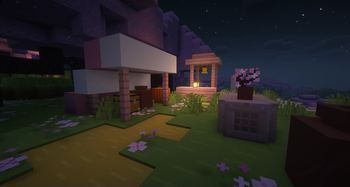
NO OPTIFINE NEEDED: Access Shaders in Video Settings > Shader Packs > Add Your Shader
!
All The Fabric is designed for optimal performance, utilizing the Fabric Loader API. It seamlessly incorporates selected mods from our All The Forge modpack, making it an excellent choice for Minecraft enthusiasts with low-end PC setups that might struggle to handle our comprehensive Forge pack. Immerse yourself in a world of possibilities with popular mods like Bewitchment and Applied Energistics 2, enhancing your gaming experience. All The Fabric prioritizes stability and an immersive Minecraft journey, making it the ultimate selection.
Our modpack offers a diverse range of style mods to cater to your unique preferences. Whether you enjoy mixing gameplay styles or need a lighter alternative to our Forge modpack, you've come to the right place. Engineered with performance in mind, this modpack ensures a smooth experience on lower-end PCs with at least 4GB of RAM. However, we strongly recommend avoiding installation on machines with less than 4GB of RAM, as it hasn't been tested and may result in performance issues.
!
Explore diverse biomes with mods like Terrestria and Traverse.
Experience unique landscapes in Cinderscapes and reach for the stars with Ad Astra.
Dive into advanced technology with Applied Energistics 2 and Create.
Uncover the secrets of the Industrial Revolution using Industrial Revolution and Tech Reborn.
Embrace the mystical world of Bewitchment and enhance gameplay with CC: Tweaked.
Build stunning structures with Chisel Reborn and Macaw’s Bridges.
Enjoy abundant building blocks and delicious food from Farmer's Delight.
Customize your experience with built-in Shader support via Iris Shaders (requires adding your own Shader).
Roll back chat reporting to Pre 1.19 and benefit from quality-of-life improvements like Backpacks, Waystones, recipe fixes/upgrades, optimizations, and handheld device support.
All this and more in a feature-packed modpack with over 100 mods!
You can find the full list of mods under the "Versions" tab by following this link.
!
If you need help or support with this modpack, please join our Discord server by clicking the Discord banner below.
](https://discord.ampznetwork.com)
FABRIC: While the latest version of Fabric for 1.20.1 should be compatible, it's possible that it may cause an older mod in the modpack to break. In such a case, the version of Fabric currently included in the modpack is 0.16.14
OptiFine: By default, OptiFine is not compatible with All The Fabric because it contains some pre-installed optimization mods. Therefore, you must remove the listed mods below in order to load the pack with OptiFine.
Optimization Mods
| Sodium | |
| Lithium | |
| Indium | |
| Iris Shaders | |
| ImmediatelyFast | |
| CIT Resewn | |
| Cull Less Leaves | |
| Custom Entity Models | |
| Entity Texture Features | |
| Entity Culling | |
| OptiGUI |
Please remember that in addition to OptiFine, you must also have a mod called OptiFabric installed, otherwise the pack will crash. We do not recommend using OptiFine at all due to its closed source and mod incompatibility. You can download OptiFabric from this link if you still want to use OptiFine.
OPTIONAL RECOMMENDATIONS:
If your system can handle it, I recommend trying out shaders with this modpack and Minecraft to enhance your experience. Shaders can significantly improve both the modpack and the game. For the best results, consider using either Complementary Shaders - Unbound or Complementary Shaders - Reimagined.
Verfügbare Versionen
All The Fabric Server einrichten
Server bestellen
Wähle mindestens 4 GB RAM (6 GB empfohlen für All The Fabric). Je nach Spieleranzahl: +1 GB pro 8 Spieler.
Modpack im Dashboard installieren
Öffne den Modpack-Browser im Dashboard, suche nach "All The Fabric" und klicke "Installieren". Der fabric-Loader und Minecraft 1.20.1 werden automatisch konfiguriert.
Server starten & spielen
Starte den Server – alle Mods werden automatisch geladen. Teile die Server-IP mit Freunden und spielt zusammen!
Häufige Fragen
All The Fabric Server crasht oder startet nicht – was tun?
Häufigste Ursachen: zu wenig RAM oder falscher fabric-Loader. Prüfe latest.log auf "OutOfMemoryError" → erhöhe RAM auf mindestens 6 GB. Bei "Mixin" oder "ClassNotFoundException": Modpack-Version und Loader stimmen nicht überein. Bei Mado Hosting werden Loader und Minecraft-Version beim Modpack-Install automatisch konfiguriert – das verhindert die meisten Startprobleme.
Wie viel RAM braucht ein All The Fabric Server wirklich?
Minimum 4 GB, empfohlen 6 GB für stabile Performance. +1 GB pro 8 Spieler. Wichtig: Minecraft-Modpacks brauchen mehr RAM als Vanilla – plane pro zusätzlichem Spieler extra ein. Bei Mado Hosting kannst du den RAM jederzeit live hochskalieren, ohne Datenverlust (ab €5.2/Monat).
Kann ich eigene Mods zu All The Fabric hinzufügen, ohne Konflikte?
Ja, aber achte auf die Kompatibilität: Nutze nur Mods für den gleichen Loader (fabric) und die gleiche Minecraft-Version (1.20.1). Häufige Probleme: ID-Konflikte bei Rezept-Mods und inkompatible Coremod-Versionen. Im Mado Dashboard zeigt der Mod-Browser nur kompatible Mods an und warnt bei bekannten Konflikten.
All The Fabric Server laggt – Performance-Tipps
1) RAM auf 6 GB+ erhöhen. 2) Server-View-Distance auf 8 reduzieren (server.properties). 3) Pre-Generiere Chunks mit dem "Chunky" Plugin. 4) Prüfe mit /spark profiler welche Mods die meiste Tick-Time verbrauchen. Bei Mado Hosting laufen alle Server auf NVMe-SSDs mit dedizierten CPU-Kernen – das eliminiert Hardware als Engpass.
Ähnliche Modpacks
![Better MC [FABRIC] - BMC2](https://cdn.modrinth.com/data/shFhR8Vx/a19c2bcb51d38f32f138d3607e91cb2b7b8e387f_96.webp)
![Better MC [FORGE] - BMC4](https://cdn.modrinth.com/data/4BV47HRn/7f5ef7cc61b2593609aabef3ed07a866a4f11b73_96.webp)


All The Fabric Server mieten
Starte deinen eigenen Server mit automatischer Modpack-Installation.
Details
- Lizenz
- LicenseRef-All-Rights-Reserved
- Server-seitig
- Erforderlich
- Client-seitig
- Erforderlich
Unterstützte Versionen
Starte deinen All The Fabric Server jetzt
Ab €5.20/Monat; für die beste Performance werden 6 GB RAM empfohlen.
Server konfigurieren →