
All The Fabric
All The Fabric is a streamlined version of our modpack, All The Forge, optimized for performance while retaining essential mods.
Screenshots
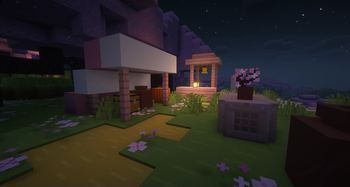
About this Modpack
!



NO OPTIFINE NEEDED: Access Shaders in Video Settings > Shader Packs > Add Your Shader
!
All The Fabric is designed for optimal performance, utilizing the Fabric Loader API. It seamlessly incorporates selected mods from our All The Forge modpack, making it an excellent choice for Minecraft enthusiasts with low-end PC setups that might struggle to handle our comprehensive Forge pack. Immerse yourself in a world of possibilities with popular mods like Bewitchment and Applied Energistics 2, enhancing your gaming experience. All The Fabric prioritizes stability and an immersive Minecraft journey, making it the ultimate selection.
Our modpack offers a diverse range of style mods to cater to your unique preferences. Whether you enjoy mixing gameplay styles or need a lighter alternative to our Forge modpack, you've come to the right place. Engineered with performance in mind, this modpack ensures a smooth experience on lower-end PCs with at least 4GB of RAM. However, we strongly recommend avoiding installation on machines with less than 4GB of RAM, as it hasn't been tested and may result in performance issues.
!
Explore diverse biomes with mods like Terrestria and Traverse.
Experience unique landscapes in Cinderscapes and reach for the stars with Ad Astra.
Dive into advanced technology with Applied Energistics 2 and Create.
Uncover the secrets of the Industrial Revolution using Industrial Revolution and Tech Reborn.
Embrace the mystical world of Bewitchment and enhance gameplay with CC: Tweaked.
Build stunning structures with Chisel Reborn and Macaw’s Bridges.
Enjoy abundant building blocks and delicious food from Farmer's Delight.
Customize your experience with built-in Shader support via Iris Shaders (requires adding your own Shader).
Roll back chat reporting to Pre 1.19 and benefit from quality-of-life improvements like Backpacks, Waystones, recipe fixes/upgrades, optimizations, and handheld device support.
All this and more in a feature-packed modpack with over 100 mods!
You can find the full list of mods under the "Versions" tab by following this link.
!
If you need help or support with this modpack, please join our Discord server by clicking the Discord banner below.
](https://discord.ampznetwork.com)
FABRIC: While the latest version of Fabric for 1.20.1 should be compatible, it's possible that it may cause an older mod in the modpack to break. In such a case, the version of Fabric currently included in the modpack is 0.16.14
OptiFine: By default, OptiFine is not compatible with All The Fabric because it contains some pre-installed optimization mods. Therefore, you must remove the listed mods below in order to load the pack with OptiFine.
Optimization Mods
| Sodium | |
| Lithium | |
| Indium | |
| Iris Shaders | |
| ImmediatelyFast | |
| CIT Resewn | |
| Cull Less Leaves | |
| Custom Entity Models | |
| Entity Texture Features | |
| Entity Culling | |
| OptiGUI |
Please remember that in addition to OptiFine, you must also have a mod called OptiFabric installed, otherwise the pack will crash. We do not recommend using OptiFine at all due to its closed source and mod incompatibility. You can download OptiFabric from this link if you still want to use OptiFine.
OPTIONAL RECOMMENDATIONS:
If your system can handle it, I recommend trying out shaders with this modpack and Minecraft to enhance your experience. Shaders can significantly improve both the modpack and the game. For the best results, consider using either Complementary Shaders - Unbound or Complementary Shaders - Reimagined.
Available Versions
How to Set Up a All The Fabric Server
Order Server
Choose at least 4 GB RAM (6 GB recommended for All The Fabric). Based on player count: per 8 players.
Install Modpack in Dashboard
Open the modpack browser in the dashboard, search for "All The Fabric" and click "Install". The fabric loader and Minecraft 1.20.1 are configured automatically.
Start Server & Play
Start the server – all mods are loaded automatically. Share the server IP with friends and play together!
Frequently Asked Questions
All The Fabric server crashes or won't start – what to do?
Most common causes: insufficient RAM or wrong fabric loader. Check latest.log for "OutOfMemoryError" → increase RAM to at least 6 GB. For "Mixin" or "ClassNotFoundException" errors: modpack version and loader don't match. With Mado Hosting, loader and Minecraft version are auto-configured on modpack install – preventing most startup issues.
How much RAM does a All The Fabric server really need?
Minimum 4 GB, recommended 6 GB for stable performance. per 8 players. Important: Minecraft modpacks need more RAM than vanilla – plan extra per additional player. With Mado Hosting, you can scale RAM up live at any time without data loss (from €5.2/month).
Can I add custom mods to All The Fabric without conflicts?
Yes, but check compatibility: only use mods for the same loader (fabric) and same Minecraft version (1.20.1). Common issues: ID conflicts with recipe mods and incompatible coremod versions. The Mado dashboard mod browser only shows compatible mods and warns about known conflicts.
All The Fabric server lagging – performance tips
1) Increase RAM to 6 GB+. 2) Reduce server view-distance to 8 (server.properties). 3) Pre-generate chunks with the "Chunky" plugin. 4) Use /spark profiler to check which mods consume the most tick time. With Mado Hosting, all servers run on NVMe SSDs with dedicated CPU cores – eliminating hardware as a bottleneck.
Similar Modpacks
![Better MC [FABRIC] - BMC2](https://cdn.modrinth.com/data/shFhR8Vx/a19c2bcb51d38f32f138d3607e91cb2b7b8e387f_96.webp)
![Better MC [FORGE] - BMC4](https://cdn.modrinth.com/data/4BV47HRn/7f5ef7cc61b2593609aabef3ed07a866a4f11b73_96.webp)


Rent All The Fabric Server
Start your own server with automatic modpack installation.
Supported Versions
Start your All The Fabric Server now
From €5.20/month; 6 GB RAM is recommended for best performance.
Configure Server →