
ROG Ally Modpack
A simple modpack that improves overall performance and enables controller support for the Asus ROG Ally. Also adds now extra content.
Screenshots
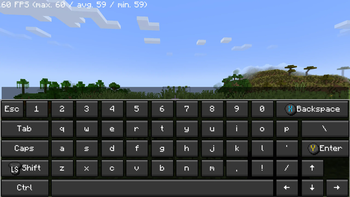
Über dieses Modpack
🎮 Asus ROG Ally Modpack
Optimized for Maximum Performance on Handheld Devices
New!
Now i release versions that can run on the silent mode to ensure to get most out of the Battery. This kind of versions are marked with Low:
ROG-Ally 1.21.8 Fabric Low
Version is something like Low-1.0.1
This modpack was specifically designed for use on the Asus ROG Ally and thoroughly tested on the device.
It combines enhanced performance with optimized controls for a smooth, controller-friendly gaming experience — no mouse or keyboard needed.
If you are a mod developer and do not want your mod to be included in my modpack, please contact me and I will remove it as soon as possible. You can find my contact details in my Profile
FPS should be around 150-350 depence on what Powermode is used and if there are any other apps running.
Setup:
- Activate Gamepad Mode
- Choose atleast the 15w Powermode (Recommended)
- Start the Game
- Let the game configure and download the controls
Restart your GameSometimes needed
If the controls won't work go to options, then controls and after that choose controller settings and click use
✨ Highlights
🚀 Optimized Performance
All included mods are carefully selected and configured to make the most of the ROG Ally’s hardware, ensuring smooth gameplay.
🎮 Controller Support
Full gamepad support makes this modpack perfect for gaming on the go or from the couch.
⚡ Faster World Loading
Use the /chunky start command to preload up to 500 chunks, reducing in-game lag and improving load times.
Comes with Shader Support
You can install and use any shader. I tested the BSL Shader on High while using the 10w Power mode and you get about 30-50 FPS!!!
📝 Notes
- Before you start switch to Gamepad Mode on your ROG Ally.
- All mods and settings were tested on the Asus ROG Ally Z1E to ensure stable and high-performance gameplay.
- I used the CPU Boost consider it as an go to if you still have low framerate (keep in mind this is using more of the battery charge).
- If you want to play on the go without charging, I would recommend disabling the Async mod.
Not affiliated with ASUS
Verfügbare Versionen
ROG Ally Modpack Server einrichten
Server bestellen
Wähle mindestens 4 GB RAM (6 GB empfohlen für ROG Ally Modpack). Je nach Spieleranzahl: +1 GB pro 5 Spieler.
Modpack im Dashboard installieren
Öffne den Modpack-Browser im Dashboard, suche nach "ROG Ally Modpack" und klicke "Installieren". Der fabric-Loader und Minecraft 26.1.2 werden automatisch konfiguriert.
Server starten & spielen
Starte den Server – alle Mods werden automatisch geladen. Teile die Server-IP mit Freunden und spielt zusammen!
Häufige Fragen
ROG Ally Modpack Server crasht oder startet nicht – was tun?
Häufigste Ursachen: zu wenig RAM oder falscher fabric-Loader. Prüfe latest.log auf "OutOfMemoryError" → erhöhe RAM auf mindestens 6 GB. Bei "Mixin" oder "ClassNotFoundException": Modpack-Version und Loader stimmen nicht überein. Bei Mado Hosting werden Loader und Minecraft-Version beim Modpack-Install automatisch konfiguriert – das verhindert die meisten Startprobleme.
Wie viel RAM braucht ein ROG Ally Modpack Server wirklich?
Minimum 4 GB, empfohlen 6 GB für stabile Performance. +1 GB pro 5 Spieler. Wichtig: Minecraft-Modpacks brauchen mehr RAM als Vanilla – plane pro zusätzlichem Spieler extra ein. Bei Mado Hosting kannst du den RAM jederzeit live hochskalieren, ohne Datenverlust (ab €5.2/Monat).
Kann ich eigene Mods zu ROG Ally Modpack hinzufügen, ohne Konflikte?
Ja, aber achte auf die Kompatibilität: Nutze nur Mods für den gleichen Loader (fabric) und die gleiche Minecraft-Version (26.1.2). Häufige Probleme: ID-Konflikte bei Rezept-Mods und inkompatible Coremod-Versionen. Im Mado Dashboard zeigt der Mod-Browser nur kompatible Mods an und warnt bei bekannten Konflikten.
ROG Ally Modpack Server laggt – Performance-Tipps
1) RAM auf 6 GB+ erhöhen. 2) Server-View-Distance auf 8 reduzieren (server.properties). 3) Pre-Generiere Chunks mit dem "Chunky" Plugin. 4) Prüfe mit /spark profiler welche Mods die meiste Tick-Time verbrauchen. Bei Mado Hosting laufen alle Server auf NVMe-SSDs mit dedizierten CPU-Kernen – das eliminiert Hardware als Engpass.
Ähnliche Modpacks
![Better MC [FABRIC] - BMC2](https://cdn.modrinth.com/data/shFhR8Vx/a19c2bcb51d38f32f138d3607e91cb2b7b8e387f_96.webp)
![Better MC [FORGE] - BMC4](https://cdn.modrinth.com/data/4BV47HRn/7f5ef7cc61b2593609aabef3ed07a866a4f11b73_96.webp)


![Better MC [FABRIC] - BMC3](https://cdn.modrinth.com/data/NHUidpfR/327e0749bb6d160c41799fd77bf6d3d631569dc8_96.webp)
ROG Ally Modpack Server mieten
Starte deinen eigenen Server mit automatischer Modpack-Installation.
Unterstützte Versionen
Starte deinen ROG Ally Modpack Server jetzt
Ab €5.20/Monat; für die beste Performance werden 6 GB RAM empfohlen.
Server konfigurieren →