
AE2 Web Integration
An add-on for AE2 (Applied Energistics 2) that lets you view your terminal in your web browser wherever you are! There is also discord integration for all your needs
Screenshots


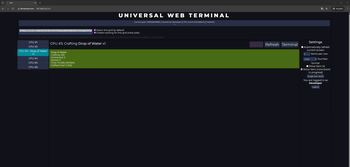
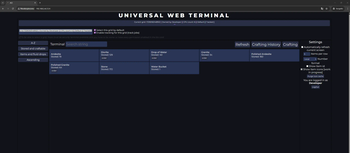
Über diese Mod
AE2 Web Integration
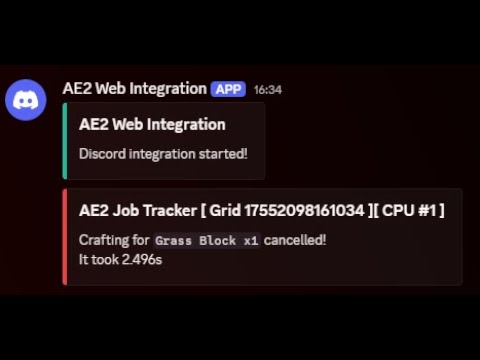
An add-on for AE2 that lets you view your terminal in your web browser wherever you are! This also includes viewing orders, cancelling them and even making a new ones! There is also a discord integration (through a webhook)!
Now also works on multiple networks and on public server = all players can have their own account!
THE MOD SHOULD ONLY BE INSTALLED ON SERVER SIDE, THERE IS NO ITEMS ADDED IN THE GAME!
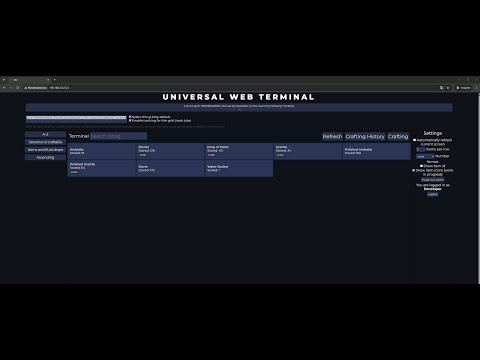
Showcase on youtube
Main mod
Discord integration
How?
This mod starts a web server on server boot that hosts a simple website that you can access directly, or through API calls
How does web panel know which network to chose from?
Because the mod is server sided only, there is no additional terminal or block added that could identify the networks,
Networks are identified through wireless access points (or security terminal on older mc versions),
all players who wants to access a specific network through the website, must place an wireless access point on that network,
Additionally, if you access the website through an Admin account, you will have access to all networks with at least one wireless access point (doesn't matter if you placed it)
On older minecraft versions where there is a security terminal, networks are identified through an security terminal,
all players who wants to access the network should have their bio cards in the security terminal block (wild bio card is ignored for security reasons!)
Admin account will have access to all networks on the server that have security terminal (doesn't matter it has your bio card)
Current features
- AE2 terminal (item list+sorting+filtering)
- Monitor as many networks as you want!
- Public mode, that allows the mod to works on servers with many independent players!
- Start a new order
- Check any CPU status
- Cancel any CPU order
- Order tracking
Gallery
Gallery
Security
In public mode,
all users on your server can create an account on the website and access their AE2 networks,
passwords are saved on the server as a PBKDF2WithHmacSHA1 hash
Once a user is authenticated, server generates a token valid for 1 hour/7 days and uses it to verify all requests after
In public mode disabled,
there is only an admin account which password is set in the config.
token mechanism is the same as in public mode.
Note: localhost connections are automatically authenticated by default, you can change that in config!
Requirements
- An open port if you want to access the service outside your local network (configurable, terminal will be hosted at http://your-server-ip-or-domain:configured-port/ for example: http://server.kuba6000.pl:2324/)
How to use
- Download the latest version for your game version from the releases page
- Drop the mod in your server mods folder (only on the server!) (This also works on single player, but is not recommended)
- Start the server
- You can now find the config in /configs/ae2webintegration/ae2webintegration.toml (or .cfg on older mc versions). Edit the port number and password protection for your needs
- Disable public mode if you play by yourself
- [This step is done automatically by config watcher since 1.21.1, you can still force reload if it didn't worked!] Reload the config (/ae2webintegration reload) or restart the server
- Make sure you have opened the configured port (firewall, redirections) if you want to use it on public internet
- Now you can visit http://your-server-ip-or-domain:configured-port/ and login should appear on your browser!
- There is a default user Admin which password is set in the config
Discord integration
Note: Discord integration is working only in public mode disabled!
- Create a webhook on your discord server and set it in the ae2webintegration config
Custom website
- If you already have a web server and want to host the panel there, you can!
- There is currently no API documentation...
- Check out Simple proxy site !
- There you can find a simple website written in PHP ready to use, it's just simple proxy to API calls to the AE2 endpoint.
Compatibility
The mod is currently implemented only on 1.21.1 (NEO), 1.20.1, 1.12.2 and 1.7.10 versions, although it might change in the future!
A few remarks about compatibility:
- 1.7.10 version is based on GTNH fork of AE2 and GTNH fork AE2FC for 1.7.10
- 1.12.2 version is based on AE2-UEL and AE2FC for 1.12.2
Verfügbare Versionen
AE2 Web Integration auf dem Server installieren
Server bestellen
Bestelle einen Minecraft Java Server mit mindestens 3 GB RAM (4 GB empfohlen).
forge Loader setzen
Wähle im Panel unter "Egg" den forge-Loader und die passende Minecraft-Version (1.21.1).
Mod installieren
Öffne den Mod-Browser im Dashboard und suche nach "AE2 Web Integration". Klicke "Installieren" – fertig! Alternativ: Lade die .jar via SFTP in den /mods Ordner.
Kompatibilität
Mod-Loader
Minecraft-Versionen
1.21.1, 1.20.1, 1.12.2 (+1 weitere)
Server-seitig
✓ ErforderlichEmpfohlener RAM
4 GB(min. 3 GB)Häufige Fragen
AE2 Web Integration Server crasht beim Start – was tun?
Häufigste Ursache: falsche forge-Version oder zu wenig RAM. Prüfe im Server-Log (latest.log), ob ein "OutOfMemoryError" oder "Mixin"-Fehler auftritt. Bei Mado Hosting: Stelle sicher, dass mindestens 3 GB RAM zugewiesen sind und der Loader zur Mod-Version passt (1.21.1). Über das Panel kannst du den Loader mit einem Klick wechseln.
Ist AE2 Web Integration mit forge und neoforge kompatibel?
AE2 Web Integration unterstützt offiziell forge, neoforge für Minecraft 1.21.1, 1.20.1, 1.12.2. Im Mado Dashboard werden inkompatible Loader-Kombinationen automatisch erkannt.
Server laggt mit AE2 Web Integration – wie optimiere ich die Performance?
Empfohlener RAM: 4 GB (+1 GB pro 8 Spieler). Prüfe mit /spark profiler, ob AE2 Web Integration den meisten Tick-Time verbraucht. Häufige Fixes: Server-View-Distance auf 8-10 reduzieren, bei Forge "performant" oder "starlight" als Zusatz-Mod installieren. Bei Mado Hosting läuft dein Server auf NVMe-SSDs mit dedizierten CPU-Kernen für minimale Latenz.
Ähnliche Mods






Modded Server mieten
Installiere AE2 Web Integration mit nur einem Klick auf deinem Server.
Details
- Lizenz
- GNU Lesser General Public License v3.0 or later
- Server-seitig
- Erforderlich