
AFK Utilitys
Advanced AFK management mod for Minecraft Fabric with anti-kick protection, auto-reconnect, safety disconnect, and hunger management
Screenshots
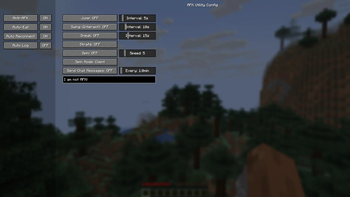
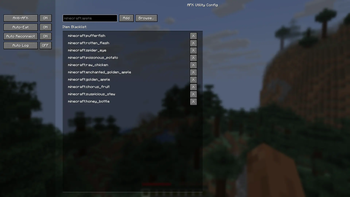


Über diese Mod
AFK Utilitys

An advanced utility mod for Minecraft Fabric that manages AFK (Away From Keyboard) states with intelligent automation and safety features.
Settings Keybind:
K
Use Cases
- Server AFK Protection: Prevent kicks from AFK timeout systems
- Safety Management: Auto-disconnect when health drops or taking damage
- Automatic Reconnection: Never lose your spot during server restarts
- Hunger Management: Keep your hunger bar full while away
- Farm Automation: Maintain activity for passive mob farms and auto-clickers

Features
Anti-AFK System
Simulates natural player activity to prevent server kicks:
- Auto-Jump: Randomized jumping intervals for natural appearance
- Auto-Swing: Periodic hand swinging with Use (right-click) interaction. Perfect for flipping levers or interacting with buttons automatically.
- Auto-Sneak: Configurable crouch timing and intervals
- Strafe Mode: Automatic left-right movement to avoid coordinate-based detection
- Spin Mode:
- Client Mode: Rotates your camera view visually
- Server Mode: Sends rotation packets while keeping your screen static
- Chat Messages: Send periodic messages with custom text
- Interval range: 0.1 to 30 minutes
- Custom message support
Auto Reconnect
Smart reconnection system for uninterrupted gameplay:
- Server Retention: Automatically remembers last connected server
- Countdown Timer: Visual countdown on disconnect screen
- Quick Toggle: Enable/disable directly from disconnect screen
- Configurable Delay: Set custom wait time before reconnection attempt
Auto Log (Safety Disconnect)
Protect your character while away:
- HP Threshold: Disconnect when health drops below configured value
- Instant Damage Mode: Disconnect immediately upon taking any damage
- Safety Lock: Optional Auto Reconnect disable after Auto Log trigger
- Death Prevention: Keeps you safe in dangerous situations
Auto Eat
Intelligent hunger management:
- Smart Timing: Only eats when hunger restoration won't be wasted
- Blacklist Support: Exclude specific items (e.g., Rotten Flesh, Spider Eyes)
- Efficient Consumption: Calculates optimal eating times based on food value
Installation
Requirements
- Minecraft 1.21+
- Fabric Loader 0.16.0+
- FabricAPI
Download
Download the mod from Modrinth and place the .jar file into your .minecraft/mods folder.
Configuration
The mod features a sidebar-based configuration UI with four main categories:
- Anti-AFK: Configure all anti-kick features and intervals
- Auto-Eat: Set hunger thresholds and manage food blacklist
- Reconnect: Adjust reconnection delay and toggle auto-reconnect
- Auto-Log: Configure health thresholds and safety settings
Configuration File
Settings are saved to:
.minecraft/config/afkutility.json
Example configuration:
{
  "antiAfk": {
    "autoJump": true,
    "autoSwing": true,
    "autoSneak": false,
    "sneakTime": 2.0,
    "strafeMode": false,
    "spinMode": "OFF",
    "chatMessages": false,
    "messageInterval": 5.0,
    "customMessage": "I am not AFK"
  },
  "autoReconnect": {
    "enabled": true,
    "delay": 5
  },
  "autoLog": {
    "enabled": true,
    "healthThreshold": 4.0,
    "onDamage": false,
    "disableReconnect": true
  },
  "autoEat": {
    "enabled": true,
    "blacklist": ["minecraft:rotten_flesh", "minecraft:spider_eye"]
  }
}
For Developers
Building
./gradlew build
Output: build/libs/afk-utility-1.0.0.jar
Project Structure
src/client/java/dev/afk/utility/
├── AFKUtilityClient.java          # Client entrypoint
├── config/
│   └── ModConfig.java             # Configuration management
├── features/
│   ├── AntiAFK.java               # Anti-AFK implementations
│   ├── AutoReconnect.java         # Reconnection handler
│   ├── AutoLog.java               # Safety disconnect
│   └── AutoEat.java               # Hunger management
├── mixin/client/
│   ├── DisconnectScreenMixin.java # UI integration
│   └── ClientPlayerMixin.java     # Player event hooks
└── screen/
    └── ConfigScreen.java          # Sidebar configuration UI
License
MIT
Credits
- Fabric API Team
- Minecraft Modding Community
Verfügbare Versionen
AFK Utilitys auf deinem Client installieren
Mod-Loader lokal installieren
Installiere fabric für deine lokale Minecraft-Version.
Passende Datei herunterladen
Wähle die AFK Utilitys-Datei für fabric und Minecraft 1.21.11.
Mod installieren
Lege die .jar-Datei in deinem lokalen .minecraft/mods-Ordner ab und starte Minecraft neu. Eine Installation auf dem Server ist nicht nötig.
Kompatibilität
Mod-Loader
Minecraft-Versionen
1.21.11, 1.21.10, 1.21.9 (+9 weitere)
Server-seitig
✗ Nicht unterstütztEmpfohlener RAM
4 GB(min. 3 GB)Häufige Fragen
Muss AFK Utilitys auf dem Minecraft Server installiert werden?
Nein. Modrinth kennzeichnet AFK Utilitys serverseitig als nicht unterstützt. Installiere die Mod nur im lokalen Minecraft-Mods-Ordner. Dein Server kann unverändert bleiben, sofern die Mod-Seite keine zusätzliche Abhängigkeit nennt.
Welche Version und welchen Loader braucht AFK Utilitys?
Nutze eine Datei für fabric und exakt deine Minecraft-Version. Unterstützte Versionen sind unter anderem 1.21.11, 1.21.10, 1.21.9. Loader-Dateien sind nicht untereinander austauschbar.
AFK Utilitys funktioniert nicht – was kann ich prüfen?
Prüfe zuerst Minecraft-Version, Loader-Version und erforderliche Abhängigkeiten. Lege die .jar-Datei im lokalen .minecraft/mods-Ordner ab und entferne ältere Duplikate. Da die Mod clientseitig ist, löst mehr Server-RAM dieses Problem nicht.
Ähnliche Mods






Minecraft Server für deine Gruppe
AFK Utilitys bleibt auf deinem Client. Hoste dazu eine kompatible Welt für deine Mitspieler.