
Animal Pens
Reduce lag and keep your animals neatly stored while maintaining full interactivity!
Screenshots
Über diese Mod
🐾 Animal Pens Mod
✅ Optimize Your Farms & Reduce Lag!
Tired of lag caused by massive animal farms? Animal Pens lets you store animals in specialized pens, aquariums and aviaries while keeping full functionality!
No more overcrowded barns - keep your animals neatly contained while still breeding, shearing, milking, and collecting drops like normal.
🎮 How It Works:
✔️ Animal Cage & Container – Capture land animals with the Animal Cage and water creatures with the Animal Container.
✔️ Feeding animals acts as breeding – No need for free-roaming animals, just feed them inside their pen!
✔️ Most vanilla interactions(1) are possible, including:
🗡️ Animal farming for loot
✂️ Shearing sheep
🥛 Milking cows, mooshrooms, and goats
🍄 Collecting mushroom stew from mooshrooms
🐝 Bee pollen regeneration
🐢 Turtle scutes dropping based on settings
🖌️ Brush scutes from armadillo
🧺 Water bucket to pick up fishes or axolotls
✔️ Custom Interactions:
🔹 Chickens, Turtles and Sniffers – Use a bucket to collect eggs.
🔹 Turtles – Drop scutes after feeding (configurable timing).
🔹 Sniffers – Require a bowl to drop seeds.
🔹 Fish Feeding – Fish eat kelp & seagrass, while other water creatures eat fish.
🔹 Frogs – Drop Frog Lights when fed a Magma Cube.
✔️ Variant Storage & Selection
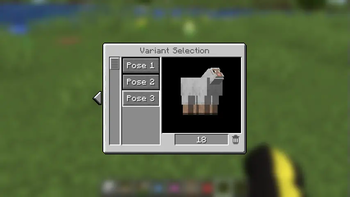
• Picking up an animal saves its variant inside the cage.
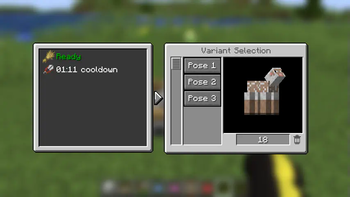
• Right-click an empty-handed pen to view stored variants.
• If visual animal growing is enabled, you can adjust the display size of the animals.
• You can adjust the minimal amount of animals that should be protected from killing.
• You can toggle if animal pen/aquarium should be interactable only by you.
✔️ Releasing animals by crouch clicking on ground.
✔️ Animal Pens, Aquariums and Aviaries can send Redstone signal with comparator.
✔️ Dispenser can be used on Animal Pens, Aquariums and Aviaries with certain tools.
(1) Features not added:
Any animal transformation
Any animal interaction with other entities
🔧 Customizable Settings:
Easily adjust gameplay with the mod’s configuration file [config/animal_pen_config.json], allowing you to tweak:
🗡️ Attack cooldown - Allows to change how fast players can kill animals in pen.
📏 Animal Growth System (Optional):
• If enabled, more animals = larger pen display.
• Adjustable growth multiplier.
🎨 Stored Variants – Allows to change how many variants can be stored per pen.
🔧 Data Driven Settings:
Added Three New Item Tags:
These tags define which items can attack their respective blocks:
animal_pen:can_attack_aquarium– Items in this tag can attack the Aquarium block.animal_pen:can_attack_pen– Items in this tag can attack the Animal Pen block.animal_pen:can_attack_aviary– Items in this tag can attack the Aviary block.
Example: Adding Custom Weapons
To allow custom_knife and modded_dagger to attack pens, create the following file in your datapack:
📂 For Minecraft 1.20.6 and Below:
Path: your_custom_datapack/data/animal_pen/tags/items/can_attack_pen.json
📂 For Minecraft 1.21 and Above:
Path: your_custom_datapack/data/animal_pen/tags/item/can_attack_pen.json
{
  "replace": false,
  "values": [
    "mod1_id:custom_knife",
    "mod2_id:modded_dagger"
  ]
}
This allows custom weapons to be used for attacking animal pens and aquariums.
Added Three New Entity Tags:
These tags define which items can attack their respective blocks:
animal_pen:animal_cage_pickable– Mobs that can be picked up by Animal Cage.animal_pen:bird_catcher_pickable– Mobs that can be picked up by Bird Catcher.animal_pen:water_mob_container_pickable– Mobs that can be picked up by Water Animal Container.
📂 For Minecraft 1.20.6 and Below:
Path: <your_custom_datapack>/data/animal_pen/tags/entity_types/animal_cage_pickable.json
📂 For Minecraft 1.21 and Above:
Path: <your_custom_datapack>/data/animal_pen/tags/entity_type/animal_cage_pickable.json
Customizable Interaction
You can also add or change interactions each animal. You can do it with data packs.
To add animal interaction you need to create a file: <your_custom_datapack>/data/<your_data_pack_id>/animal_interactions/<your_interaction>.json
To change animal interaction you need to change animal file: <your_custom_datapack>/data/minecraft/animal_interactions/<entity_id>.json
The interaction definition you can check at: [Wiki] (https://github.com/BONNePlayground/AnimalPen/wiki/Animal-Interaction)
📜 Commands:
Use these commands (server moderators) to manage the mod:
💾 /animal_pen reset – Resets the config file to default values.
🔄 /animal_pen reload – Reloads the config file without restarting the game.
🛠️ Requirements:
📌 Architectury API (Required).
📖 Patchouli (Optional, adds an in-game guidebook).
📖 ClothConfigAPI (Optional, adds config editing GUI).
🎨 Mod Artwork:
Credit to Breadcrumb5550 for the mod’s blocks and items!
With Animal Pens, you can reduce lag, keep your farms organized, and maintain full interactivity!
Verfügbare Versionen
Animal Pens auf dem Server installieren
Server bestellen
Bestelle einen Minecraft Java Server mit mindestens 3 GB RAM (4 GB empfohlen).
fabric Loader setzen
Wähle im Panel unter "Egg" den fabric-Loader und die passende Minecraft-Version (26.3).
Mod installieren
Öffne den Mod-Browser im Dashboard und suche nach "Animal Pens". Klicke "Installieren" – fertig! Alternativ: Lade die .jar via SFTP in den /mods Ordner.
Kompatibilität
Mod-Loader
Minecraft-Versionen
26.3, 26.2, 26.1.2 (+27 weitere)
Server-seitig
✓ ErforderlichEmpfohlener RAM
4 GB(min. 3 GB)Häufige Fragen
Animal Pens Server crasht beim Start – was tun?
Häufigste Ursache: falsche fabric-Version oder zu wenig RAM. Prüfe im Server-Log (latest.log), ob ein "OutOfMemoryError" oder "Mixin"-Fehler auftritt. Bei Mado Hosting: Stelle sicher, dass mindestens 3 GB RAM zugewiesen sind und der Loader zur Mod-Version passt (26.3). Über das Panel kannst du den Loader mit einem Klick wechseln.
Ist Animal Pens mit fabric und forge und neoforge kompatibel?
Animal Pens unterstützt offiziell fabric, forge, neoforge für Minecraft 26.3, 26.2, 26.1.2. Achtung: Forge- und Fabric-Mods sind NICHT untereinander kompatibel – wähle einen Loader und bleibe dabei. Im Mado Dashboard werden inkompatible Loader-Kombinationen automatisch erkannt.
Server laggt mit Animal Pens – wie optimiere ich die Performance?
Empfohlener RAM: 4 GB (+1 GB pro 8 Spieler). Prüfe mit /spark profiler, ob Animal Pens den meisten Tick-Time verbraucht. Häufige Fixes: Server-View-Distance auf 8-10 reduzieren, bei Forge "performant" oder "starlight" als Zusatz-Mod installieren. Bei Mado Hosting läuft dein Server auf NVMe-SSDs mit dedizierten CPU-Kernen für minimale Latenz.
Ähnliche Mods

![[ETF] Entity Texture Features](https://cdn.modrinth.com/data/BVzZfTc1/af683d206d50b05258d865b0d6e4aa2f2cee12f2_96.webp)
![[EMF] Entity Model Features](https://cdn.modrinth.com/data/4I1XuqiY/6e5bbd0d06b1741bfdab6c0cfab6de8fdaf0064c_96.webp)



Modded Server mieten
Installiere Animal Pens mit nur einem Klick auf deinem Server.