
Animation Overhaul
Smooth and interactive animations. Customizable and compatible!
Screenshots
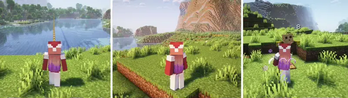
Über diese Mod

Completely overhaul the player's animations with smooth animations that interact with the world
Configurable and customizable! You can replace the animations yourself with a resource pack!
Requires Necronomicon API
✨ Features

Smooth & Interactive Player Animations
Compatibility
One of the main reasons behind the development of this mod was that the alternatives weren't compatible with famous mods such as Better Combat or Spell Engine.
Animation Overhaul fixes that by adding special support for those mods!
Configurability
From enabling individual animations to changing their speed and transitions! Completely configurable.
Resource Pack Support
Want your own animations instead? You can change the animations using a resource pack!
Credits
Verfügbare Versionen
Animation Overhaul auf deinem Client installieren
Mod-Loader lokal installieren
Installiere fabric für deine lokale Minecraft-Version.
Passende Datei herunterladen
Wähle die Animation Overhaul-Datei für fabric und Minecraft 1.20.4.
Mod installieren
Lege die .jar-Datei in deinem lokalen .minecraft/mods-Ordner ab und starte Minecraft neu. Eine Installation auf dem Server ist nicht nötig.
Kompatibilität
Mod-Loader
Minecraft-Versionen
1.20.4, 1.20.3, 1.20.2 (+7 weitere)
Server-seitig
✗ Nicht unterstütztEmpfohlener RAM
4 GB(min. 3 GB)Häufige Fragen
Muss Animation Overhaul auf dem Minecraft Server installiert werden?
Nein. Modrinth kennzeichnet Animation Overhaul serverseitig als nicht unterstützt. Installiere die Mod nur im lokalen Minecraft-Mods-Ordner. Dein Server kann unverändert bleiben, sofern die Mod-Seite keine zusätzliche Abhängigkeit nennt.
Welche Version und welchen Loader braucht Animation Overhaul?
Nutze eine Datei für fabric, forge, neoforge, quilt und exakt deine Minecraft-Version. Unterstützte Versionen sind unter anderem 1.20.4, 1.20.3, 1.20.2. Loader-Dateien sind nicht untereinander austauschbar.
Animation Overhaul funktioniert nicht – was kann ich prüfen?
Prüfe zuerst Minecraft-Version, Loader-Version und erforderliche Abhängigkeiten. Lege die .jar-Datei im lokalen .minecraft/mods-Ordner ab und entferne ältere Duplikate. Da die Mod clientseitig ist, löst mehr Server-RAM dieses Problem nicht.
Ähnliche Mods

![[ETF] Entity Texture Features](https://cdn.modrinth.com/data/BVzZfTc1/af683d206d50b05258d865b0d6e4aa2f2cee12f2_96.webp)
![[EMF] Entity Model Features](https://cdn.modrinth.com/data/4I1XuqiY/6e5bbd0d06b1741bfdab6c0cfab6de8fdaf0064c_96.webp)



Minecraft Server für deine Gruppe
Animation Overhaul bleibt auf deinem Client. Hoste dazu eine kompatible Welt für deine Mitspieler.