
3D Armor
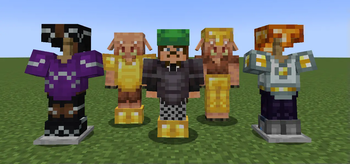
Renders the player and entity equipped armor in 3D and is compatible with most modded armor, dyes, and trims with support for 16x resource packs.
Screenshots
Über diese Mod


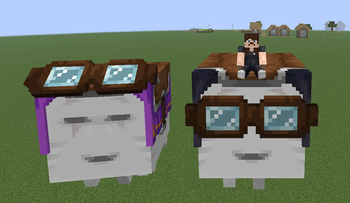
This mod enables rendering of the player and entity equipped armor/elytra/harness in 3D and is compatible with most standard armor mods, dyes, and trims with support for 16x resource packs.
This project is still a beta stage so expect few visual bugs. Although extensive precautions were taken to prevent frame rate drops, performance may decrease in areas with many armored entities. This is due to the dynamic armor model which ensures compatibility across all armors, but comes at a slight performance cost even when using optimization mods.
🟣 YOUTUBE SHOWCASES
🟠 PLANNED FEATURES
- 3D Saddles (with modded/resource pack support)
- 3D Ghast Harness (with modded/resource pack support)
- 3D Wolf Armor (with modded/resource pack support)
- 3D Horse Armor (with modded/resource pack support)
- 3D Nautilus Armor (with modded/resource pack support)
- Better Optimization
- 32x Resource Pack Support
- Compatibility with Curios API
🔵 DEPENDENCIES
- Entity Model Features (2.4 or above)
🟢 COMPATIBILITES
⚠️ Works, but slightly buggy.
- 3D Skin Layers
- Fresh Animations (and all extensions)
- Fresh Moves
- Better Combat
- Punchy!
- Not Enough Animations
- First-person Model
- ⚠️ Show Me Your Skin!
- Elytra Physics
- 3D Hands
- Aether (gloves and pendants)
- Expanded Combat (gauntlets)
- MmmMmmMmmMmm
- Illagers Wear Armor
- Corpse
- Paper Doll
- Easy NPC
- Straw Statues
🔴 INCOMPATIBILITES
Any mod that adds new armor layers are currently incompatible. 3D Elytra and Ghast Harness will break on all animation texture packs like Fresh Animations and Fresh Moves that require their own custom models. A patch will be released in the future!
NEED A SERVER?
Verfügbare Versionen
3D Armor auf deinem Client installieren
Mod-Loader lokal installieren
Installiere fabric für deine lokale Minecraft-Version.
Passende Datei herunterladen
Wähle die 3D Armor-Datei für fabric und Minecraft 26.3.
Mod installieren
Lege die .jar-Datei in deinem lokalen .minecraft/mods-Ordner ab und starte Minecraft neu. Eine Installation auf dem Server ist nicht nötig.
Kompatibilität
Mod-Loader
Minecraft-Versionen
26.3, 26.2, 26.1.2 (+21 weitere)
Server-seitig
✗ Nicht unterstütztEmpfohlener RAM
4 GB(min. 3 GB)Häufige Fragen
Muss 3D Armor auf dem Minecraft Server installiert werden?
Nein. Modrinth kennzeichnet 3D Armor serverseitig als nicht unterstützt. Installiere die Mod nur im lokalen Minecraft-Mods-Ordner. Dein Server kann unverändert bleiben, sofern die Mod-Seite keine zusätzliche Abhängigkeit nennt.
Welche Version und welchen Loader braucht 3D Armor?
Nutze eine Datei für fabric, forge, neoforge, quilt und exakt deine Minecraft-Version. Unterstützte Versionen sind unter anderem 26.3, 26.2, 26.1.2. Loader-Dateien sind nicht untereinander austauschbar.
3D Armor funktioniert nicht – was kann ich prüfen?
Prüfe zuerst Minecraft-Version, Loader-Version und erforderliche Abhängigkeiten. Lege die .jar-Datei im lokalen .minecraft/mods-Ordner ab und entferne ältere Duplikate. Da die Mod clientseitig ist, löst mehr Server-RAM dieses Problem nicht.
Ähnliche Mods

![[ETF] Entity Texture Features](https://cdn.modrinth.com/data/BVzZfTc1/af683d206d50b05258d865b0d6e4aa2f2cee12f2_96.webp)
![[EMF] Entity Model Features](https://cdn.modrinth.com/data/4I1XuqiY/6e5bbd0d06b1741bfdab6c0cfab6de8fdaf0064c_96.webp)



Minecraft Server für deine Gruppe
3D Armor bleibt auf deinem Client. Hoste dazu eine kompatible Welt für deine Mitspieler.