
Armor Chroma for Fabric
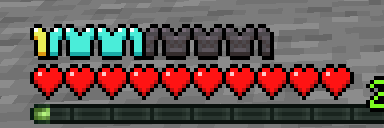
Fabric fork of Armor Chroma, adds different icons in the armor bar depending on the material and can display glint for enchanted items.
Screenshots
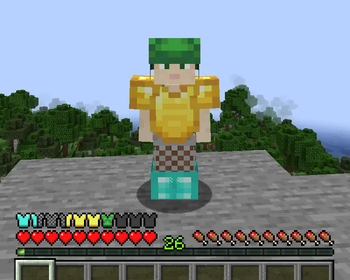
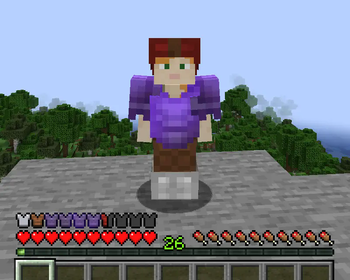
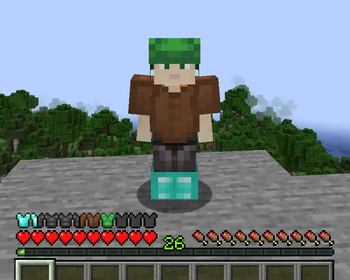
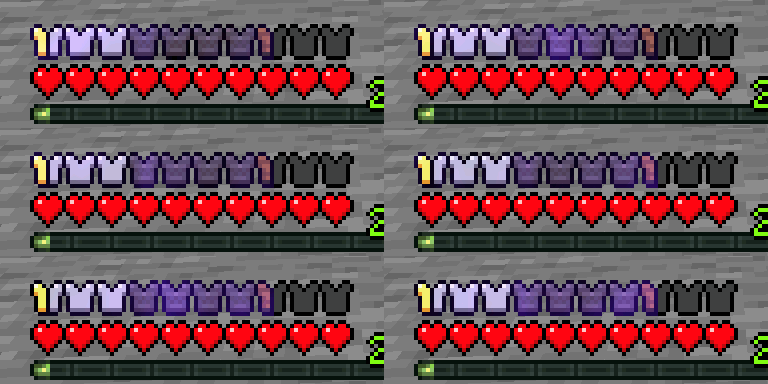
Über diese Mod
This is a Fabric fork of the original Armor Chroma mod by jobicade, a client-side mod to improve on vanilla's default armor bar.
Features include:
- Different icons depending on the material of equipped items
- Displaying glint for enchanted armor pieces
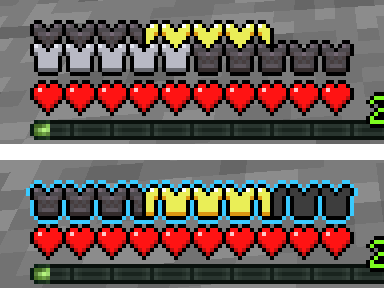
- Displaying armor points over 20 with additional armor icon rows or with a colored outline
- A minimal config screen accessible through Mod Menu (CF / MR)
when Cloth Config (CF / MR) is installed - Optional built-in resource pack by Andrew Grant with alternative icons for vanilla materials.
Mod support
Built-in icons are included for some supported mods:
- Additional Additions (CF / MR)
- Botania (CF / MR)
- Copper Equipment (CF / MR)
- DragonLoot
- Tech Reborn
(See here for other mods supported by the original mod (mostly Forge-only mods).)
Support for other mods can be added using resource packs, for instance Chromatic Icons.
To create your own resource pack, see the documentation here.
Credits (Ɛ>)
- Original mod by jobicade, original suggestion by badhaloninja
- Alternative icons by Andrew Grant
- Icons for Additional Additions, Copper Equipment, DragonLoot and Tech Reborn by Ejektaflex
it_ittranslation by VladAndreiMorariuko_krtranslation by pkb- Option to reverse the armor order suggested by robotkoer
Links: original Forge version · CurseForge · GitHub · Modrinth
Verfügbare Versionen
Armor Chroma for Fabric auf deinem Client installieren
Mod-Loader lokal installieren
Installiere fabric für deine lokale Minecraft-Version.
Passende Datei herunterladen
Wähle die Armor Chroma for Fabric-Datei für fabric und Minecraft 1.21.5.
Mod installieren
Lege die .jar-Datei in deinem lokalen .minecraft/mods-Ordner ab und starte Minecraft neu. Eine Installation auf dem Server ist nicht nötig.
Kompatibilität
Mod-Loader
Minecraft-Versionen
1.21.5, 1.21.4, 1.21.3 (+21 weitere)
Server-seitig
✗ Nicht unterstütztEmpfohlener RAM
4 GB(min. 3 GB)Häufige Fragen
Muss Armor Chroma for Fabric auf dem Minecraft Server installiert werden?
Nein. Modrinth kennzeichnet Armor Chroma for Fabric serverseitig als nicht unterstützt. Installiere die Mod nur im lokalen Minecraft-Mods-Ordner. Dein Server kann unverändert bleiben, sofern die Mod-Seite keine zusätzliche Abhängigkeit nennt.
Welche Version und welchen Loader braucht Armor Chroma for Fabric?
Nutze eine Datei für fabric, quilt und exakt deine Minecraft-Version. Unterstützte Versionen sind unter anderem 1.21.5, 1.21.4, 1.21.3. Loader-Dateien sind nicht untereinander austauschbar.
Armor Chroma for Fabric funktioniert nicht – was kann ich prüfen?
Prüfe zuerst Minecraft-Version, Loader-Version und erforderliche Abhängigkeiten. Lege die .jar-Datei im lokalen .minecraft/mods-Ordner ab und entferne ältere Duplikate. Da die Mod clientseitig ist, löst mehr Server-RAM dieses Problem nicht.
Ähnliche Mods

![[ETF] Entity Texture Features](https://cdn.modrinth.com/data/BVzZfTc1/af683d206d50b05258d865b0d6e4aa2f2cee12f2_96.webp)
![[EMF] Entity Model Features](https://cdn.modrinth.com/data/4I1XuqiY/6e5bbd0d06b1741bfdab6c0cfab6de8fdaf0064c_96.webp)



Minecraft Server für deine Gruppe
Armor Chroma for Fabric bleibt auf deinem Client. Hoste dazu eine kompatible Welt für deine Mitspieler.