
Auto Clicker Ultra
This mod is an innovative and new auto-clicker that brings a whole new set of features to the table in an easy-to-use and understand GUI.
Screenshots
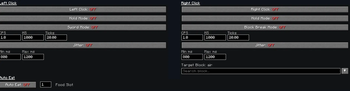
Über diese Mod
AutoClicker Ultra
Why an autoclicker is useful.
Open GUI : K
This mod is a simple, reliable autoclicker made for Minecraft players who just want things to work without a bunch of hassle. If you’ve ever spent way too long holding down your mouse for farms or grinding, this is meant to take that pressure off. It fits right into normal gameplay and helps you get things done without feeling like you’re fighting with the mod itself.
Why use this over others?
What really makes this stand out is how easy it is to use while still being flexible. A lot of autoclicker mods either throw a ton of confusing options at you or don’t give you enough control. This one tries to sit right in the middle—you get useful features without needing to dig through complicated menus. You can set it up quickly and get back to playing, whether you’re new to mods or have been using them for a while.
How its different than others?
It also includes a few features you won’t usually find in other autoclickers, while still keeping everything lightweight and smooth. It’s built to handle different situations without slowing your game down, and it stays consistent even during long AFK sessions. Overall, it’s designed to be something you can rely on without having to think about it too much.
Verfügbare Versionen
Auto Clicker Ultra auf deinem Client installieren
Mod-Loader lokal installieren
Installiere fabric für deine lokale Minecraft-Version.
Passende Datei herunterladen
Wähle die Auto Clicker Ultra-Datei für fabric und Minecraft 1.21.11.
Mod installieren
Lege die .jar-Datei in deinem lokalen .minecraft/mods-Ordner ab und starte Minecraft neu. Eine Installation auf dem Server ist nicht nötig.
Kompatibilität
Mod-Loader
Minecraft-Versionen
1.21.11
Server-seitig
✗ Nicht unterstütztEmpfohlener RAM
4 GB(min. 3 GB)Häufige Fragen
Muss Auto Clicker Ultra auf dem Minecraft Server installiert werden?
Nein. Modrinth kennzeichnet Auto Clicker Ultra serverseitig als nicht unterstützt. Installiere die Mod nur im lokalen Minecraft-Mods-Ordner. Dein Server kann unverändert bleiben, sofern die Mod-Seite keine zusätzliche Abhängigkeit nennt.
Welche Version und welchen Loader braucht Auto Clicker Ultra?
Nutze eine Datei für fabric und exakt deine Minecraft-Version. Unterstützte Versionen sind unter anderem 1.21.11. Loader-Dateien sind nicht untereinander austauschbar.
Auto Clicker Ultra funktioniert nicht – was kann ich prüfen?
Prüfe zuerst Minecraft-Version, Loader-Version und erforderliche Abhängigkeiten. Lege die .jar-Datei im lokalen .minecraft/mods-Ordner ab und entferne ältere Duplikate. Da die Mod clientseitig ist, löst mehr Server-RAM dieses Problem nicht.
Ähnliche Mods


Minecraft Server für deine Gruppe
Auto Clicker Ultra bleibt auf deinem Client. Hoste dazu eine kompatible Welt für deine Mitspieler.