
Auto Clicker Ultra
This mod is an innovative and new auto-clicker that brings a whole new set of features to the table in an easy-to-use and understand GUI.
Screenshots
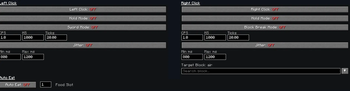
About this Mod
AutoClicker Ultra
Why an autoclicker is useful.
Open GUI : K
This mod is a simple, reliable autoclicker made for Minecraft players who just want things to work without a bunch of hassle. If you’ve ever spent way too long holding down your mouse for farms or grinding, this is meant to take that pressure off. It fits right into normal gameplay and helps you get things done without feeling like you’re fighting with the mod itself.
Why use this over others?
What really makes this stand out is how easy it is to use while still being flexible. A lot of autoclicker mods either throw a ton of confusing options at you or don’t give you enough control. This one tries to sit right in the middle—you get useful features without needing to dig through complicated menus. You can set it up quickly and get back to playing, whether you’re new to mods or have been using them for a while.
How its different than others?
It also includes a few features you won’t usually find in other autoclickers, while still keeping everything lightweight and smooth. It’s built to handle different situations without slowing your game down, and it stays consistent even during long AFK sessions. Overall, it’s designed to be something you can rely on without having to think about it too much.
Available Versions
How to Install Auto Clicker Ultra on Your Client
Install the Mod Loader Locally
Install fabric for your local Minecraft version.
Download the Matching File
Choose the Auto Clicker Ultra file for fabric and Minecraft 1.21.11.
Install Mod
Place the .jar file in your local .minecraft/mods folder and restart Minecraft. No server-side installation is required.
Compatibility
Mod Loaders
Minecraft Versions
1.21.11
Server-side
✗ UnsupportedRecommended RAM
4 GB(min. 3 GB)Frequently Asked Questions
Does Auto Clicker Ultra need to be installed on the Minecraft server?
No. Modrinth marks Auto Clicker Ultra as unsupported on the server side. Install it only in your local Minecraft mods folder. Your server can remain unchanged unless the mod page lists an additional dependency.
Which version and loader does Auto Clicker Ultra require?
Use a file for fabric and your exact Minecraft version. Supported versions include 1.21.11. Files for different loaders are not interchangeable.
Auto Clicker Ultra is not working – what should I check?
First check the Minecraft version, loader version and required dependencies. Put the .jar file in your local .minecraft/mods folder and remove older duplicates. Because this mod is client-side, adding server RAM will not fix it.
Similar Mods


Minecraft Server for Your Group
Auto Clicker Ultra stays on your client. Host a compatible world for your group.