
Beltborne Lanterns
Beltborne Lanterns — free hands, bright path
Über diese Mod



Beltborne Lanterns — free hands, bright path


Press B while holding a lantern — it snaps onto your belt. Walk, jump, fight — the lantern sways with physics and casts light near you.
Need it back in your hands? Press B again. 💡
🧩 Why it’s awesome
- One key, zero hassle. Stop digging in your inventory: B instantly attaches or detaches the lantern.
- Living light. Physics makes the glow feel real — a gentle sway as you move and turn.
- Immersion without compromise. Hands free, light by your side — explore, build, survive.
⚙️ How to use
- Hold a lantern.
- Press B — it attaches to your belt.
- Move around — it sways with you and casts light near you.
- Press B again — it detaches.
Dynamic lighting note: the in‑world light effect requires a dynamic lighting mod — see FAQ.
⧉ Add-ons
- Beltborne Lanterns - Accessories Layer: Modrinth / Curseforge / Github
📷 Showcase




❓ FAQ — compatibility & multiplayer
- Does it work in multiplayer? — YES! (Requires both client and server)
- Does it emit light in vanilla Minecraft? — No. Install a dynamic lighting mod to get light from the belt lantern:
- Fabric / Quilt / NeoForge: LambDynamicLights
- Alternative (NeoForge): Dynamic Lights (AtomicStryker)
- Will this work with the Soul Lantern? — YES!
- Will this work with a lantern from another mod? — YES! Add its item tag to the compatible list in the config.
- Does this work with the Accessories? — YES, Install the Beltborne Lanterns: Accessories Layer add-on.
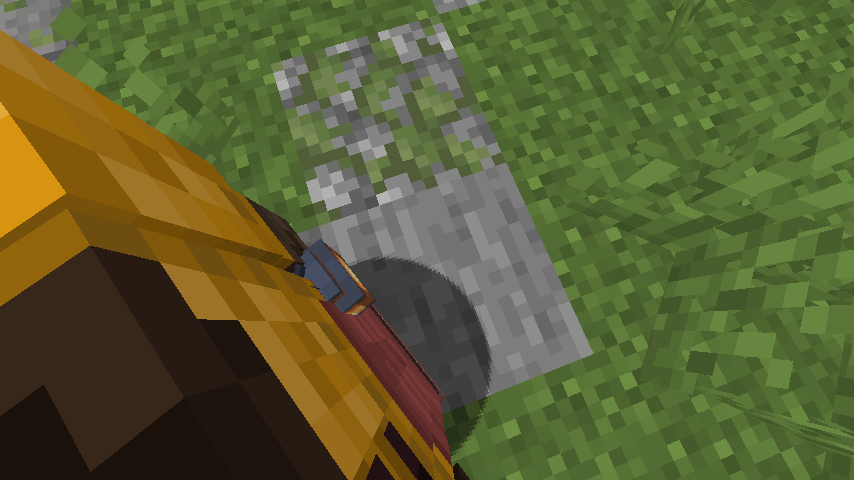
- Does this work with the First-person Model? — YES, and it looks fantastic! (screenshot under spoiler)
Show screenshot
📜 License
This project is licensed under the Apache License 2.0 — see the LICENSE file for details.
Full license text: Apache 2.0
Crafted with ❤️ for the Minecraft community
Verfügbare Versionen
Beltborne Lanterns auf dem Server installieren
Server bestellen
Bestelle einen Minecraft Java Server mit mindestens 3 GB RAM (4 GB empfohlen).
fabric Loader setzen
Wähle im Panel unter "Egg" den fabric-Loader und die passende Minecraft-Version (1.21.11).
Mod installieren
Öffne den Mod-Browser im Dashboard und suche nach "Beltborne Lanterns". Klicke "Installieren" – fertig! Alternativ: Lade die .jar via SFTP in den /mods Ordner.
Kompatibilität
Mod-Loader
Minecraft-Versionen
1.21.11, 1.21.10, 1.21.9 (+10 weitere)
Server-seitig
✓ ErforderlichEmpfohlener RAM
4 GB(min. 3 GB)Häufige Fragen
Beltborne Lanterns Server crasht beim Start – was tun?
Häufigste Ursache: falsche fabric-Version oder zu wenig RAM. Prüfe im Server-Log (latest.log), ob ein "OutOfMemoryError" oder "Mixin"-Fehler auftritt. Bei Mado Hosting: Stelle sicher, dass mindestens 3 GB RAM zugewiesen sind und der Loader zur Mod-Version passt (1.21.11). Über das Panel kannst du den Loader mit einem Klick wechseln.
Ist Beltborne Lanterns mit fabric und neoforge und quilt kompatibel?
Beltborne Lanterns unterstützt offiziell fabric, neoforge, quilt für Minecraft 1.21.11, 1.21.10, 1.21.9. Im Mado Dashboard werden inkompatible Loader-Kombinationen automatisch erkannt.
Server laggt mit Beltborne Lanterns – wie optimiere ich die Performance?
Empfohlener RAM: 4 GB (+1 GB pro 8 Spieler). Prüfe mit /spark profiler, ob Beltborne Lanterns den meisten Tick-Time verbraucht. Häufige Fixes: Server-View-Distance auf 8-10 reduzieren, bei Forge "performant" oder "starlight" als Zusatz-Mod installieren. Bei Mado Hosting läuft dein Server auf NVMe-SSDs mit dedizierten CPU-Kernen für minimale Latenz.
Ähnliche Mods

![[ETF] Entity Texture Features](https://cdn.modrinth.com/data/BVzZfTc1/af683d206d50b05258d865b0d6e4aa2f2cee12f2_96.webp)
![[EMF] Entity Model Features](https://cdn.modrinth.com/data/4I1XuqiY/6e5bbd0d06b1741bfdab6c0cfab6de8fdaf0064c_96.webp)



Modded Server mieten
Installiere Beltborne Lanterns mit nur einem Klick auf deinem Server.