
BetterF3 - Spark Module
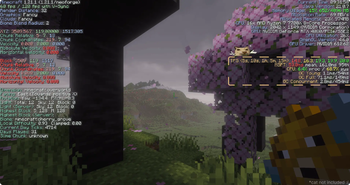
Adds spark TPS, MSPT, CPU and GC stats to BetterF3 screen
Screenshots
Über diese Mod
why?
Too lazy to type /spark tps && /spark gc every time I wanted to check server health, so now it just sits on the BetterF3 screen
BetterF3 - Spark Module adds one more module to BetterF3's screen: live TPS, MSPT, CPU and GC stats, read straight from spark
What you get
| Line | Shows |
|---|---|
| TPS | 5s, 10s, 1m, 5m, 15m averages |
| MSPT | mean + 95th percentile tick time (10s window) |
| GC Young | avg pause / frequency - the normal small collections, happens constantly, nothing to worry about |
| GC Full | avg pause / frequency - full GC, G1 tries hard to avoid these. |
| GC Concurrent | avg pause / frequency - background marking work, runs alongside the game without stopping it |
| CPU | this client's own process/system load |

Config
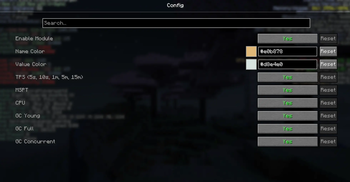
No separate config - it's just another BetterF3 module. Open F3+M (needs Cloth Config, same as any BetterF3 module) to toggle it, move it, or recolor individual lines.

Server && LAN
Hosting your own world (singleplayer or LAN)? Just works, no setup.
Playing on someone else's server is different if you want real numbers instead of a "not installed on server" placeholder, the server owner needs this same jar (+ spark) on the server too. No config involved, it just starts broadcasting once both sides have it.
Why does the server need this too?
Spark only ever reports on the machine it's running on. As a normal player, that machine is the server's, not yours - your client can't see into it unless something on that end shares the data. This addon is that something.
License
MIT. It reads data through spark's MIT-licensed spark-api, and displays it through BetterF3's public module API - both used as intended, nothing bundled from either.
Verfügbare Versionen
BetterF3 - Spark Module auf dem Server installieren
Server bestellen
Bestelle einen Minecraft Java Server mit mindestens 3 GB RAM (4 GB empfohlen).
fabric Loader setzen
Wähle im Panel unter "Egg" den fabric-Loader und die passende Minecraft-Version (1.21.11).
Mod installieren
Öffne den Mod-Browser im Dashboard und suche nach "BetterF3 - Spark Module". Klicke "Installieren" – fertig! Alternativ: Lade die .jar via SFTP in den /mods Ordner.
Kompatibilität
Mod-Loader
Minecraft-Versionen
1.21.11, 1.21.10, 1.21.9 (+9 weitere)
Server-seitig
~ OptionalEmpfohlener RAM
4 GB(min. 3 GB)Häufige Fragen
BetterF3 - Spark Module Server crasht beim Start – was tun?
Häufigste Ursache: falsche fabric-Version oder zu wenig RAM. Prüfe im Server-Log (latest.log), ob ein "OutOfMemoryError" oder "Mixin"-Fehler auftritt. Bei Mado Hosting: Stelle sicher, dass mindestens 3 GB RAM zugewiesen sind und der Loader zur Mod-Version passt (1.21.11). Über das Panel kannst du den Loader mit einem Klick wechseln.
Ist BetterF3 - Spark Module mit fabric und neoforge kompatibel?
BetterF3 - Spark Module unterstützt offiziell fabric, neoforge für Minecraft 1.21.11, 1.21.10, 1.21.9. Im Mado Dashboard werden inkompatible Loader-Kombinationen automatisch erkannt.
Server laggt mit BetterF3 - Spark Module – wie optimiere ich die Performance?
Empfohlener RAM: 4 GB (+1 GB pro 8 Spieler). Prüfe mit /spark profiler, ob BetterF3 - Spark Module den meisten Tick-Time verbraucht. Häufige Fixes: Server-View-Distance auf 8-10 reduzieren, bei Forge "performant" oder "starlight" als Zusatz-Mod installieren. Bei Mado Hosting läuft dein Server auf NVMe-SSDs mit dedizierten CPU-Kernen für minimale Latenz.
Ähnliche Mods


Modded Server mieten
Installiere BetterF3 - Spark Module mit nur einem Klick auf deinem Server.