
BetterF3 - Spark Module
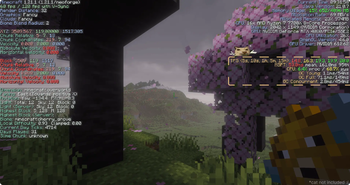
Adds spark TPS, MSPT, CPU and GC stats to BetterF3 screen
Screenshots
About this Mod
why?
Too lazy to type /spark tps && /spark gc every time I wanted to check server health, so now it just sits on the BetterF3 screen
BetterF3 - Spark Module adds one more module to BetterF3's screen: live TPS, MSPT, CPU and GC stats, read straight from spark
What you get
| Line | Shows |
|---|---|
| TPS | 5s, 10s, 1m, 5m, 15m averages |
| MSPT | mean + 95th percentile tick time (10s window) |
| GC Young | avg pause / frequency - the normal small collections, happens constantly, nothing to worry about |
| GC Full | avg pause / frequency - full GC, G1 tries hard to avoid these. |
| GC Concurrent | avg pause / frequency - background marking work, runs alongside the game without stopping it |
| CPU | this client's own process/system load |

Config
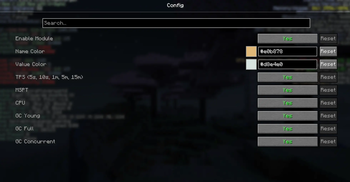
No separate config - it's just another BetterF3 module. Open F3+M (needs Cloth Config, same as any BetterF3 module) to toggle it, move it, or recolor individual lines.

Server && LAN
Hosting your own world (singleplayer or LAN)? Just works, no setup.
Playing on someone else's server is different if you want real numbers instead of a "not installed on server" placeholder, the server owner needs this same jar (+ spark) on the server too. No config involved, it just starts broadcasting once both sides have it.
Why does the server need this too?
Spark only ever reports on the machine it's running on. As a normal player, that machine is the server's, not yours - your client can't see into it unless something on that end shares the data. This addon is that something.
License
MIT. It reads data through spark's MIT-licensed spark-api, and displays it through BetterF3's public module API - both used as intended, nothing bundled from either.
Available Versions
How to Install BetterF3 - Spark Module on Your Server
Order Server
Order a Minecraft Java server with at least 3 GB RAM (4 GB recommended).
Set fabric Loader
In the panel under "Egg", select the fabric loader and matching Minecraft version (1.21.11).
Install Mod
Open the mod browser in the dashboard and search for "BetterF3 - Spark Module". Click "Install" – done! Alternatively, upload the .jar via SFTP to the /mods folder.
Compatibility
Mod Loaders
Minecraft Versions
1.21.11, 1.21.10, 1.21.9 (+9 more)
Server-side
~ OptionalRecommended RAM
4 GB(min. 3 GB)Frequently Asked Questions
BetterF3 - Spark Module server crashes on startup – what to do?
Most common cause: wrong fabric version or insufficient RAM. Check the server log (latest.log) for "OutOfMemoryError" or "Mixin" errors. With Mado Hosting: ensure at least 3 GB RAM is allocated and the loader matches the mod version (1.21.11). You can switch loaders with one click in the panel.
Is BetterF3 - Spark Module compatible with fabric and neoforge?
BetterF3 - Spark Module officially supports fabric, neoforge for Minecraft 1.21.11, 1.21.10, 1.21.9. The Mado dashboard automatically detects incompatible loader combinations.
Server lagging with BetterF3 - Spark Module – how to optimize performance?
Recommended RAM: 4 GB (per 8 players). Use /spark profiler to check if BetterF3 - Spark Module consumes the most tick time. Common fixes: reduce server view-distance to 8-10, install "performant" or "starlight" as supplementary mods on Forge. With Mado Hosting, your server runs on NVMe SSDs with dedicated CPU cores for minimal latency.
Similar Mods


Rent Modded Server
Install BetterF3 - Spark Module with just one click on your server.