
Borderless Windowed Vulkan
Pretty much cubes without boarders mod but working with vulkan mod - This also works without vulkan incase you just prefer this mod
Screenshots

Über diese Mod
Borderless Windowed Vulkan


Adds Borderless Windowed More commonly known as cubes without borders* to work with vulkan (Also works without the vulkan mod)
A question you might be asking: "Doesn't vulkan already have this built in?"
- Yes. But not like this, without the mod if you click off the screen still minimizes, And it does not fix the issue I stated below in "Fixes" section.
If you want motionblur for VulkanMod check this mod out: Vulkan Motion Blur
note: a windows update might break it for you so if it doesn't work that could be why.
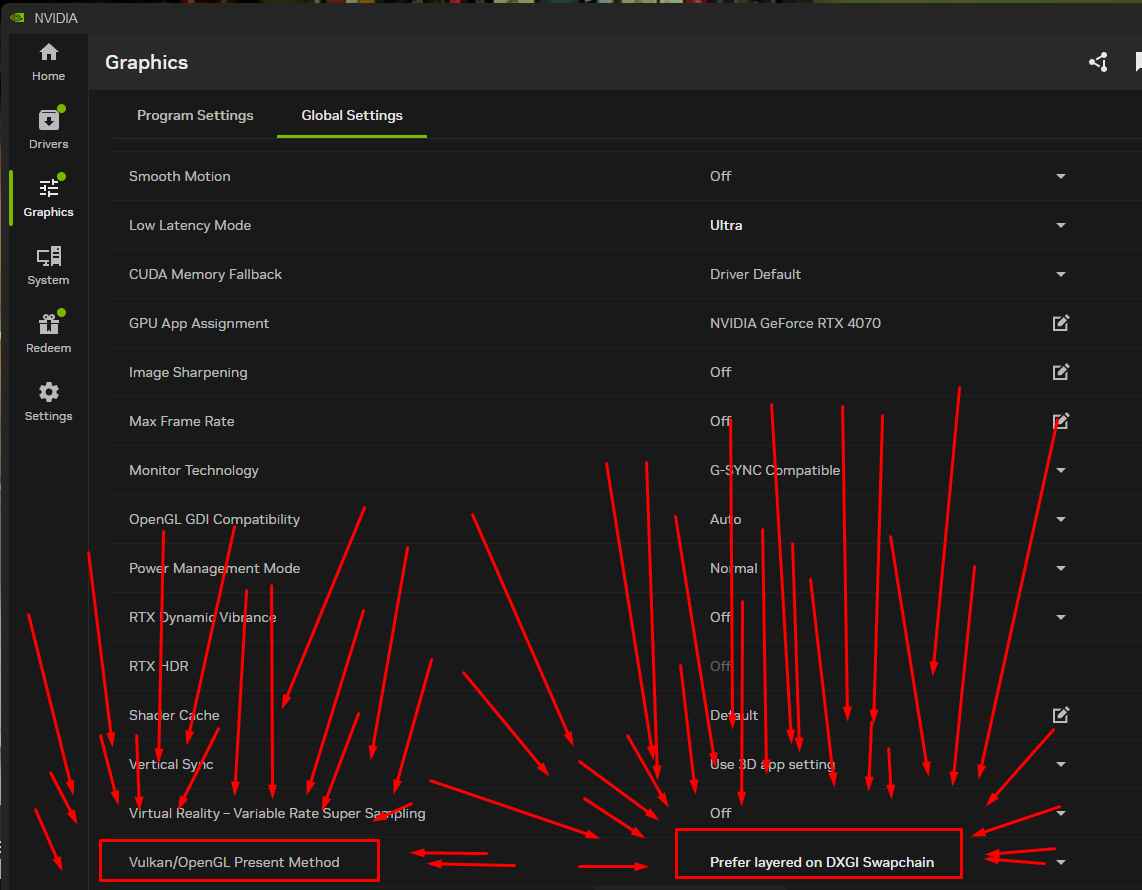
If you have the black screen issue do this
Showcase

Heres Win + Tabbing working with other windows
Goal and what it does
This mod lets you run Minecraft in a borderless fullscreen window. You can keep the game open while using other apps on another monitor, or even interact with things on top of Minecraft, without the game minimizing itself.
The goal of this project is to just work out of the box and feel good to use. I spent a lot of time fixing issues, like not being able to tab out or the game breaking if you clicked F11 really fast. I tested this a lot to make sure it behaves properly in real use.
It works both with Vulkan and without it, but it was mainly made with Vulkan in mind. Even without Vulkan it should still work completely fine.
OS?
I do not have access to Linux or macOS devices, so I cannot test those platforms myself. If you try the mod on Linux or macOS, let me know how it goes in my Discord. Whether it works, breaks, or has issues, any feedback helps.
Fixes
This mod also fixes a really annoying Discord screenshare issue where the stream would be super choppy and update at something like one frame every few seconds. I spent a long time trying to figure out what caused that problem, and this change ended up being required to fix it.
Requires
Recommends
have any questions?
need help?
want to report a bug?
Request a something added to the mod?
or you just wanna be cool? ⭐
Then join my Discord!


Verfügbare Versionen
Borderless Windowed Vulkan auf deinem Client installieren
Mod-Loader lokal installieren
Installiere fabric für deine lokale Minecraft-Version.
Passende Datei herunterladen
Wähle die Borderless Windowed Vulkan-Datei für fabric und Minecraft 26.3.
Mod installieren
Lege die .jar-Datei in deinem lokalen .minecraft/mods-Ordner ab und starte Minecraft neu. Eine Installation auf dem Server ist nicht nötig.
Kompatibilität
Mod-Loader
Minecraft-Versionen
26.3, 26.1.2, 26.1.1 (+13 weitere)
Server-seitig
✗ Nicht unterstütztEmpfohlener RAM
4 GB(min. 3 GB)Häufige Fragen
Muss Borderless Windowed Vulkan auf dem Minecraft Server installiert werden?
Nein. Modrinth kennzeichnet Borderless Windowed Vulkan serverseitig als nicht unterstützt. Installiere die Mod nur im lokalen Minecraft-Mods-Ordner. Dein Server kann unverändert bleiben, sofern die Mod-Seite keine zusätzliche Abhängigkeit nennt.
Welche Version und welchen Loader braucht Borderless Windowed Vulkan?
Nutze eine Datei für fabric und exakt deine Minecraft-Version. Unterstützte Versionen sind unter anderem 26.3, 26.1.2, 26.1.1. Loader-Dateien sind nicht untereinander austauschbar.
Borderless Windowed Vulkan funktioniert nicht – was kann ich prüfen?
Prüfe zuerst Minecraft-Version, Loader-Version und erforderliche Abhängigkeiten. Lege die .jar-Datei im lokalen .minecraft/mods-Ordner ab und entferne ältere Duplikate. Da die Mod clientseitig ist, löst mehr Server-RAM dieses Problem nicht.
Ähnliche Mods


Minecraft Server für deine Gruppe
Borderless Windowed Vulkan bleibt auf deinem Client. Hoste dazu eine kompatible Welt für deine Mitspieler.