
Borderless Windowed Vulkan
Pretty much cubes without boarders mod but working with vulkan mod - This also works without vulkan incase you just prefer this mod
Screenshots

About this Mod
Borderless Windowed Vulkan


Adds Borderless Windowed More commonly known as cubes without borders* to work with vulkan (Also works without the vulkan mod)
A question you might be asking: "Doesn't vulkan already have this built in?"
- Yes. But not like this, without the mod if you click off the screen still minimizes, And it does not fix the issue I stated below in "Fixes" section.
If you want motionblur for VulkanMod check this mod out: Vulkan Motion Blur
note: a windows update might break it for you so if it doesn't work that could be why.
If you have the black screen issue do this
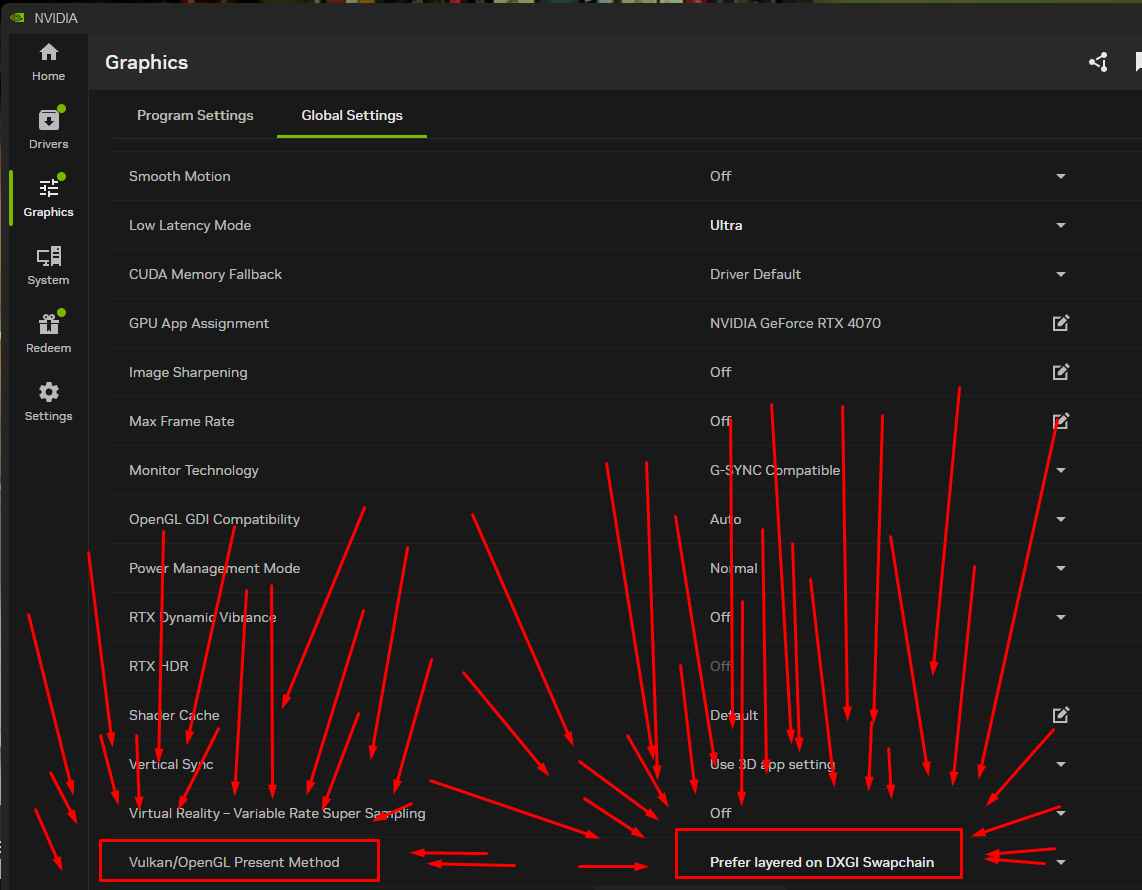
Showcase

Heres Win + Tabbing working with other windows
Goal and what it does
This mod lets you run Minecraft in a borderless fullscreen window. You can keep the game open while using other apps on another monitor, or even interact with things on top of Minecraft, without the game minimizing itself.
The goal of this project is to just work out of the box and feel good to use. I spent a lot of time fixing issues, like not being able to tab out or the game breaking if you clicked F11 really fast. I tested this a lot to make sure it behaves properly in real use.
It works both with Vulkan and without it, but it was mainly made with Vulkan in mind. Even without Vulkan it should still work completely fine.
OS?
I do not have access to Linux or macOS devices, so I cannot test those platforms myself. If you try the mod on Linux or macOS, let me know how it goes in my Discord. Whether it works, breaks, or has issues, any feedback helps.
Fixes
This mod also fixes a really annoying Discord screenshare issue where the stream would be super choppy and update at something like one frame every few seconds. I spent a long time trying to figure out what caused that problem, and this change ended up being required to fix it.
Requires
Recommends
have any questions?
need help?
want to report a bug?
Request a something added to the mod?
or you just wanna be cool? ⭐
Then join my Discord!


Available Versions
How to Install Borderless Windowed Vulkan on Your Client
Install the Mod Loader Locally
Install fabric for your local Minecraft version.
Download the Matching File
Choose the Borderless Windowed Vulkan file for fabric and Minecraft 26.3.
Install Mod
Place the .jar file in your local .minecraft/mods folder and restart Minecraft. No server-side installation is required.
Compatibility
Mod Loaders
Minecraft Versions
26.3, 26.1.2, 26.1.1 (+13 more)
Server-side
✗ UnsupportedRecommended RAM
4 GB(min. 3 GB)Frequently Asked Questions
Does Borderless Windowed Vulkan need to be installed on the Minecraft server?
No. Modrinth marks Borderless Windowed Vulkan as unsupported on the server side. Install it only in your local Minecraft mods folder. Your server can remain unchanged unless the mod page lists an additional dependency.
Which version and loader does Borderless Windowed Vulkan require?
Use a file for fabric and your exact Minecraft version. Supported versions include 26.3, 26.1.2, 26.1.1. Files for different loaders are not interchangeable.
Borderless Windowed Vulkan is not working – what should I check?
First check the Minecraft version, loader version and required dependencies. Put the .jar file in your local .minecraft/mods folder and remove older duplicates. Because this mod is client-side, adding server RAM will not fix it.
Similar Mods


Minecraft Server for Your Group
Borderless Windowed Vulkan stays on your client. Host a compatible world for your group.