
BtrBz
A Hypixel SkyBlock QOL mod focused on improving the Bazaar experience
Screenshots
Über diese Mod
BtrBz
BtrBz is a Fabric client mod for Hypixel SkyBlock's Bazaar. It puts order status, market prices, alerts, and quick actions into Bazaar screens. Configure BtrBz with /btrbz.
Download on Modrinth | Discord | Issue tracker
Features
Track orders
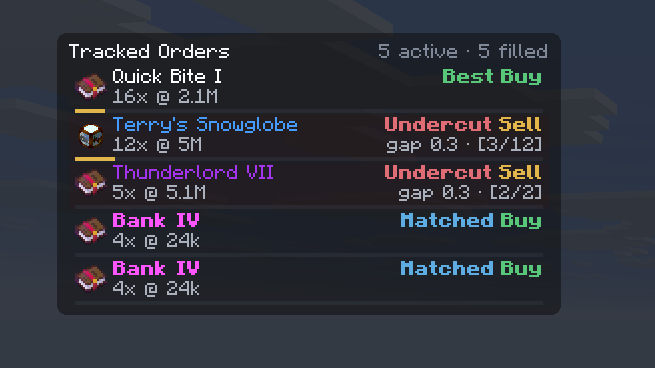
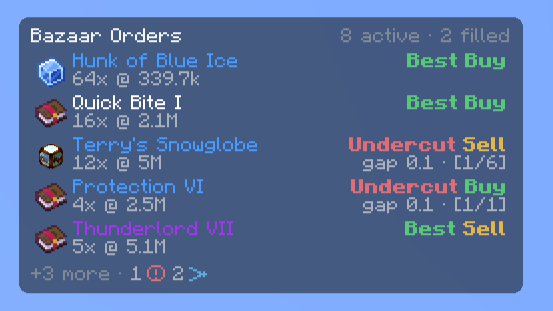
BtrBz tracks active buy orders and sell offers against current Bazaar data. See whether each order is at the top, matched, or undercut, and get a notification when its status changes. It can also flag when your own orders compete. The Orders HUD keeps them visible while the Bazaar is closed.
Queue position, items ahead, and fill time are estimates.
Check prices and order books
Open an order book for the selected product, including while entering a price. Product tooltips show the current price to buy or sell an item instantly. Hold Shift to see the total for a stack or the quantity represented by a supported menu item. The Price Difference widget shows the spread per item and across your sellable inventory.
Product lookup shortcuts open items on Skyblock.bz, Coflnet, or Skyblock.Finance.
Reuse common Bazaar actions
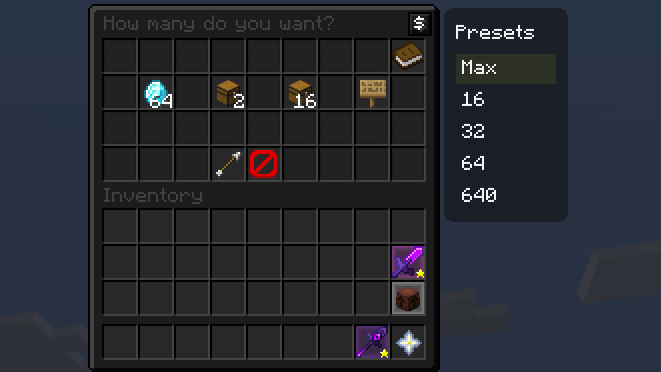
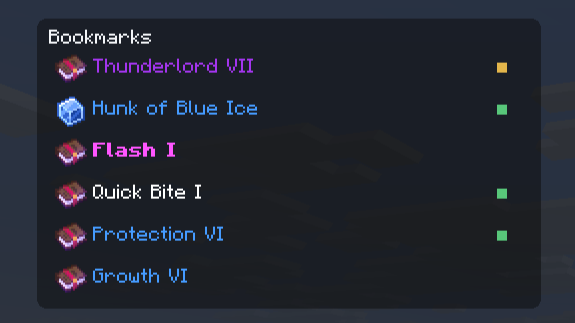
Keep frequently traded products in the Bookmarks widget, which also shows whether you have a buy order or sell offer on a product. Save amount presets for the quantity menu and sign entry. Filled buy orders can be flipped into sell offers with one click.
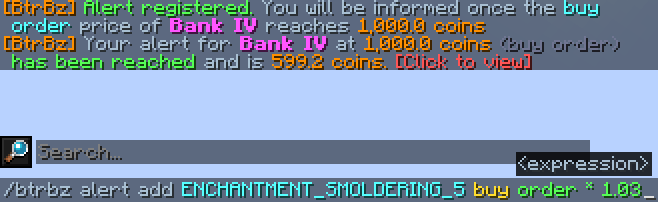
Set price and liquidity alerts
Price alerts notify you when a price to buy or sell instantly reaches a saved target. Liquidity alerts watch whether enough items are available to buy or sell instantly within your price bound. Open the alert editor with /btrbz alert or the bell on a Bazaar product page. Alerts are saved between sessions.
Protect orders and track daily usage
Order Protection can block prices that undercut too aggressively or cross the spread to a price where an instant trade would fill. The warning explains why an order was blocked, and you can hold Ctrl while confirming to override it. The Daily Limit widget compares estimated Bazaar transaction value with a personal daily limit.
Customize widgets
The Widget Manager lets you choose which widgets appear, where they sit, and how large they are. You can also set a background color and opacity for individual widgets. Open it from /btrbz settings or the quick access button in the Bazaar.
Getting started
Run /btrbz to configure features. Use /btrbz alert to manage alerts and /btrbz preset add <amount> to save an amount preset.
Installation
BtrBz currently supports Minecraft 26.1 and 26.2. It requires Java 25 or newer and Fabric Loader 0.19.3 or newer.
- Download the release for your Minecraft version from the BtrBz Versions page.
- Install matching versions of Fabric API, Hypixel Mod API, Yet Another Config Lib, and owo-lib.
- Place BtrBz and its dependencies in the Minecraft
modsfolder, then start Fabric and join Hypixel SkyBlock.
Mod Menu is optional and adds another way to open BtrBz settings.
Note: BtrBz is in alpha. Saved data may be reset when its format changes.
Notes
- Bazaar prices may be delayed. Liquidity alerts can only check the top 30 orders per side returned by Hypixel.
- The Daily Limit widget estimates usage from transactions observed by the mod and uses the tax rate set with
/btrbz tax set <rate>. - Opening a bookmarked product uses
/bzand requires an active Cookie Buff.
Icon attribution
This project uses icons from Flaticon:
- Bookmark icons
created by Ian Anandara - Flaticon - Instagram-tools icons created by Dewi Sari - Flaticon
- Red icons created by
hqrloveq - Flaticon - Yes icons created by
hqrloveq - Flaticon - Trash icons created by
Magnific - Flaticon - Question icons created
by Magnific - Flaticon - Bell icons created
by Pixel perfect - Flaticon - Redo icons created
by Creatype - Flaticon
Verfügbare Versionen
BtrBz auf deinem Client installieren
Mod-Loader lokal installieren
Installiere fabric für deine lokale Minecraft-Version.
Passende Datei herunterladen
Wähle die BtrBz-Datei für fabric und Minecraft 26.2.
Mod installieren
Lege die .jar-Datei in deinem lokalen .minecraft/mods-Ordner ab und starte Minecraft neu. Eine Installation auf dem Server ist nicht nötig.
Kompatibilität
Mod-Loader
Minecraft-Versionen
26.2, 26.1.2, 26.1.1 (+5 weitere)
Server-seitig
✗ Nicht unterstütztEmpfohlener RAM
4 GB(min. 3 GB)Häufige Fragen
Muss BtrBz auf dem Minecraft Server installiert werden?
Nein. Modrinth kennzeichnet BtrBz serverseitig als nicht unterstützt. Installiere die Mod nur im lokalen Minecraft-Mods-Ordner. Dein Server kann unverändert bleiben, sofern die Mod-Seite keine zusätzliche Abhängigkeit nennt.
Welche Version und welchen Loader braucht BtrBz?
Nutze eine Datei für fabric und exakt deine Minecraft-Version. Unterstützte Versionen sind unter anderem 26.2, 26.1.2, 26.1.1. Loader-Dateien sind nicht untereinander austauschbar.
BtrBz funktioniert nicht – was kann ich prüfen?
Prüfe zuerst Minecraft-Version, Loader-Version und erforderliche Abhängigkeiten. Lege die .jar-Datei im lokalen .minecraft/mods-Ordner ab und entferne ältere Duplikate. Da die Mod clientseitig ist, löst mehr Server-RAM dieses Problem nicht.
Ähnliche Mods


![CobbleDollars [Cobblemon Addon]](https://cdn.modrinth.com/data/s7N7AsqL/684040a264fc1d7f9b856ec5d2da39767398c7ad.png)

Minecraft Server für deine Gruppe
BtrBz bleibt auf deinem Client. Hoste dazu eine kompatible Welt für deine Mitspieler.
Details
- Lizenz
- GNU Lesser General Public License v3.0 only
- Server-seitig
- Nicht unterstützt