
Bubblellaneous
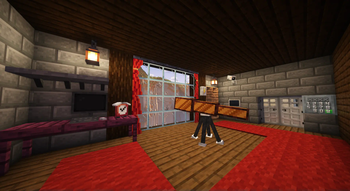
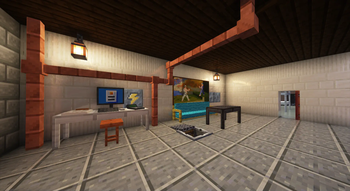
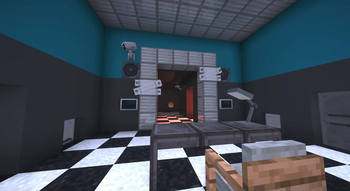
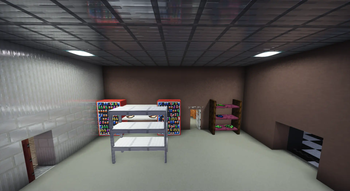
Adds Furniture, Technology, Food & Miscellaneous blocks and items.
Screenshots

Über diese Mod
🫧 Bubblellaneous Pack
This Minecraft pack adds Furniture, Technology, Food & Miscellaneous blocks and items.
To use it you must install the data pack in your world. All players playing on your server must have the resource pack installed.
- Use
/function menu:bubblellaneousfor settings/debugging! - Use
/function give:bubblellaneous/<item_name>to give an item. - Use
/function spawn:bubblellaneous/<item_name>to spawn an item. - Use
/function place:bubblellaneous/<block_name>to place a block.
| Minecraft version | Status |
|---|---|
| 1.20.2 and earlier | 🚫 Broken due to Minecraft limitations |
| 1.20.3 | ✅ Supported (only 2.0.0) |
| 1.20.4 | ✅ Supported (only 2.0.0) |
| 1.21.0—1.21.9 | ✅ Supported (only to 2.2.3) |
| 1.21.11—26.2 | ✅ Supported (only 3.0.0 and later) |
If you wish to contribute, refer to CONTRIBUTING.md
🔖 Translations
Thanks to wonderful people you can enjoy this pack in different languages:
| Maintainer | Translation |
|---|---|
| BubbleFish | 🇺🇸 English (US) [100%] |
| BubbleFish | 🇬🇧 English (UK) [100%] |
| BubbleFish | 🇷🇺 Russian [100%] |
| Unintegrated | 🇨🇿 Czech [100%] |
| Unintegrated | 🌍 Toki Pona [100%] |
| Atten007 | 🇩🇪 German [100%] |
| Caesar_Galahad | 🇨🇳 Chinese [100%] |
| Antoha256M | 🇷🇺 Russian Pre-Reform [100%] |
| FBreakDance30 | 🇮🇹 Italian [99%] |
| Dorlonkho | 🇯🇵 Japanesse [17%] |
If you want to help with translations, refer to CONTRIBUTING.md
🖥️ About Bubblellaneous
This data pack was originally published by me on Nov 21st, 2021. This is a complete rework, designed to be great for survival, map making, and the creation of your content.
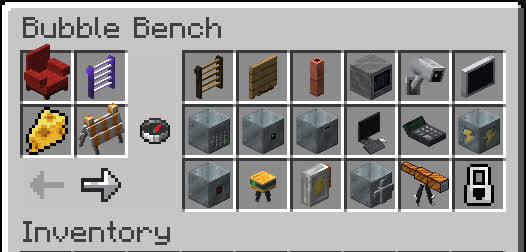
- You can obtain all custom content without memorizing recipes using Bubble Bench: Drop a glass bottle onto a crafting table!

- Many blocks/items have different variants (variating in color and material):

- Have fun with all the content! Feel free to join my discord:
📦 For Map Makers / Developers
Storing blocks
Bubblellaneous uses entities to display blocks, this may become inconvenient for mapmakers. For this reason, there's a way of restoring the block's state when loading from structures using structure blocks or /place:
- Prevent copying before you save all of the blocks:
/function bubblellaneous:blocks/copy_properties/prevent_copying. - Store blocks that you want to save:
/execute as @e[tag=bbln.block] run function bubblellaneous:blocks/copy_properties/save_to_block. - Save the structure. You can now break the blocks.
- Start copying state:
/function bubblellaneous:blocks/copy_properties/stop_prevent_copying. - Now you can place the saved structure template anywhere and it will automatically restore all data.
- If you encounter errors, create a GitHub Issue telling which block and how exactly it broke.
Events
Bubblellaneous has several events that can be used to extend the data pack logic. The way you hook to these events is by creating a Function tag in the specified path. The function tag is executed by a certain entity that you can refer to.
[!NOTE]
If your project requires more events, create a GitHub Issue or message me on Discord, and I'll add it.
Entity tag is @e[tag=bbln.<value>]. e.g. if the value is name.test, then the actual selector is @e[tag=bbln.name.test].
| Function tag | Entity tag | Description |
|---|---|---|
#bubblellaneous:settings/on_load |
- | Settings were loaded/changed |
#bubblellaneous:block/all/on_place |
block | A block was placed |
#bubblellaneous:block/all/on_break |
block | A block was broken. Use /return 1 to prevent the block from breaking |
#bubblellaneous:block/bear_trap/on_catch |
name.bear_trap | Bear Trap caught a player |
#bubblellaneous:block/bear_trap/on_release |
name.bear_trap | Bear Trap released the player |
#bubblellaneous:block/electrical_box/on_enable |
name.electrical_box | An electrical box was toggled on |
#bubblellaneous:block/electrical_box/on_disable |
name.electrical_box | An electrical box was toggled off |
#bubblellaneous:block/alarm_block/on_trigger |
name.alarm_block | An alarm block was triggered with redstone |
Bubble Bench Blacklist
You can hide certain blocks/items from Bubble Bench, preventing players from crafting them.
Substitute
<unit>/<id>with the following values:
<unit>is eitherblockoritem.<id>is the id of the block/item. The same ID is used in commands like/function give:bubblellaneous/...for reference.
Adding unit into blacklist:
data modify storage minecraft:bubblellaneous bench_blacklist append value {entry: "<unit>/<id>"}

# Example:
data modify storage minecraft:bubblellaneous bench_blacklist append value {entry: "block/acacia_table"}
Removing unit from blacklist:
data remove storage minecraft:bubblellaneous bench_blacklist[{entry: "<unit>/<id>"}]

# Example:
data remove storage minecraft:bubblellaneous bench_blacklist[{entry: "item/white_key"}]
The changes will apply on the next /reload.
🔗 Extra Links
You can leave a comment on the PMC page!

Verfügbare Versionen
Bubblellaneous auf dem Server installieren
Server bestellen
Bestelle einen Minecraft Java Server mit mindestens 3 GB RAM (4 GB empfohlen).
datapack Loader setzen
Wähle im Panel unter "Egg" den datapack-Loader und die passende Minecraft-Version (26.2).
Mod installieren
Öffne den Mod-Browser im Dashboard und suche nach "Bubblellaneous". Klicke "Installieren" – fertig! Alternativ: Lade die .jar via SFTP in den /mods Ordner.
Kompatibilität
Mod-Loader
Minecraft-Versionen
26.2, 26.1.2, 26.1.1 (+17 weitere)
Server-seitig
✓ ErforderlichEmpfohlener RAM
4 GB(min. 3 GB)Häufige Fragen
Bubblellaneous Server crasht beim Start – was tun?
Häufigste Ursache: falsche datapack-Version oder zu wenig RAM. Prüfe im Server-Log (latest.log), ob ein "OutOfMemoryError" oder "Mixin"-Fehler auftritt. Bei Mado Hosting: Stelle sicher, dass mindestens 3 GB RAM zugewiesen sind und der Loader zur Mod-Version passt (26.2). Über das Panel kannst du den Loader mit einem Klick wechseln.
Ist Bubblellaneous mit datapack und fabric und forge und minecraft und neoforge und quilt kompatibel?
Bubblellaneous unterstützt offiziell datapack, fabric, forge, minecraft, neoforge, quilt für Minecraft 26.2, 26.1.2, 26.1.1. Achtung: Forge- und Fabric-Mods sind NICHT untereinander kompatibel – wähle einen Loader und bleibe dabei. Im Mado Dashboard werden inkompatible Loader-Kombinationen automatisch erkannt.
Server laggt mit Bubblellaneous – wie optimiere ich die Performance?
Empfohlener RAM: 4 GB (+1 GB pro 8 Spieler). Prüfe mit /spark profiler, ob Bubblellaneous den meisten Tick-Time verbraucht. Häufige Fixes: Server-View-Distance auf 8-10 reduzieren, bei Forge "performant" oder "starlight" als Zusatz-Mod installieren. Bei Mado Hosting läuft dein Server auf NVMe-SSDs mit dedizierten CPU-Kernen für minimale Latenz.
Ähnliche Mods

![[ETF] Entity Texture Features](https://cdn.modrinth.com/data/BVzZfTc1/af683d206d50b05258d865b0d6e4aa2f2cee12f2_96.webp)
![[EMF] Entity Model Features](https://cdn.modrinth.com/data/4I1XuqiY/6e5bbd0d06b1741bfdab6c0cfab6de8fdaf0064c_96.webp)



Modded Server mieten
Installiere Bubblellaneous mit nur einem Klick auf deinem Server.
Details
- Lizenz
- Creative Commons Attribution Share Alike 4.0 International
- Server-seitig
- Erforderlich