
BuildPaste - Instant Structures
Build your dream world in seconds with 10,000+ instant structures
Screenshots
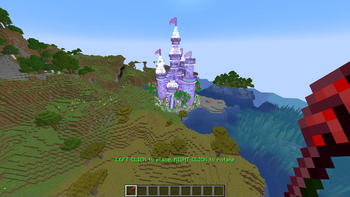
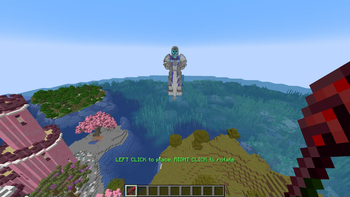
Über diese Mod

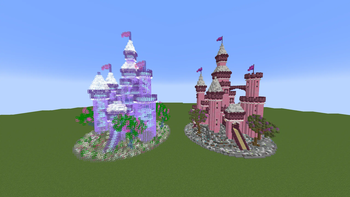
15,000+ unique structures ready to be placed in your world
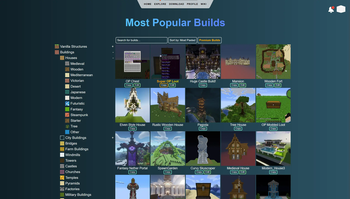
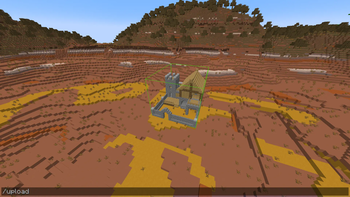
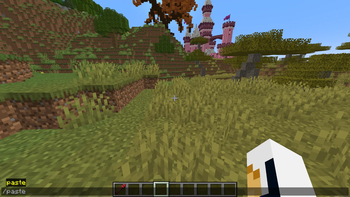
Houses, Castles, Towers, Statues, Mansions, Redstone Constructions and many more categories are all available to explore on buildpaste.net. All builds can be easily placed in your world, either by using the Build Placer item or by using the simple /paste command. The builds load instantly and can be undoed if necessary
Note that the Fabric version supports the Build Placer only since version 26.1.2.
A new era of schematics
This mod introduces a new way of using schematics, or in this case 'builds'. The hassle of downloading a schematic, putting it into the correct schematics folder and finally figuring out how to paste it properly is now history. Simply select a build on the website and paste it instantly using the /paste command, or use the Build Placer to preview where to place it. All builds are stored in a database and load instantly, and you can even upload your own structures for anyone to use!
Upload your own structures
If you want to you can also participate in the community and upload your own structures. Or, if you don't want to share it with everyone, you can share it with your friend by sending them the unique id or the link of one of your creations. When you publish a build, others can also give you feedback through comments.
How to get started
Getting started with BuildPaste is easy. You can use BuildPaste with or without an account, but it’s more convenient with an account because copying and pasting builds is much easier and you can also upload your own structures. To start, sign in to buildpaste.net and then add your Minecraft name to your profile. After that, you can copy a build and type /paste and it will paste the build right in front of you, or you can use the Build Placer right away. You can also watch this short YouTube tutorial
NOTE: This mod is only available for singleplayer
Want layer-by-layer 3D blueprints for survival? Try Buildguides.net
Verfügbare Versionen
BuildPaste - Instant Structures auf dem Server installieren
Server bestellen
Bestelle einen Minecraft Java Server mit mindestens 4 GB RAM (6 GB empfohlen).
bukkit Loader setzen
Wähle im Panel unter "Egg" den bukkit-Loader und die passende Minecraft-Version (26.3).
Mod installieren
Öffne den Mod-Browser im Dashboard und suche nach "BuildPaste - Instant Structures". Klicke "Installieren" – fertig! Alternativ: Lade die .jar via SFTP in den /mods Ordner.
Kompatibilität
Mod-Loader
Minecraft-Versionen
26.3, 26.2, 26.1.2 (+38 weitere)
Server-seitig
✓ ErforderlichEmpfohlener RAM
6 GB(min. 4 GB)Häufige Fragen
BuildPaste - Instant Structures Server crasht beim Start – was tun?
Häufigste Ursache: falsche bukkit-Version oder zu wenig RAM. Prüfe im Server-Log (latest.log), ob ein "OutOfMemoryError" oder "Mixin"-Fehler auftritt. Bei Mado Hosting: Stelle sicher, dass mindestens 4 GB RAM zugewiesen sind und der Loader zur Mod-Version passt (26.3). Über das Panel kannst du den Loader mit einem Klick wechseln.
Ist BuildPaste - Instant Structures mit bukkit und fabric und forge und neoforge und paper und spigot kompatibel?
BuildPaste - Instant Structures unterstützt offiziell bukkit, fabric, forge, neoforge, paper, spigot für Minecraft 26.3, 26.2, 26.1.2. Achtung: Forge- und Fabric-Mods sind NICHT untereinander kompatibel – wähle einen Loader und bleibe dabei. Im Mado Dashboard werden inkompatible Loader-Kombinationen automatisch erkannt.
Server laggt mit BuildPaste - Instant Structures – wie optimiere ich die Performance?
Empfohlener RAM: 6 GB (+1 GB pro 5 Spieler). Prüfe mit /spark profiler, ob BuildPaste - Instant Structures den meisten Tick-Time verbraucht. Häufige Fixes: Server-View-Distance auf 8-10 reduzieren, bei Forge "performant" oder "starlight" als Zusatz-Mod installieren. Bei Mado Hosting läuft dein Server auf NVMe-SSDs mit dedizierten CPU-Kernen für minimale Latenz.
Ähnliche Mods

![[ETF] Entity Texture Features](https://cdn.modrinth.com/data/BVzZfTc1/af683d206d50b05258d865b0d6e4aa2f2cee12f2_96.webp)
![[EMF] Entity Model Features](https://cdn.modrinth.com/data/4I1XuqiY/6e5bbd0d06b1741bfdab6c0cfab6de8fdaf0064c_96.webp)



Modded Server mieten
Installiere BuildPaste - Instant Structures mit nur einem Klick auf deinem Server.