Modrinth · Fabric, Quilt · Client-Mod
Chat Patches
Chat Patches ist eine clientseitige Mod. Du installierst sie auf deinem Rechner, auf dem Server ist sie nicht nötig.
A Minecraft Fabric client-side mod that touches up a few aspects of Minecraft's mundane chat, with as much configurability as possible!
- Downloads
- 7.4M
- Autor
- OBro1961
- Loader
- Fabric, Quilt
- Minecraft
- 1.18 – 26.3
- Aktualisiert
- –
Screenshots
So sieht Chat Patches aus
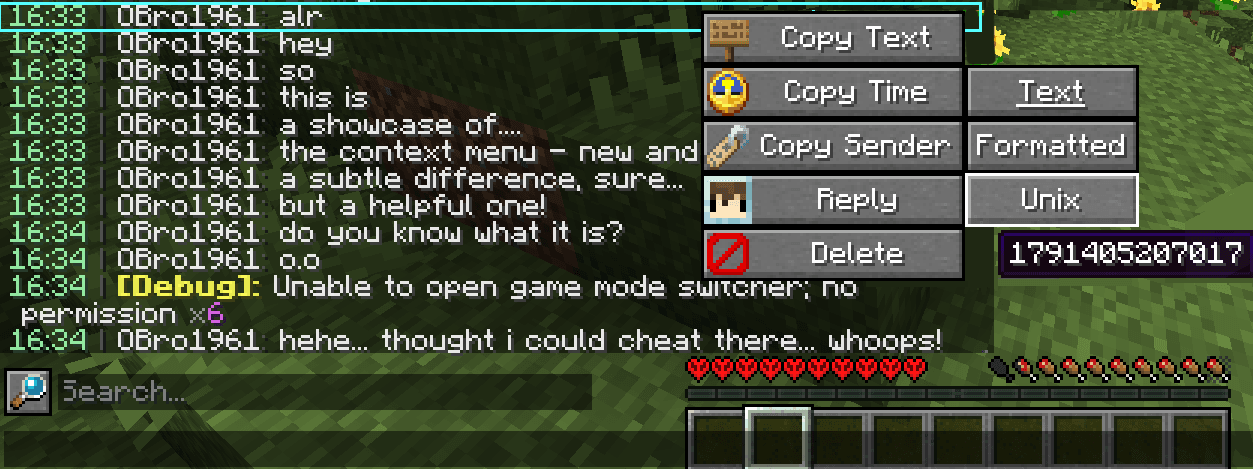
 Context menu
 Original duplicate counter
 Both methods of dupe counters
 Dynamic shift animation
 Searching for messages
Bilder: Chat Patches auf Modrinth, vom Projektteam veröffentlicht.
Einrichtung
Chat Patches auf deinem Client installieren
Clientseitige Mods laufen nur auf deinem Rechner. Mehr Server-RAM ändert an ihrer Leistung nichts.
- 01
Loader lokal installieren
Installiere Fabric oder Quilt für deine Minecraft-Version in deinem Launcher.
- 02
Datei herunterladen
Lade die Chat Patches-Datei für deinen Loader und exakt deine Minecraft-Version herunter, zum Beispiel 26.3.
- 03
In den Mods-Ordner legen
Lege die .jar-Datei in den lokalen Ordner .minecraft/mods und entferne ältere Duplikate.
- 04
Starten
Starte Minecraft mit dem Loader-Profil. Auf dem Server musst du nichts ändern.
- Auf dem Server
- Nicht nötig
- Auf dem Client
- Erforderlich
- Loader
- Fabric, Quilt
- Minecraft
- 26.3, 26.2-snapshot-6, 26.2 +30 weitere
- Lizenz
- GNU Lesser General Public License v3.0 only
Versionen
Veröffentlichte Versionen
Nimm die Datei, die zu Loader und Minecraft-Version deines Servers passt. Server und Spieler brauchen dieselbe Version.
Chat Patches · Modrinth- 8.0.0 for 26.3 Fabric4. Oktober 2026Minecraft 26.3 · Fabric
- 8.0.0 for 26.2 Fabric4. Oktober 2026Minecraft 26.2 · Fabric
- 8.0.0 for 26.1.2 Fabric4. Oktober 2026Minecraft 26.1, 26.1.1, 26.1.2 · Fabric
- 8.0.0 for 1.21.11 Fabric4. Oktober 2026Minecraft 1.21.11 · Fabric
- 8.0.0 for 1.21.1 Fabric4. Oktober 2026Minecraft 1.21, 1.21.1 · Fabric
Originalbeschreibung des Projektautors






Chat Patches
Requires Yet Another Config Lib and a menu mod (see below) for 1.19.2+
A Minecraft client-side mod that touches up Minecraft's mundane chat, with configurability in mind!
It's most significant features include (but are not limited to):
- Increasing the maximum amount of chat messages from 100 to 16,384
- Adding a timestamp in front of all messages, formatted as
[HOUR:MINUTE:SECOND]in pink text, with a tooltip that renders a complete date - Keeping chat history and previously sent messages across ALL worlds and servers
- Allowing logging chat messages for restoring them later in future Minecraft sessions
- Letting you modify vanilla player names to anything you want (ex. without the triangle brackets!)
- Minimizing spam with a counter that shows how many duplicate messages have been sent in a row
- Shifting the chat hud up by 10 pixels, so it doesn't overlap with the armor bar
- Providing a menu to copy specific data (and the text of course!) from chat messages
- Letting you search through all received messages with a search bar
- YOU being able to toggle any of these features and MORE!
Many of these features were adopted or inspired from the following existing mods
(of which Chat Patches serves as a replacement):
- More Chat History
- When Was That Again
- Don't Clear Chat History
- No Angled Brackets
- Clear Spam
- Chat Up!
- Compact Chat
FAQ
- What Minecraft version can I use this with?
- The latest Fabric versions of Minecraft, plus 1.18.x. Quilt seemingly works out of the box, but I don't specifically develop versions for it.
- Will you make it for (older Minecraft version)?
- Unless it's after 1.18.x, then probably not. Any older version would only be considered if it was requested across the board, because I don't have the time for that!
- Will you make this for Forge or NeoForge?
- Yes, but it will take some time. I have a system that is in-development that would support Forge, but it's pretty complicated and hinges on a lot of
other things. But keep an eye out, one day it will be ready!
- Yes, but it will take some time. I have a system that is in-development that would support Forge, but it's pretty complicated and hinges on a lot of
- I found a bug/issue, what do I do?
- First, make sure you're on the latest version of Chat Patches for your Minecraft version. If it doesn't go away, you can click on the Issues tab on this
page, and if it hasn't been reported yet, you can create a new report! Make sure to fill out the entire thing as much as possible.
- First, make sure you're on the latest version of Chat Patches for your Minecraft version. If it doesn't go away, you can click on the Issues tab on this
- It says I need to install Fabric, but I already have it installed?
- Do servers need this mod?
- Nope! It's entirely client-side, meaning it won't do anything if installed on the server.
- I can't access the config menu in-game!
- For 1.19.2+:
- Installing either Mod Menu or Catalogue with Menulogue will allow you to edit the config in-game!
- Otherwise, if you still cannot access the config, open an issue on GitHub, and
provide any logged errors if they exist.
- For 1.18.x: You need the latest versions of both Cloth Config and [Mod Menu]
(https://modrinth.com/mod/modmenu/versions?l=fabric&c=release). - For all versions: You can always edit the config at
(directory)/config/chatpatches.json.
- For 1.19.2+:
- My config is broken/not working!
- When you load one of the more recent mod versions, it makes a creates a new file with your old settings and resets the main file. You can access this
copy at(directory)/config/chatpatches_old.json. By then opening both the new and old configs at the same time, you can copy and paste over the values.
Make sure the settings have correct inputs (ex.timeshould betrue/falsenot123or"true"). - If you still are having problems, open a new issue on GitHub.
- When you load one of the more recent mod versions, it makes a creates a new file with your old settings and resets the main file. You can access this
- Can I use this in a modpack?
- Yes, as long as you credit me and/or link back to one of the official pages (GitHub, Modrinth, and CurseForge).
- Can I re-upload this mod elsewhere?
- No, unless you have explicit permission from me (OBro1961), modify the mod in an undisputable way, or any download links used direct to one of the official
pages (see above). If you're unsure, message me on Discord (@obro1961) about it.
- No, unless you have explicit permission from me (OBro1961), modify the mod in an undisputable way, or any download links used direct to one of the official
- How do I do XYZ?
- If the answer you're looking for isn't anywhere here or in the config, check the #Help section located below.
- If you still can't find it, ask in the Discord!
Setup devenv / Build latest jars
- Download the latest ZIP (this page -> Code -> Download ZIP)
- Extract it to your desired folder
- Open a terminal/command prompt, then run
./gradlew build - [For a devenv]: open the folder in your IDE
- [For built jars]: navigate to
/build/libs/
Localization and Translation
If you would like to help translate Chat Patches into other languages, you can:
- Create a pull request that adds, corrects, or updates a language file (preferred)
- Create an issue on GitHub with the language file attached
- DM me on Discord (@obro1961)
Once you contribute, join the Discord server so you can receive your complementary Contributor and Translator roles!
Find out more information on the GitHub page!
Any suggestions and/or issues are much more likely to be addressed if they are made on GitHub.
(not sponsored; highly encouraged)
Muss Chat Patches auf dem Minecraft Server installiert werden?
Nein. Modrinth kennzeichnet Chat Patches serverseitig als nicht unterstützt. Installiere die Mod nur im lokalen Mods-Ordner. Dein Server kann unverändert bleiben, sofern die Projektseite keine zusätzliche Abhängigkeit nennt.
Welche Version und welchen Loader braucht Chat Patches?
Nutze eine Datei für Fabric, Quilt und exakt deine Minecraft-Version. Unterstützt werden unter anderem 26.3, 26.2-snapshot-6, 26.2. Dateien für verschiedene Loader sind nicht austauschbar.
Chat Patches funktioniert nicht – was kann ich prüfen?
Prüfe zuerst Minecraft-Version, Loader-Version und erforderliche Abhängigkeiten. Da die Mod clientseitig ist, löst mehr Server-RAM das Problem nicht.
Ähnliche Mods
Beliebte Mods aus derselben Kategorie
 Nur Client

Iris Shaders
von coderbot
A modern shader pack loader for Minecraft intended to be compatible with existing OptiFine shader packs
 Nur Client

[ETF] Entity Texture Features
von Traben
Emissive, Random & Custom texture support for entities in resourcepacks just like Optifine but for Fabric
 Nur Client

[EMF] Entity Model Features
von Traben
EMF is an, OptiFine format, Custom Entity Model replacement mod available for Fabric and Forge.
 Nur Client

Not Enough Animations
von tr7zw
Bringing first-person animations to the third-person
Mods für deinen eigenen Server gesucht?
Im Katalog findest du Mods, die auf Minecraft Servern laufen.