
Clear Void
Remove the pitch black bottom half of the skybox at low Y levels. Intended for floating island worlds.
Screenshots
Über diese Mod
Clear Void
Sponsor if you like this project.
This is a simple mod that removes the pitch black bottom half of the skybox. You will probably need this if you are playing in some sort of floating island world.
Effect
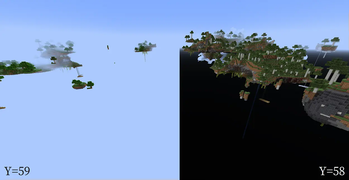
In vanilla Minecraft, when playing floating-islands worlds, you'll find that the bottom half of the skybox (the void) suddenly turning black when you go through Y=58. This is annoying in floating island worlds.

With the mod, the void will no longer suddenly turn black. Instead, it will gardually become dark when you go through Y levels below Y=-32.
Actually it will, but at 64 blocks below the min build height, so you will not encounter it unless you are dying in the void.
Reporting bugs
Report bugs at Github Issue Tracker. Avoid using private messages since I might not check them.
Verfügbare Versionen
Clear Void auf deinem Client installieren
Mod-Loader lokal installieren
Installiere fabric für deine lokale Minecraft-Version.
Passende Datei herunterladen
Wähle die Clear Void-Datei für fabric und Minecraft 1.21.10.
Mod installieren
Lege die .jar-Datei in deinem lokalen .minecraft/mods-Ordner ab und starte Minecraft neu. Eine Installation auf dem Server ist nicht nötig.
Kompatibilität
Mod-Loader
Minecraft-Versionen
1.21.10, 1.21.9, 1.21.8 (+23 weitere)
Server-seitig
✗ Nicht unterstütztEmpfohlener RAM
4 GB(min. 3 GB)Häufige Fragen
Muss Clear Void auf dem Minecraft Server installiert werden?
Nein. Modrinth kennzeichnet Clear Void serverseitig als nicht unterstützt. Installiere die Mod nur im lokalen Minecraft-Mods-Ordner. Dein Server kann unverändert bleiben, sofern die Mod-Seite keine zusätzliche Abhängigkeit nennt.
Welche Version und welchen Loader braucht Clear Void?
Nutze eine Datei für fabric, forge, neoforge, quilt und exakt deine Minecraft-Version. Unterstützte Versionen sind unter anderem 1.21.10, 1.21.9, 1.21.8. Loader-Dateien sind nicht untereinander austauschbar.
Clear Void funktioniert nicht – was kann ich prüfen?
Prüfe zuerst Minecraft-Version, Loader-Version und erforderliche Abhängigkeiten. Lege die .jar-Datei im lokalen .minecraft/mods-Ordner ab und entferne ältere Duplikate. Da die Mod clientseitig ist, löst mehr Server-RAM dieses Problem nicht.
Ähnliche Mods

![[ETF] Entity Texture Features](https://cdn.modrinth.com/data/BVzZfTc1/af683d206d50b05258d865b0d6e4aa2f2cee12f2_96.webp)
![[EMF] Entity Model Features](https://cdn.modrinth.com/data/4I1XuqiY/6e5bbd0d06b1741bfdab6c0cfab6de8fdaf0064c_96.webp)



Minecraft Server für deine Gruppe
Clear Void bleibt auf deinem Client. Hoste dazu eine kompatible Welt für deine Mitspieler.