
ClickOptimizer
Eliminates input lag and lost clicks by capturing mouse and keyboard inputs at the render-frame level (FPS) instead of the 20 TPS tick rate. 100% Client-side.
Screenshots
Über diese Mod
⚡ ClickOptimizer (SubTick Input Engine)
Have you ever felt like Minecraft ignores some of your extremely fast clicks? You are not crazy, it actually does.
In Vanilla Minecraft, your mouse and keyboard inputs are bottlenecked by the game's internal 20 TPS (50ms) tick loop. If you make multiple fast clicks or flick your mouse rapidly within a single 50ms window, the game engine might drop or miscalculate those inputs.
This mod fixes that entirely by tracking your input at the Render-Frame (FPS) level instead of the Tick level.
✨ Features
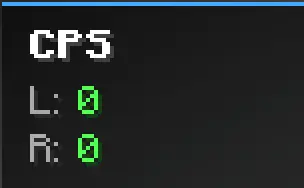
- Real-time CPS HUD: Displays a sleek, color-coded Clicks Per Second counter on your screen. (Press
Hin-game to toggle it on/off). - Zero Input Loss: Tracks your mouse clicks (Left/Right) at your exact FPS rate to ensure no physical click is ever dropped.
- 100% Client-Side & Legit: This mod acts purely as a passive observer. It does not generate extra clicks, it does not bypass cooldowns, and it does not send custom packets to the server. It is completely safe, vanilla-friendly, and perfect for competitive PvP servers.
🛠️ How It Works
The mod listens to the raw GLFW inputs at the render thread and timestamps them. This allows you to monitor your true hardware input speed without the restrictions of the game's 50ms tick rate.
📦 Compatibility
- Requires Fabric API.
- Fully compatible with Sodium, Iris, and other performance mods.
- Works flawlessly on Minecraft 1.20.4 up to 1.21.x and beyond.
Verfügbare Versionen
ClickOptimizer auf deinem Client installieren
Mod-Loader lokal installieren
Installiere fabric für deine lokale Minecraft-Version.
Passende Datei herunterladen
Wähle die ClickOptimizer-Datei für fabric und Minecraft 26.3.
Mod installieren
Lege die .jar-Datei in deinem lokalen .minecraft/mods-Ordner ab und starte Minecraft neu. Eine Installation auf dem Server ist nicht nötig.
Kompatibilität
Mod-Loader
Minecraft-Versionen
26.3, 26.2, 26.1.2 (+17 weitere)
Server-seitig
✗ Nicht unterstütztEmpfohlener RAM
4 GB(min. 3 GB)Häufige Fragen
Muss ClickOptimizer auf dem Minecraft Server installiert werden?
Nein. Modrinth kennzeichnet ClickOptimizer serverseitig als nicht unterstützt. Installiere die Mod nur im lokalen Minecraft-Mods-Ordner. Dein Server kann unverändert bleiben, sofern die Mod-Seite keine zusätzliche Abhängigkeit nennt.
Welche Version und welchen Loader braucht ClickOptimizer?
Nutze eine Datei für fabric und exakt deine Minecraft-Version. Unterstützte Versionen sind unter anderem 26.3, 26.2, 26.1.2. Loader-Dateien sind nicht untereinander austauschbar.
ClickOptimizer funktioniert nicht – was kann ich prüfen?
Prüfe zuerst Minecraft-Version, Loader-Version und erforderliche Abhängigkeiten. Lege die .jar-Datei im lokalen .minecraft/mods-Ordner ab und entferne ältere Duplikate. Da die Mod clientseitig ist, löst mehr Server-RAM dieses Problem nicht.
Ähnliche Mods


Minecraft Server für deine Gruppe
ClickOptimizer bleibt auf deinem Client. Hoste dazu eine kompatible Welt für deine Mitspieler.