
ClickOptimizer
Eliminates input lag and lost clicks by capturing mouse and keyboard inputs at the render-frame level (FPS) instead of the 20 TPS tick rate. 100% Client-side.
Screenshots
About this Mod
⚡ ClickOptimizer (SubTick Input Engine)
Have you ever felt like Minecraft ignores some of your extremely fast clicks? You are not crazy, it actually does.
In Vanilla Minecraft, your mouse and keyboard inputs are bottlenecked by the game's internal 20 TPS (50ms) tick loop. If you make multiple fast clicks or flick your mouse rapidly within a single 50ms window, the game engine might drop or miscalculate those inputs.
This mod fixes that entirely by tracking your input at the Render-Frame (FPS) level instead of the Tick level.
✨ Features
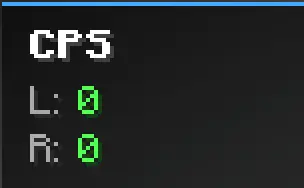
- Real-time CPS HUD: Displays a sleek, color-coded Clicks Per Second counter on your screen. (Press
Hin-game to toggle it on/off). - Zero Input Loss: Tracks your mouse clicks (Left/Right) at your exact FPS rate to ensure no physical click is ever dropped.
- 100% Client-Side & Legit: This mod acts purely as a passive observer. It does not generate extra clicks, it does not bypass cooldowns, and it does not send custom packets to the server. It is completely safe, vanilla-friendly, and perfect for competitive PvP servers.
🛠️ How It Works
The mod listens to the raw GLFW inputs at the render thread and timestamps them. This allows you to monitor your true hardware input speed without the restrictions of the game's 50ms tick rate.
📦 Compatibility
- Requires Fabric API.
- Fully compatible with Sodium, Iris, and other performance mods.
- Works flawlessly on Minecraft 1.20.4 up to 1.21.x and beyond.
Available Versions
How to Install ClickOptimizer on Your Client
Install the Mod Loader Locally
Install fabric for your local Minecraft version.
Download the Matching File
Choose the ClickOptimizer file for fabric and Minecraft 26.3.
Install Mod
Place the .jar file in your local .minecraft/mods folder and restart Minecraft. No server-side installation is required.
Compatibility
Mod Loaders
Minecraft Versions
26.3, 26.2, 26.1.2 (+17 more)
Server-side
✗ UnsupportedRecommended RAM
4 GB(min. 3 GB)Frequently Asked Questions
Does ClickOptimizer need to be installed on the Minecraft server?
No. Modrinth marks ClickOptimizer as unsupported on the server side. Install it only in your local Minecraft mods folder. Your server can remain unchanged unless the mod page lists an additional dependency.
Which version and loader does ClickOptimizer require?
Use a file for fabric and your exact Minecraft version. Supported versions include 26.3, 26.2, 26.1.2. Files for different loaders are not interchangeable.
ClickOptimizer is not working – what should I check?
First check the Minecraft version, loader version and required dependencies. Put the .jar file in your local .minecraft/mods folder and remove older duplicates. Because this mod is client-side, adding server RAM will not fix it.
Similar Mods


Minecraft Server for Your Group
ClickOptimizer stays on your client. Host a compatible world for your group.