
ColoredGlowLib
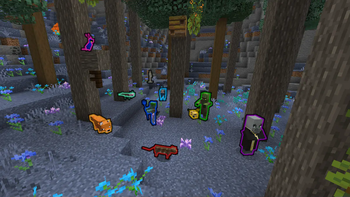
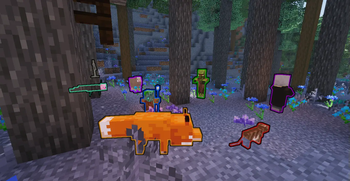
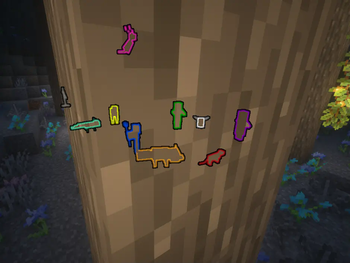
Makes entities glow any RGB color, not just vanilla colors! Also supports custom color animations with datapacks!
Screenshots

Über diese Mod
This library mod enables you to make entities glow different colors other than plain white or Minecraft vanilla's Team colors. You can also add custom color animation, a set of colors that will change overtime, like a rainbow!
For normal users, you can use the commands to set custom colors, and datapacks to add custom animation, while developers can use the API and the javadoc as guide. There is also a wiki.

Commands
Every command begins with /cgl , short for ColoredGlowLib. You can also use /coloredglowlib.
You can specify a color to use for an entity/entitytype using the following command:
/cgl setglowcolor <entity/type/default> <color>
The entity/type/defaylt parameter is what you want to target, so @p, Emafire003, the uuid of the entity in front of you etc or it's type such as minecraft:sheep. default means that all entites that don't have a specific color will glow the default color.
The color parameter is a hexadecimal color code (like #ff85ab, #750711, #abc, #123, #a7e ecc, search "color picker" online to get them) without the # since minecraft interprets it as a beginning of a tag (which is not what it should be doing in this case). In alternative you can provide the word rainbow that will make the entity glow, you guessed it, rainbow. You can also use random to make an entity glow a different random color every half a second, or another string that represents a custom animation added via datapack!
There also are some settings you can tweak. For example if you want to override the default team colors (the ones minecraft assigns) with the command:
/cgl settings set overrideTeamColors <true/false>
You can also get the current value of the setting, like so:
/cgl settings get overrideTeamColors
To remove a color you can use:
/cgl clear <entity/type/default> [useDefault]
useDefault is an optional true/false parameter. If set to true, the default color will be used instead of setting the color for entities to white.
More of this in the wiki!
Custom color animations
You can add custom animations via a datapack, you can find an example of one here. After you created the datapack, you can use it as a color, corresponding to the name parameter you have set inside the datapack.
For example you can use:/cgl setglowcolor @p marine
More info in the wiki.
Setup
For normal users:
Just drag and drop this mod into your mod folder and enjoy! (Make sure you are downloading the correct file for the correct loader tho!)
For developers:
Add this library into your build.gradle as a dependency
repositories {
    maven {
        name = "Modrinth"
        url = "https://api.modrinth.com/maven"
        content {
            includeGroup "maven.modrinth"
        }
    }
}

dependencies {
    modImplementation "maven.modrinth:coloredglowlib:<version>"
}
NOTE there currently is a f***ing annoying bug that I can't seem to fix, requiring you to add CardinalComponentsAPI to your project as well, and you can do that by adding these as dependencies:
repositories {
    maven {
        name = "Ladysnake Mods"
        url = 'https://maven.ladysnake.org/releases'
    }
}

dependencies {
    modImplementation("dev.onyxstudios.cardinal-components-api:cardinal-components-base:5.4.0")
	modImplementation("dev.onyxstudios.cardinal-components-api:cardinal-components-entity:5.4.0")
	modImplementation("dev.onyxstudios.cardinal-components-api:cardinal-components-scoreboard:5.4.0")
}
You can find the correct version in the versions page on Modrinth.
If you want the forge version, add a +forge to the number version. (NOTE: Not currently availbale for 3.0.0)
If you already need CardinalComponetsAPI modules in your mod, consider downloading the version of the mod that doesn't already include them, by adding a +nocca in the version format.
The modules needed are: base, entity, scoreboard.
You can find more information on the wiki!
You can find examples of this lib being used in my FoxGlow and LightWithin mod.

License
This mod is available under the GNU LGPL3 License.
Support me
If you would like to offer me a coffee, here you go.

For modpack devs: You are permitted to use this mod without directly asking, but please credit me somewhere, it would help! (Also, I'm kind of a curious person so maybe send me a message when you include it into your modpack, and I'd like to check it out)
My other projects:
- LightWithin: a mod adding player-unique magicalish fancy powers that activate when the player is in danger!
- FoxGlow: a mod that makes foxes and player glow whenever you eat the Glow Berry, or other glowy foods!
- BeamPass: makes the beacom beam pass through selectable blocks, even if they are solid!
- StructurePlacerAPI: an API that allows developers to easly place NBT structures in the world, and to restore it afterwards!
- Seedlight Riftways: An experimental mod to travel seamlessly from worlds to servers and viceversa though portals!
- And others! Check them out over my profile page!
Verfügbare Versionen
ColoredGlowLib auf dem Server installieren
Server bestellen
Bestelle einen Minecraft Java Server mit mindestens 3 GB RAM (4 GB empfohlen).
fabric Loader setzen
Wähle im Panel unter "Egg" den fabric-Loader und die passende Minecraft-Version (26.2).
Mod installieren
Öffne den Mod-Browser im Dashboard und suche nach "ColoredGlowLib". Klicke "Installieren" – fertig! Alternativ: Lade die .jar via SFTP in den /mods Ordner.
Kompatibilität
Mod-Loader
Minecraft-Versionen
26.2, 26.1.2, 26.1.1 (+35 weitere)
Server-seitig
~ OptionalEmpfohlener RAM
4 GB(min. 3 GB)Häufige Fragen
ColoredGlowLib Server crasht beim Start – was tun?
Häufigste Ursache: falsche fabric-Version oder zu wenig RAM. Prüfe im Server-Log (latest.log), ob ein "OutOfMemoryError" oder "Mixin"-Fehler auftritt. Bei Mado Hosting: Stelle sicher, dass mindestens 3 GB RAM zugewiesen sind und der Loader zur Mod-Version passt (26.2). Über das Panel kannst du den Loader mit einem Klick wechseln.
Ist ColoredGlowLib mit fabric und forge und quilt kompatibel?
ColoredGlowLib unterstützt offiziell fabric, forge, quilt für Minecraft 26.2, 26.1.2, 26.1.1. Achtung: Forge- und Fabric-Mods sind NICHT untereinander kompatibel – wähle einen Loader und bleibe dabei. Im Mado Dashboard werden inkompatible Loader-Kombinationen automatisch erkannt.
Server laggt mit ColoredGlowLib – wie optimiere ich die Performance?
Empfohlener RAM: 4 GB (+1 GB pro 8 Spieler). Prüfe mit /spark profiler, ob ColoredGlowLib den meisten Tick-Time verbraucht. Häufige Fixes: Server-View-Distance auf 8-10 reduzieren, bei Forge "performant" oder "starlight" als Zusatz-Mod installieren. Bei Mado Hosting läuft dein Server auf NVMe-SSDs mit dedizierten CPU-Kernen für minimale Latenz.
Ähnliche Mods

![[ETF] Entity Texture Features](https://cdn.modrinth.com/data/BVzZfTc1/af683d206d50b05258d865b0d6e4aa2f2cee12f2_96.webp)
![[EMF] Entity Model Features](https://cdn.modrinth.com/data/4I1XuqiY/6e5bbd0d06b1741bfdab6c0cfab6de8fdaf0064c_96.webp)



Modded Server mieten
Installiere ColoredGlowLib mit nur einem Klick auf deinem Server.