
Colorwheel
Allows you to use Iris Shaders with Flywheel
Screenshots
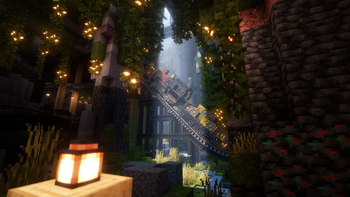
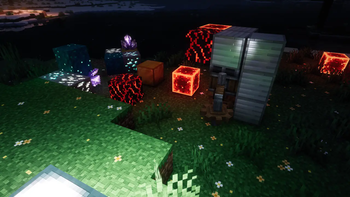
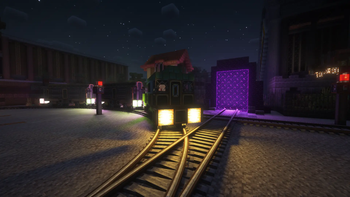
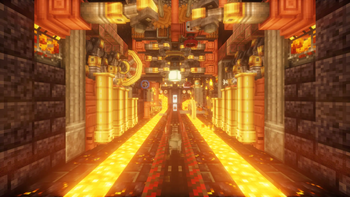
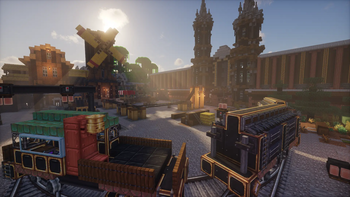
Über diese Mod

Colorwheel is a mod that makes Flywheel and Iris compatible. This means that you can play with Create 6 while using shaders and still have good performance!
This mod is similar to Iris Flywheel Compat. However, Colorwheel's compatibility with Iris and Flywheel is much better. Colorwheel also includes the indirect backend, which is able to increase FPS by +30% in large Create factories.
Shaderpacks
There are 3 tiers of shaderpacks:
- Shaderpacks that supports the mod officially
- Shaderpacks with non-official support (using Colorwheel-Patcher)
- Shaderpacks without support (may be compatible with the fallback mode)
Developers can adapt their shaderpacks to be compatible with Colorwheel with this documentation.
As of today, shaderpacks officially compatible are:
- Complementary Unbound/Reimagined, since r5.7
- Euphoria Patches, since 1.7.0
- Eclipse (edit of Bliss, available on GitHub)
- Glimmer, since v1.5
- I Like Vanilla, since v1.0.3
- Just Colored Lighting, since 0.9.5
- RenderPearl, since v2.8.0-beta.3
- Shrimple (WIP, available on GitHub)
- Solas Shader, since v3.2
- Spooklementary, since v2.0.3
- Steadfast
These shaderpacks above work straight out of the box, and require no intervention.
There is also a fork of photon available on my GitHub. This fork supports colored lighting on contraptions and is compatible with Voxy, which isn't the case with the patch available with Colorwheel-Patcher.
Some shaderpacks have non-official support with some custom made patches Those patches are available with the Colorwheel-Patcher mod. Such shaderpacks are:
- BSL 10.1
- Bliss 2.1.1 - 2.1.2
- Complementary 5.6 - 5.6.1
- Complementary 5.5.1 (with Colorwheel-Patcher 1.0.0)
- Euphoria Patches 1.6.3 - 1.6.8
- Photon 1.3a
- Rethinking Voxels 0.1-beta9
For shaderpacks without support, a fallback mode is available. This mode will use existing shaders as a best effort attempt, like Iris Flywheel Compat does. This doesn't replace true compatible packs as there WILL BE rendering issues, but that's better than nothing.
Those shaderpacks have been tested with Create without major issues:
- Kappa
- MakeUp Ultra Fast
- Noble
- Nostalgia
- Pastel Shaders
- Sildur's Vibrant
- Solas Shader
- Super Duper Vanilla
Tip: it's common for shaderpacks to disable Entity Shadows or Block Entity Shadows by default. Make sure that those options are toggled if you want Create contraptions to cast lights and shadows (and don't forget to toggle the required options for light casting in the shaderpack settings !).
Compatibility
As of version 1.0, Iris Flywheel Compat is incompatible with Colorwheel due to conflicting mixins. This won't be fixed.
Create Better FPS is compatible, and may improve performance in some situations. This may happen either because the flywheel:off backend is used or because some blocks, like the factory gauges, are not rendered using Flywheel.
Performances comparison
Steam Deck, BSL Low:
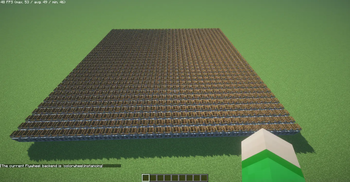
1089 waterwheels:
- Flywheel OFF: 2 fps
- Create Better FPS: 5 fps
- Colorwheel: 50 fps
Modpacks
Colorwheel doesn't requires a Flywheel mod. In this case, the mod will disable itself.
Iris/Oculus is the only hard dependency.
Verfügbare Versionen
Colorwheel auf deinem Client installieren
Mod-Loader lokal installieren
Installiere fabric für deine lokale Minecraft-Version.
Passende Datei herunterladen
Wähle die Colorwheel-Datei für fabric und Minecraft 1.21.1.
Mod installieren
Lege die .jar-Datei in deinem lokalen .minecraft/mods-Ordner ab und starte Minecraft neu. Eine Installation auf dem Server ist nicht nötig.
Kompatibilität
Mod-Loader
Minecraft-Versionen
1.21.1, 1.20.1
Server-seitig
✗ Nicht unterstütztEmpfohlener RAM
4 GB(min. 3 GB)Häufige Fragen
Muss Colorwheel auf dem Minecraft Server installiert werden?
Nein. Modrinth kennzeichnet Colorwheel serverseitig als nicht unterstützt. Installiere die Mod nur im lokalen Minecraft-Mods-Ordner. Dein Server kann unverändert bleiben, sofern die Mod-Seite keine zusätzliche Abhängigkeit nennt.
Welche Version und welchen Loader braucht Colorwheel?
Nutze eine Datei für fabric, forge, neoforge und exakt deine Minecraft-Version. Unterstützte Versionen sind unter anderem 1.21.1, 1.20.1. Loader-Dateien sind nicht untereinander austauschbar.
Colorwheel funktioniert nicht – was kann ich prüfen?
Prüfe zuerst Minecraft-Version, Loader-Version und erforderliche Abhängigkeiten. Lege die .jar-Datei im lokalen .minecraft/mods-Ordner ab und entferne ältere Duplikate. Da die Mod clientseitig ist, löst mehr Server-RAM dieses Problem nicht.
Ähnliche Mods


Minecraft Server für deine Gruppe
Colorwheel bleibt auf deinem Client. Hoste dazu eine kompatible Welt für deine Mitspieler.
Details
- Lizenz
- GNU Lesser General Public License v3.0 only
- Server-seitig
- Nicht unterstützt