
Colorwheel
Allows you to use Iris Shaders with Flywheel
Screenshots
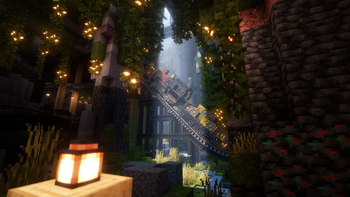
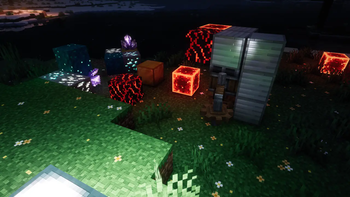
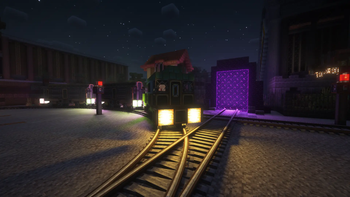
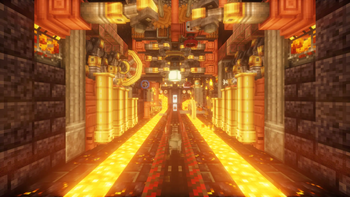
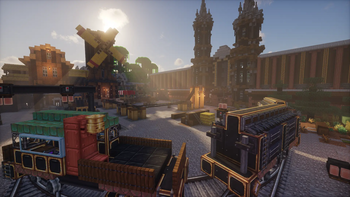
About this Mod

Colorwheel is a mod that makes Flywheel and Iris compatible. This means that you can play with Create 6 while using shaders and still have good performance!
This mod is similar to Iris Flywheel Compat. However, Colorwheel's compatibility with Iris and Flywheel is much better. Colorwheel also includes the indirect backend, which is able to increase FPS by +30% in large Create factories.
Shaderpacks
There are 3 tiers of shaderpacks:
- Shaderpacks that supports the mod officially
- Shaderpacks with non-official support (using Colorwheel-Patcher)
- Shaderpacks without support (may be compatible with the fallback mode)
Developers can adapt their shaderpacks to be compatible with Colorwheel with this documentation.
As of today, shaderpacks officially compatible are:
- Complementary Unbound/Reimagined, since r5.7
- Euphoria Patches, since 1.7.0
- Eclipse (edit of Bliss, available on GitHub)
- Glimmer, since v1.5
- I Like Vanilla, since v1.0.3
- Just Colored Lighting, since 0.9.5
- RenderPearl, since v2.8.0-beta.3
- Shrimple (WIP, available on GitHub)
- Solas Shader, since v3.2
- Spooklementary, since v2.0.3
- Steadfast
These shaderpacks above work straight out of the box, and require no intervention.
There is also a fork of photon available on my GitHub. This fork supports colored lighting on contraptions and is compatible with Voxy, which isn't the case with the patch available with Colorwheel-Patcher.
Some shaderpacks have non-official support with some custom made patches Those patches are available with the Colorwheel-Patcher mod. Such shaderpacks are:
- BSL 10.1
- Bliss 2.1.1 - 2.1.2
- Complementary 5.6 - 5.6.1
- Complementary 5.5.1 (with Colorwheel-Patcher 1.0.0)
- Euphoria Patches 1.6.3 - 1.6.8
- Photon 1.3a
- Rethinking Voxels 0.1-beta9
For shaderpacks without support, a fallback mode is available. This mode will use existing shaders as a best effort attempt, like Iris Flywheel Compat does. This doesn't replace true compatible packs as there WILL BE rendering issues, but that's better than nothing.
Those shaderpacks have been tested with Create without major issues:
- Kappa
- MakeUp Ultra Fast
- Noble
- Nostalgia
- Pastel Shaders
- Sildur's Vibrant
- Solas Shader
- Super Duper Vanilla
Tip: it's common for shaderpacks to disable Entity Shadows or Block Entity Shadows by default. Make sure that those options are toggled if you want Create contraptions to cast lights and shadows (and don't forget to toggle the required options for light casting in the shaderpack settings !).
Compatibility
As of version 1.0, Iris Flywheel Compat is incompatible with Colorwheel due to conflicting mixins. This won't be fixed.
Create Better FPS is compatible, and may improve performance in some situations. This may happen either because the flywheel:off backend is used or because some blocks, like the factory gauges, are not rendered using Flywheel.
Performances comparison
Steam Deck, BSL Low:
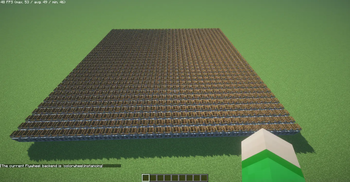
1089 waterwheels:
- Flywheel OFF: 2 fps
- Create Better FPS: 5 fps
- Colorwheel: 50 fps
Modpacks
Colorwheel doesn't requires a Flywheel mod. In this case, the mod will disable itself.
Iris/Oculus is the only hard dependency.
Available Versions
How to Install Colorwheel on Your Client
Install the Mod Loader Locally
Install fabric for your local Minecraft version.
Download the Matching File
Choose the Colorwheel file for fabric and Minecraft 1.21.1.
Install Mod
Place the .jar file in your local .minecraft/mods folder and restart Minecraft. No server-side installation is required.
Compatibility
Mod Loaders
Minecraft Versions
1.21.1, 1.20.1
Server-side
✗ UnsupportedRecommended RAM
4 GB(min. 3 GB)Frequently Asked Questions
Does Colorwheel need to be installed on the Minecraft server?
No. Modrinth marks Colorwheel as unsupported on the server side. Install it only in your local Minecraft mods folder. Your server can remain unchanged unless the mod page lists an additional dependency.
Which version and loader does Colorwheel require?
Use a file for fabric, forge, neoforge and your exact Minecraft version. Supported versions include 1.21.1, 1.20.1. Files for different loaders are not interchangeable.
Colorwheel is not working – what should I check?
First check the Minecraft version, loader version and required dependencies. Put the .jar file in your local .minecraft/mods folder and remove older duplicates. Because this mod is client-side, adding server RAM will not fix it.
Similar Mods


Minecraft Server for Your Group
Colorwheel stays on your client. Host a compatible world for your group.