
Modrinth · Forge, NeoForge
Create: Cheese Factory auf deinem Minecraft Server
Create: Cheese Factory läuft auf Minecraft Servern mit Forge oder NeoForge. Bestell deinen Server, stell den Loader im Panel ein und installiere die Mod mit einem Klick im Mod-Browser.
Build your own cheese factory with Create.
- Downloads
- 54.1K
- Autor
- robinfrt
- Loader
- Forge, NeoForge
- Minecraft
- 1.18.2 – 1.21.1
- Aktualisiert
- –
Screenshots
So sieht Create: Cheese Factory aus
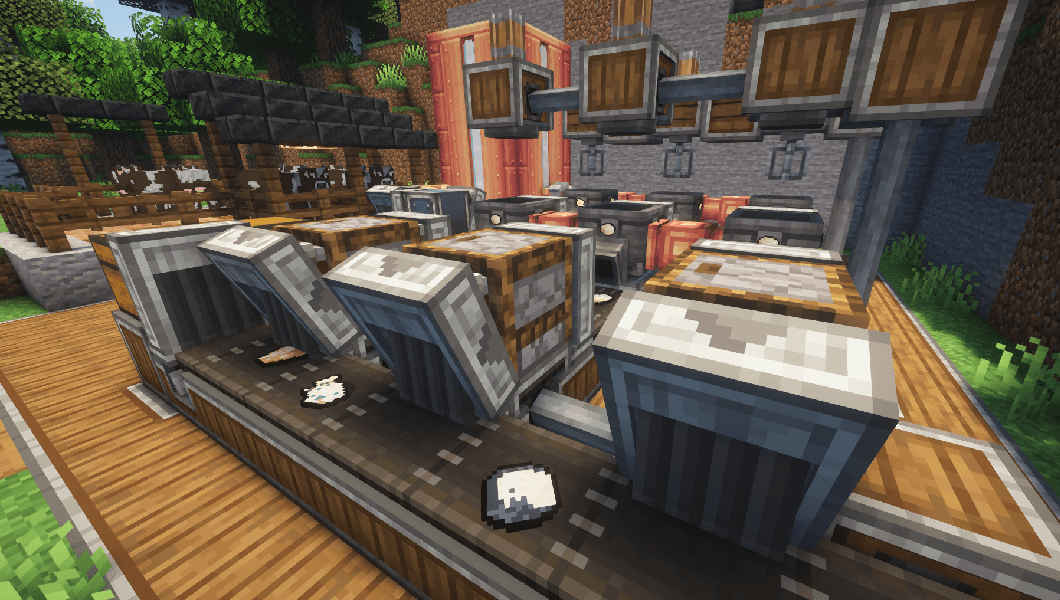
 Final product after cheese maturation
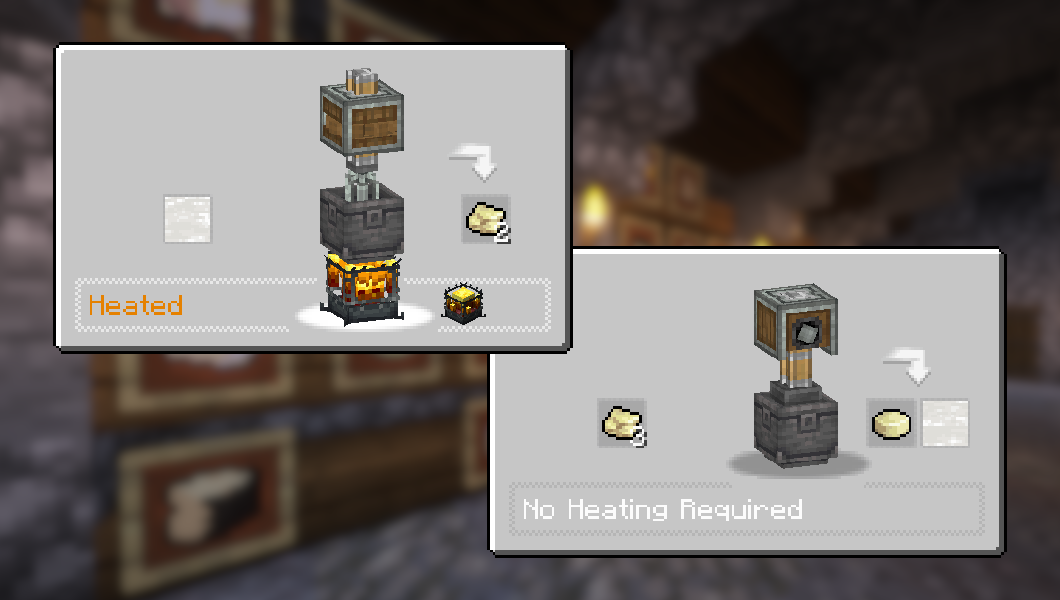 Making Cheese Curds and Fresh Cheese
 Item list
 Cheese factory belt line
 New workstation: the Cheese Cellar
Bilder: Create: Cheese Factory auf Modrinth, vom Projektteam veröffentlicht.
Einrichtung
Create: Cheese Factory auf dem Server installieren
Server und Spieler brauchen denselben Loader und dieselbe Minecraft-Version. Sichere die Welt, bevor du Mods hinzufügst oder aktualisierst.
- 01
Konfigurieren
6 GB RAM sind vorausgewählt. Laufzeit und Add-ons wählst du selbst, bezahlt wird per Kreditkarte oder PayPal.
- 02
Loader einstellen
Stell im Panel die Serversoftware auf Forge oder NeoForge und wähl die passende Minecraft-Version, zum Beispiel 1.21.1.
- 03
Mod installieren
Such im Mod-Browser nach „Create: Cheese Factory“ und installiere die Version für deinen Loader. Alternativ lädst du die .jar per SFTP in den Ordner mods. Erforderliche Abhängigkeiten stehen auf der Projektseite.
- 04
Verbinden
Alle Spieler installieren Create: Cheese Factory in derselben Version lokal und verbinden sich über die Serveradresse aus dem Panel.
- Auf dem Server
- Erforderlich
- Auf dem Client
- Erforderlich
- Loader
- Forge, NeoForge
- Minecraft
- 1.21.1, 1.21, 1.20.1 +3 weitere
- Lizenz
- LicenseRef-All-Rights-Reserved
Das Panel
Mods installieren, Fehler finden.
Echte Screenshots aus dem Mado Panel. Beides ist bei jedem Minecraft Server enthalten.
Mod-Browser
Modrinth und CurseForge direkt im Panel.
Der Browser filtert nach deiner Minecraft-Version. Mods installierst du mit einem Klick, ohne .jar-Dateien hochzuladen.

KI-Crash-Analyse
Wenn ein Mod crasht, liest die Analyse das Log.
Mods scheitern oft an einer falschen Loader-Version, Java-Version oder fehlenden Abhängigkeit. Die Analyse nennt eine wahrscheinliche Ursache und einen Lösungsvorschlag.

Versionen
Veröffentlichte Versionen
Nimm die Datei, die zu Loader und Minecraft-Version deines Servers passt. Server und Spieler brauchen dieselbe Version.
Create: Cheese Factory · Modrinth- create_cheese_factory-1.5.1-neoforge-1.21.123. Oktober 2026Minecraft 1.21, 1.21.1 · NeoForge
- create_cheese_factory-1.5.1-forge-1.20.123. Oktober 2026Minecraft 1.20, 1.20.1 · Forge, NeoForge
Originalbeschreibung des Projektautors
About
Create: Cheese Factory adds 30 new food items with recipes that use Create's mechanisms and processing, allowing you to build your own cheese factory!
Content
 Cheese Curds and Soft Curd Cheese, made by heating Milk in Create's Basin
 The Cheese Cellar: A fully automatable workstation for maturing your fresh cheese
 Adjust the maturing time using Calendar Pages and get different outputs!
 30 new food items, including well-known cheeses from all around the world
 Many other features and Create interractions to discover!
Item list

Screenshots


Tools for modpacks
You can add vanilla or modded items as possible outputs from the Cheese Cellar, using item tags:
• Maturing Tier I (300 ticks): ageing_tier_1
• Maturing Tier II (600 ticks): ageing_tier_2
• Maturing Tier III (900 ticks): ageing_tier_3
Structure is as follows: create_cheese:{tag}
Credits
Huge thanks to @pixerelia for letting me use their work for the textures.
Show spoiler

Dependencies
This mod requires Create for all of the features to work, but can technically be played without.
JEI is recommended for recipes but not required.
Installation
Add the .jar mod file into your mods folder.
Alternatively, you can browse the Modrinth launcher for the mod (if it doesn't show up, try typing the autor's name). Once found, click "Install" to add it to your modpack.
Permissions
You are free to include this mod in any modpack, public or private.
Support my work
 Download my projects on CurseForge
 Download my projects on Modrinth
Donate on Paypal
Create: Cheese Factory Server crasht beim Start – was tun?
Häufige Ursachen: Loader- oder Minecraft-Version passen nicht zur Mod-Datei, eine Abhängigkeit fehlt oder der RAM reicht nicht. Such im Log (latest.log) nach „OutOfMemoryError“, „Mixin“ oder fehlenden Mods. Bei Mado wertet die KI-Crash-Analyse das Log aus und schlägt eine Ursache vor. Loader und Version änderst du im Panel.
Mit welchem Loader läuft Create: Cheese Factory?
Laut Modrinth unterstützt Create: Cheese Factory Forge, NeoForge für Minecraft 1.21.1, 1.21, 1.20.1.
Wie viel RAM braucht ein Server mit Create: Cheese Factory?
Als Orientierung 4–6 GB für einen Server mit dieser Mod. Das ist eine Schätzung, keine gemessene Mindestanforderung. Weitere Mods, viele Spieler und große Sichtweiten brauchen mehr. Ob eine Mod die Tick-Zeit belastet, siehst du mit dem spark-Profiler.
Ähnliche Mods
Beliebte Mods aus derselben Kategorie
 Nur Client

Iris Shaders
von coderbot
A modern shader pack loader for Minecraft intended to be compatible with existing OptiFine shader packs
 Nur Client

[ETF] Entity Texture Features
von Traben
Emissive, Random & Custom texture support for entities in resourcepacks just like Optifine but for Fabric
 Nur Client

[EMF] Entity Model Features
von Traben
EMF is an, OptiFine format, Custom Entity Model replacement mod available for Fabric and Forge.
 Nur Client

Not Enough Animations
von tr7zw
Bringing first-person animations to the third-person
Bereit für deinen Server mit Create: Cheese Factory?
6 GB RAM ab 12,00 € im Monat. 35 % auf den 1. Monat mit MADO35.