Create Coasters
Adds utilities to Create Mod for making a theme park
Screenshots
Über diese Mod
Create: Coasters
An addon designed around building better theme parks with the Create Mod!
Originally made for the Europica Park project, check them out on their discord here!
This mod is highly unbalanced! It is designed for creative mode builders! There are no crafting recipes for the blocks, however the custom schedule instructions could still be abused by players, even in survival mode!
Now, with that out of the way, what does it actually add?
Features:
Boost block
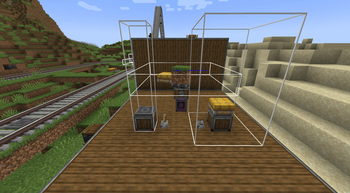
Will set the speed of trains passing over to a % of their max speed that you specify on the block. Useful for a speed boost on drops, or slowing down near stations!
Speed limit block
Will set the max speed of trains passing over to the % you specify on the block. Good for speed controlled sections of track, like slowing near a busy junction!
Lock seat block
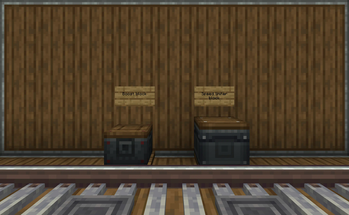
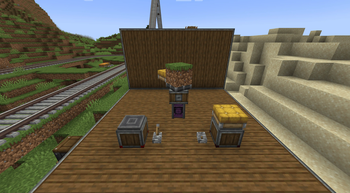
Will lock or unlock the seats of contraptions above it. When powered, it will lock the seats, when unpowered, it will unlock. It will (un)lock all seats, unless a specific seat color is placed ontop of it. Then it will only (un)lock that color. Useful for preventing players from jumping out the ride early!
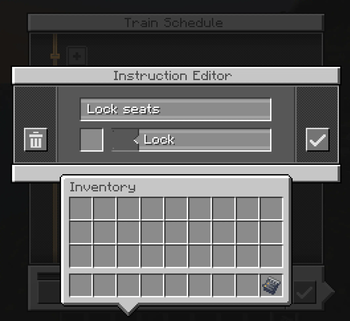
Lock seat schedule
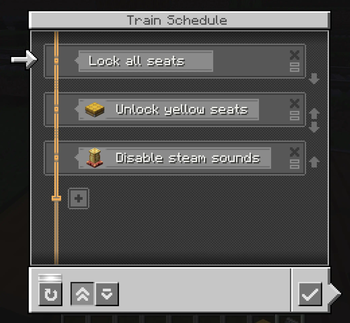
Functions similar to the lock seat block, however in schedule form. Will lock or unlock (you pick which) all seats on the train, or a specific colored seat block you can specify.
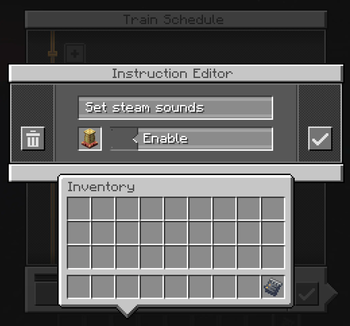
Toggle steam sounds schedule
A schedule instruction that allows you to set the steam noises of a train on or off. Useful if you don't want that chuffing noise on a specific train ride!
Camera zoom on high speed trains
On faster trains, the camera will start to zoom out slightly. While subtle, this does go a long way in making fast trains feel more fast! If you are prone to motion sickness, or find the affect too much, you can disable or turn it down in your client config.
Planned features
This mod isn't yet finished. I still have plenty of ideas I would love to implement! You can find my progress, along with planned features, over on the github project
Verfügbare Versionen
Create Coasters auf dem Server installieren
Server bestellen
Bestelle einen Minecraft Java Server mit mindestens 4 GB RAM (6 GB empfohlen).
forge Loader setzen
Wähle im Panel unter "Egg" den forge-Loader und die passende Minecraft-Version (1.21.1).
Mod installieren
Öffne den Mod-Browser im Dashboard und suche nach "Create Coasters". Klicke "Installieren" – fertig! Alternativ: Lade die .jar via SFTP in den /mods Ordner.
Kompatibilität
Mod-Loader
Minecraft-Versionen
1.21.1, 1.20.1
Server-seitig
✓ ErforderlichEmpfohlener RAM
6 GB(min. 4 GB)Häufige Fragen
Create Coasters Server crasht beim Start – was tun?
Häufigste Ursache: falsche forge-Version oder zu wenig RAM. Prüfe im Server-Log (latest.log), ob ein "OutOfMemoryError" oder "Mixin"-Fehler auftritt. Bei Mado Hosting: Stelle sicher, dass mindestens 4 GB RAM zugewiesen sind und der Loader zur Mod-Version passt (1.21.1). Über das Panel kannst du den Loader mit einem Klick wechseln.
Ist Create Coasters mit forge und neoforge kompatibel?
Create Coasters unterstützt offiziell forge, neoforge für Minecraft 1.21.1, 1.20.1. Im Mado Dashboard werden inkompatible Loader-Kombinationen automatisch erkannt.
Server laggt mit Create Coasters – wie optimiere ich die Performance?
Empfohlener RAM: 6 GB (+1 GB pro 5 Spieler). Prüfe mit /spark profiler, ob Create Coasters den meisten Tick-Time verbraucht. Häufige Fixes: Server-View-Distance auf 8-10 reduzieren, bei Forge "performant" oder "starlight" als Zusatz-Mod installieren. Bei Mado Hosting läuft dein Server auf NVMe-SSDs mit dedizierten CPU-Kernen für minimale Latenz.
Ähnliche Mods

![[ETF] Entity Texture Features](https://cdn.modrinth.com/data/BVzZfTc1/af683d206d50b05258d865b0d6e4aa2f2cee12f2_96.webp)
![[EMF] Entity Model Features](https://cdn.modrinth.com/data/4I1XuqiY/6e5bbd0d06b1741bfdab6c0cfab6de8fdaf0064c_96.webp)



Modded Server mieten
Installiere Create Coasters mit nur einem Klick auf deinem Server.