
Create: Molten Vents
Adds a renewable source of the orestones found in the Create mod, and by extension, many resources.
Screenshots
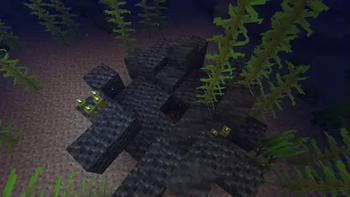
Über diese Mod
Molten Vents is a mod which adds a renewable source of the orestones found in the Create mod, and by extension the many resources that can be processed from them.
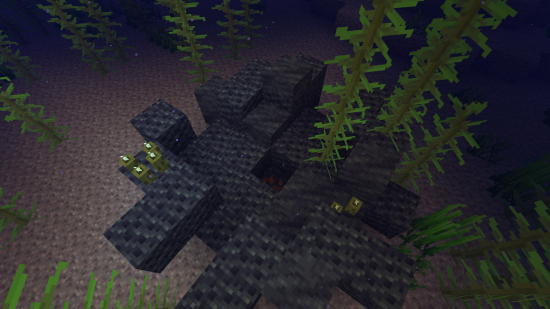
How to use:
- Locate a vent; Vents are found anywhere on the surface, but are more easily found underwater. (Configurable)
- Dig out the blocks inside of the vent until you find a block that looks like the orestones the vent is made of except with magma on it, that is the dormant orestone.
- Explode the dormant orestone by any means.
- Notice that the dormant molten vent is now an active molten vent by seeing the magma in it become brighter.
- Dump lava (preferrably via an automated method) on the active molten vent and watch as the lava turns into the corresponding orestone.
- Process the orestones into resources, or use them for building.
Default Vents:
- Veridium Vent
- Asurine Vent
- Crimsite Vent
- Ochrum Vent
- Scorchia Vent
- Scoria Vent
How to add a custom molten block
Just add the name of the block to this list (a .json file that generates in the config folder)
{"values":["asurine","veridium","crimsite","ochrum","scorchia","scoria","exampleblock"]}
And then depending on your modloader:
Neoforge
- Copy paste any other file in the config/molten_vents/conductive & config/molten_vents/convertible folders.
- Rename the files to the name of the custom block.
- Change values inside the files (Conductive is a list of blocks the molten vent can convert blocks through, it must contain the active molten vent at minimum. Convertible is a list of blocks the molten vent can convert into the new block. (ex. lava -> asurine))
Forge
Make a datapack that adds these two jsons: data/molten_vents/molten_vents/blocks/conductive/exampleblock.json (You can add whatever blocks you want here but definitely include these three) ```json { "replace": false, "values": [ "examplemodthataddsblock:exampleblock", "molten_vents:dormant_molten_exampleblock", "molten_vents:active_molten_exampleblock" ] } ``` data/molten_vents/molten_vents/blocks/convertible/exampleblock.json (The lava can be changed to any other block and other blocks can be additionally added) ```json { "replace": false, "values": [ "minecraft:lava" ] } ``` Example datapack can be found in the #datapacks channel in the discord ([https://discord.gg/HHqKa8vTAN]((https://discord.gg/HHqKa8vTAN)))Then make a resourcepack that adds the name translations, blockstates, models, and textures for "molten_vents.active_molten_exampleblock" and "molten_vents.dormant_molten_exampleblock" (optional)
How to make a custom molten vent feature
Just recreate your own copy of the placed and configured feature jsons available in the base mod in the respective directories within your own datapack:
data/yourdatapackname/worldgen/configured_feature/examplevent.json
data/yourdatapackname/worldgen/placed_feature/examplevent.json
Then add your placed feature to the forge biome modifiers:
data/yourdatapackname/forge/biome_modifier/add_vents.json
Examples are here:
Discord: https://discord.gg/HHqKa8vTAN
This mod may be used in any modpack.
Verfügbare Versionen
Create: Molten Vents auf dem Server installieren
Server bestellen
Bestelle einen Minecraft Java Server mit mindestens 4 GB RAM (6 GB empfohlen).
forge Loader setzen
Wähle im Panel unter "Egg" den forge-Loader und die passende Minecraft-Version (1.21.8).
Mod installieren
Öffne den Mod-Browser im Dashboard und suche nach "Create: Molten Vents". Klicke "Installieren" – fertig! Alternativ: Lade die .jar via SFTP in den /mods Ordner.
Kompatibilität
Mod-Loader
Minecraft-Versionen
1.21.8, 1.21.7, 1.21.6 (+15 weitere)
Server-seitig
✓ ErforderlichEmpfohlener RAM
6 GB(min. 4 GB)Häufige Fragen
Create: Molten Vents Server crasht beim Start – was tun?
Häufigste Ursache: falsche forge-Version oder zu wenig RAM. Prüfe im Server-Log (latest.log), ob ein "OutOfMemoryError" oder "Mixin"-Fehler auftritt. Bei Mado Hosting: Stelle sicher, dass mindestens 4 GB RAM zugewiesen sind und der Loader zur Mod-Version passt (1.21.8). Über das Panel kannst du den Loader mit einem Klick wechseln.
Ist Create: Molten Vents mit forge und neoforge kompatibel?
Create: Molten Vents unterstützt offiziell forge, neoforge für Minecraft 1.21.8, 1.21.7, 1.21.6. Im Mado Dashboard werden inkompatible Loader-Kombinationen automatisch erkannt.
Server laggt mit Create: Molten Vents – wie optimiere ich die Performance?
Empfohlener RAM: 6 GB (+1 GB pro 5 Spieler). Prüfe mit /spark profiler, ob Create: Molten Vents den meisten Tick-Time verbraucht. Häufige Fixes: Server-View-Distance auf 8-10 reduzieren, bei Forge "performant" oder "starlight" als Zusatz-Mod installieren. Bei Mado Hosting läuft dein Server auf NVMe-SSDs mit dedizierten CPU-Kernen für minimale Latenz.
Ähnliche Mods






Modded Server mieten
Installiere Create: Molten Vents mit nur einem Klick auf deinem Server.