
Create: Crafts & (More) Additions
Silver Ore, proper Electrum recipe, and more content for Create Crafts & Additions.
Screenshots
Über diese Mod

About
This is an addon for Create Crafts & Additions and Create. It adds new blocks, items, tools, and many other features.
Content
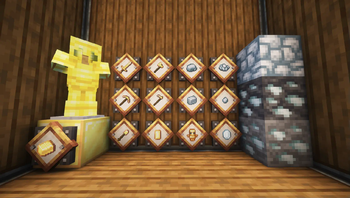
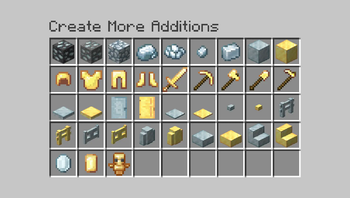
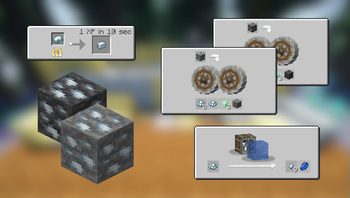
 Silver Ore: Used to craft Electrum and other items. Can be found at the same layers as Gold
Electrum tools, weapon and armor set: A middle ground between Iron and Diamond equipment
Silver and Electrum Jewels: Obtained by sanding ingots. Used in many new recipes
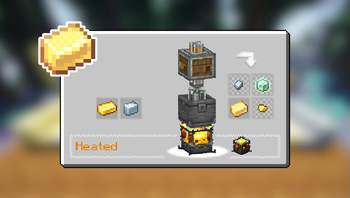
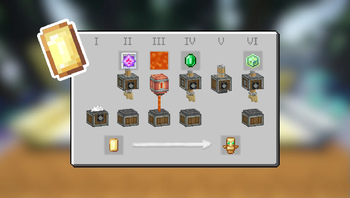
Craftable Totem Of Undying using Create's assembly line
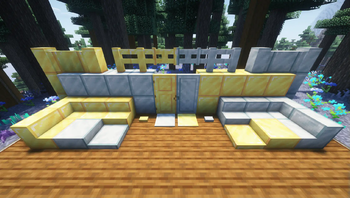
Dozens of new decorative silver-based and electrum-based blocks
Many other features to discover!
Screenshots


Compatibility
Tinker's Construct / Hephaestus
Show spoiler

Show spoiler

Dependencies
Requires both Create and Create Crafts & Additions for all of the features to work.
JEI is recommended for recipes but not required.
Installation
Add the .jar mod file into your mods folder.
Alternatively, you can browse the Modrinth launcher for the mod (if it doesn't show up, try typing the autor's name). Once found, click "Install" to add it to your modpack.
Permissions
You are free to include this mod in any modpack, public or private.
Support my work
 Download my projects on CurseForge
 Download my projects on Modrinth
Donate on Paypal
Verfügbare Versionen
Create: Crafts & (More) Additions auf dem Server installieren
Server bestellen
Bestelle einen Minecraft Java Server mit mindestens 4 GB RAM (6 GB empfohlen).
fabric Loader setzen
Wähle im Panel unter "Egg" den fabric-Loader und die passende Minecraft-Version (1.21.1).
Mod installieren
Öffne den Mod-Browser im Dashboard und suche nach "Create: Crafts & (More) Additions". Klicke "Installieren" – fertig! Alternativ: Lade die .jar via SFTP in den /mods Ordner.
Kompatibilität
Mod-Loader
Minecraft-Versionen
1.21.1, 1.21, 1.20.1 (+2 weitere)
Server-seitig
✓ ErforderlichEmpfohlener RAM
6 GB(min. 4 GB)Häufige Fragen
Create: Crafts & (More) Additions Server crasht beim Start – was tun?
Häufigste Ursache: falsche fabric-Version oder zu wenig RAM. Prüfe im Server-Log (latest.log), ob ein "OutOfMemoryError" oder "Mixin"-Fehler auftritt. Bei Mado Hosting: Stelle sicher, dass mindestens 4 GB RAM zugewiesen sind und der Loader zur Mod-Version passt (1.21.1). Über das Panel kannst du den Loader mit einem Klick wechseln.
Ist Create: Crafts & (More) Additions mit fabric und forge und neoforge und quilt kompatibel?
Create: Crafts & (More) Additions unterstützt offiziell fabric, forge, neoforge, quilt für Minecraft 1.21.1, 1.21, 1.20.1. Achtung: Forge- und Fabric-Mods sind NICHT untereinander kompatibel – wähle einen Loader und bleibe dabei. Im Mado Dashboard werden inkompatible Loader-Kombinationen automatisch erkannt.
Server laggt mit Create: Crafts & (More) Additions – wie optimiere ich die Performance?
Empfohlener RAM: 6 GB (+1 GB pro 5 Spieler). Prüfe mit /spark profiler, ob Create: Crafts & (More) Additions den meisten Tick-Time verbraucht. Häufige Fixes: Server-View-Distance auf 8-10 reduzieren, bei Forge "performant" oder "starlight" als Zusatz-Mod installieren. Bei Mado Hosting läuft dein Server auf NVMe-SSDs mit dedizierten CPU-Kernen für minimale Latenz.
Ähnliche Mods

![[ETF] Entity Texture Features](https://cdn.modrinth.com/data/BVzZfTc1/af683d206d50b05258d865b0d6e4aa2f2cee12f2_96.webp)
![[EMF] Entity Model Features](https://cdn.modrinth.com/data/4I1XuqiY/6e5bbd0d06b1741bfdab6c0cfab6de8fdaf0064c_96.webp)



Modded Server mieten
Installiere Create: Crafts & (More) Additions mit nur einem Klick auf deinem Server.