
Endercage
A tool for capturing and carrying mobs.
Screenshots
Über diese Mod
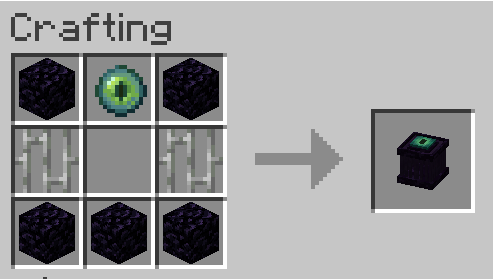
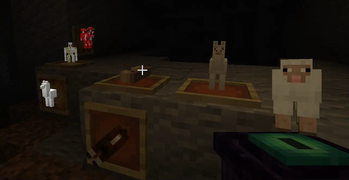
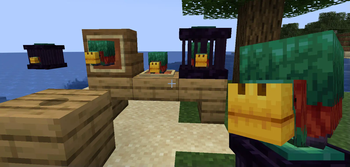
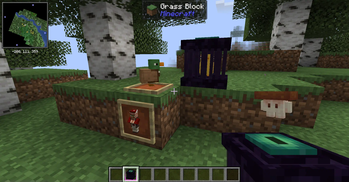
The endercage is a tool/block for capturing and easily transporting mobs. Other than that it also has some other functionalities including the ability to play sounds from contained entities and displaying the entity as decoration.
Features:
= General functionality:
-> Capture entities by rightclicking them with the cage.
-> Transfer entities between a placed cage and a cage in your hand by rightclicking them with it.
-> Entities inside the cage will play their ambient sound once in a while. You can mute a cage by rightclicking it with a feather and unmute it by rightclicking it with a noteblock.
= Redstone functionality:
-> If a cage is powered it will:
-->> Release the contained entity / capture the entity above if the block above is air.
-->> Steal from/give the contained entity to a cage above.
-> Noteblocks above cages will always play the ambient of the entity below, even if the cage is muted.
-> Comparators will output a redstone signal of 15 if the cage is filled and 0 if not.
= Misc:
-> If a filled endercage is placed in a itemframe it will just show the entitiy. If the itemframe is facing up the entity will stand normally.
There are some settings to enable/disable containment of hostiles (disabled by default), disable redstone functionality, mute them altogether and ban certain entities from being captured at all.
Note: If a entity renders as a question mark it errored while trying to render and its model got replaced with the "?" to prevent a crash. If released it will look normal.
Verfügbare Versionen
Endercage auf dem Server installieren
Server bestellen
Bestelle einen Minecraft Java Server mit mindestens 3 GB RAM (4 GB empfohlen).
fabric Loader setzen
Wähle im Panel unter "Egg" den fabric-Loader und die passende Minecraft-Version (1.20.1).
Mod installieren
Öffne den Mod-Browser im Dashboard und suche nach "Endercage". Klicke "Installieren" – fertig! Alternativ: Lade die .jar via SFTP in den /mods Ordner.
Kompatibilität
Mod-Loader
Minecraft-Versionen
1.20.1
Server-seitig
✓ ErforderlichEmpfohlener RAM
4 GB(min. 3 GB)Häufige Fragen
Endercage Server crasht beim Start – was tun?
Häufigste Ursache: falsche fabric-Version oder zu wenig RAM. Prüfe im Server-Log (latest.log), ob ein "OutOfMemoryError" oder "Mixin"-Fehler auftritt. Bei Mado Hosting: Stelle sicher, dass mindestens 3 GB RAM zugewiesen sind und der Loader zur Mod-Version passt (1.20.1). Über das Panel kannst du den Loader mit einem Klick wechseln.
Ist Endercage mit fabric kompatibel?
Endercage unterstützt offiziell fabric für Minecraft 1.20.1. Im Mado Dashboard werden inkompatible Loader-Kombinationen automatisch erkannt.
Server laggt mit Endercage – wie optimiere ich die Performance?
Empfohlener RAM: 4 GB (+1 GB pro 8 Spieler). Prüfe mit /spark profiler, ob Endercage den meisten Tick-Time verbraucht. Häufige Fixes: Server-View-Distance auf 8-10 reduzieren, bei Forge "performant" oder "starlight" als Zusatz-Mod installieren. Bei Mado Hosting läuft dein Server auf NVMe-SSDs mit dedizierten CPU-Kernen für minimale Latenz.
Ähnliche Mods


Modded Server mieten
Installiere Endercage mit nur einem Klick auf deinem Server.