
Etched
A new form of entertainment. Create and play your very own records that everyone can hear!
Screenshots
Über diese Mod
💿 Etched, a new form of entertainment

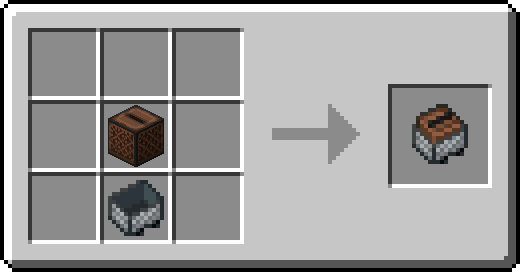
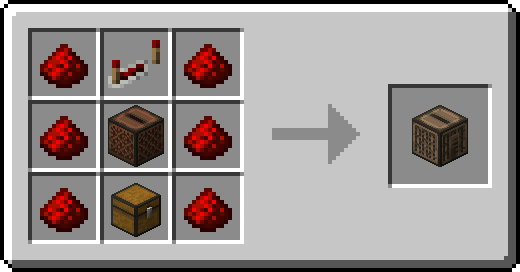
Etched provides new ways to play your own music right in Minecraft! Not only can you create custom records with full customization with the new Etching Table, Etched also provides new ways to play all discs. The new Album Jukebox lets you store up to 9 records which will play in order and on repeat unless powered by redstone, which then it'll pause and reset to the first disc. The Jukebox Minecart lets you play music on the rails with the ability to insert records into it with hoppers or, if the song is ended, restart the song with an activator rail!
📦 Features:
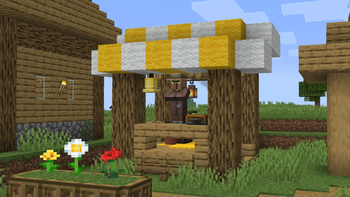
- The new bard profession for villagers with various musical trades.
- New ways to play music such as the Jukebox Minecart, Album Jukebox, or Radio! Play songs on the go, live from a radio station, or multiple songs in order on repeat, just like an album.
- Insert records into jukeboxes with hoppers! A parity feature from Bedrock.
- Create your own custom records with the Etching Table! Provide a URL (supports SoundCloud, MP3, WAV, OGG, and Sound Events), a blank disc, and a label to decorate your disc.
💽 How to create a disc:
It's quite easy to do, simply insert a Blank Music Disc along with a Music Label (right click it to customize the song's info, color with dyes in a crafting table, and craft two dyed music labels together to create a Complex Music Label) and you'll be ready to create your first disc. Once you've got the necessary components, you can select the pattern of the label under the component slots to make your disc look pretty and the URL to your song goes in the bar above! Etched currently supports URLs that lead to an MP3 File, WAV File, OGG File, SoundCloud Song (GO+ songs are not supported, regardless of subscription status), Bandcamp Song, or a Minecraft Sound Event.
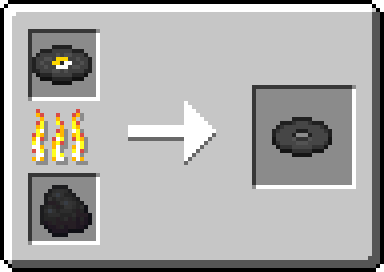
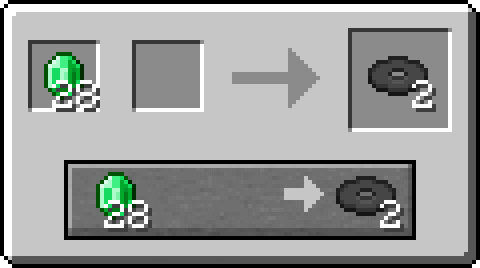
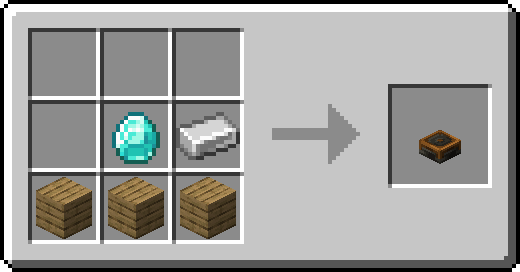
How do I obtain a Blank Music Disc?
These wouldn't be records without some sort of challenge. To get a Blank Music Disc, you can either smelt a vanilla Music Disc or trade with the new Bard at merchant level 2.
Verfügbare Versionen
Etched auf dem Server installieren
Server bestellen
Bestelle einen Minecraft Java Server mit mindestens 4 GB RAM (6 GB empfohlen).
forge Loader setzen
Wähle im Panel unter "Egg" den forge-Loader und die passende Minecraft-Version (1.21.1).
Mod installieren
Öffne den Mod-Browser im Dashboard und suche nach "Etched". Klicke "Installieren" – fertig! Alternativ: Lade die .jar via SFTP in den /mods Ordner.
Kompatibilität
Mod-Loader
Minecraft-Versionen
1.21.1, 1.20.1
Server-seitig
✓ ErforderlichEmpfohlener RAM
6 GB(min. 4 GB)Häufige Fragen
Etched Server crasht beim Start – was tun?
Häufigste Ursache: falsche forge-Version oder zu wenig RAM. Prüfe im Server-Log (latest.log), ob ein "OutOfMemoryError" oder "Mixin"-Fehler auftritt. Bei Mado Hosting: Stelle sicher, dass mindestens 4 GB RAM zugewiesen sind und der Loader zur Mod-Version passt (1.21.1). Über das Panel kannst du den Loader mit einem Klick wechseln.
Ist Etched mit forge und neoforge kompatibel?
Etched unterstützt offiziell forge, neoforge für Minecraft 1.21.1, 1.20.1. Im Mado Dashboard werden inkompatible Loader-Kombinationen automatisch erkannt.
Server laggt mit Etched – wie optimiere ich die Performance?
Empfohlener RAM: 6 GB (+1 GB pro 5 Spieler). Prüfe mit /spark profiler, ob Etched den meisten Tick-Time verbraucht. Häufige Fixes: Server-View-Distance auf 8-10 reduzieren, bei Forge "performant" oder "starlight" als Zusatz-Mod installieren. Bei Mado Hosting läuft dein Server auf NVMe-SSDs mit dedizierten CPU-Kernen für minimale Latenz.
Ähnliche Mods






Modded Server mieten
Installiere Etched mit nur einem Klick auf deinem Server.