
Simple Storage
Simple Storage (former EZStorage) introduces an early-game storage system that scales and evolves as players progress, while keeping the vanilla flair.
Screenshots
Über diese Mod
Simple Storage
Simple storage mod for Minecraft 1.7.10 (Forge).
Description
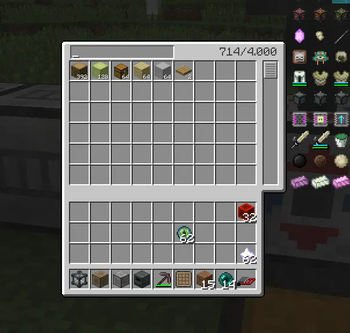
Simple Storage (former EZStorage) introduces an early-game storage system that scales and evolves as players progress, while keeping the vanilla flair. Want to put 100k Cobblestone in 1 slot? No problem. The blocks in the mod can add a crafting grid, additional storage, and more. Also includes integration into some mods for easier crafting or additional features!
Blocks & Items
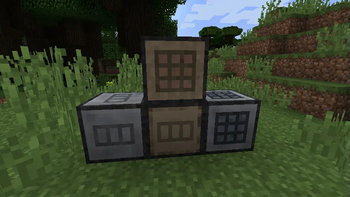
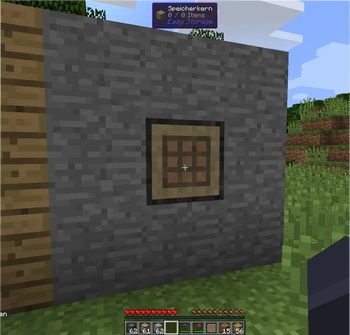
- Storage Core
- This is the core of your storage system
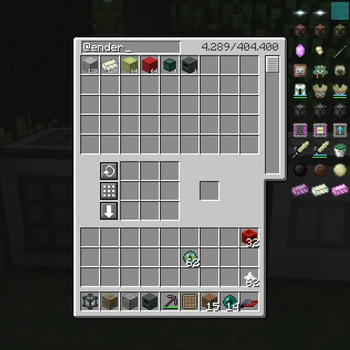
- Click on this block to open the GUI (search box included), and add adjacent blocks to expand
- Each system can only have 1 Storage Core
- This block can only be broken if it contains no items
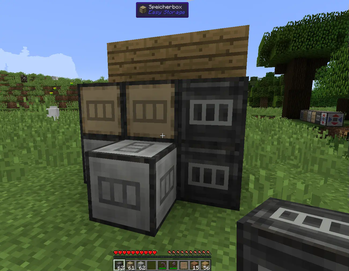
- Storage Box
- Tier 1 storage add-on wich increases the storage capacity of the Storage Core by a small amount
- Condensed Storage Box
- Tier 2 storage add-on
- Hyper Storage Box
- Tier 3 storage add-on
- Proxy Port
- Expose the storage inventory to hoppers, conduits or maschines
- Crafting Box
- This adds a crafting grid to the GUI of your Storage Core (compatible with NEI + clicking for easy crafting from the internal inventory)
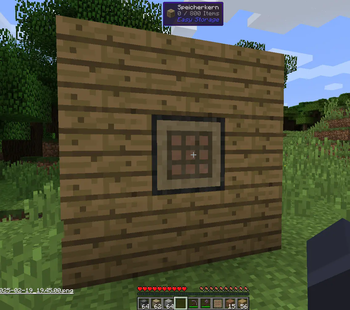
- Portable Storage Panel
- This adds a small item that features a wood panel with wireless access to your storage core. It's tier can be upgraded and a crafting grid can also be added.
- Upgrade by putting in crafting grid together with one redstone block and the upgrade item (ender eye, ender pearl, nether star, crafting box)
- No need for chunkloading the target storage core, it works without!
Mod Integration
- Not Enough Items (GTNH version)
- Overlay recipes
- One-click crafting
- NEI-like search
- Waila
- Advanced tooltip overlay
- Show storage content (items/types count) in world tooltip
- JABBA
- Move the storage core from one place to another place using the dolly from Jabba
- Crafting Tweaks
- Show typical crafting tweaks buttons on crafting grid
- Et Futurum Requiem
- Spectator mode
Remarks
This mod is intented to be a compact storage solution, and not an automated storage network. As of right now, I'm not going to include any features like filtered output, network cables, external monitors, or anything else remeniscent of Applied Energistics. If you have an idea how such features would fit nicely in vanilla worlds, feel free to open an issue for discussion.
As from my side, this mod is feature-completed. I'll try fixing bugs as they were found or make improvements where possible. However, any contribution in form of troubleshooting or pull requests for bugfixes, improvements, mod compat, or new features are welcome at any time.
Contribution
If you want to help adding any feature or make improvements or getting compatibility with another mod, feel free to make a pull request. I only have the time to maintenance this mod at a low level, the lowest effort needed for getting it working nicely on my server and in the modpack.
Changes compared to the original version of EZStorage
This fork becomes some changes to be usable on servers, less-buggy and a lot of feature and code improvements.
- Many bugfixes and some stability and code improvements
- Lots of UI and performance improvements
- Mod compat with NEI, Waila, Jabba, Crafting Tweaks, Et Futurum Requiem, etc.
- Re-made the most textures to look nicer and fit better into vanilla worlds
- Replaced input and output block with a more enhanced proxy block
- Configurable maximum different item types per storage (no limit by default)
- Store storage as separated file in the world's save directory instead directly on the TileEntity (only send to client when needed)
Verfügbare Versionen
Simple Storage auf dem Server installieren
Server bestellen
Bestelle einen Minecraft Java Server mit mindestens 3 GB RAM (4 GB empfohlen).
forge Loader setzen
Wähle im Panel unter "Egg" den forge-Loader und die passende Minecraft-Version (1.7.10).
Mod installieren
Öffne den Mod-Browser im Dashboard und suche nach "Simple Storage". Klicke "Installieren" – fertig! Alternativ: Lade die .jar via SFTP in den /mods Ordner.
Kompatibilität
Mod-Loader
Minecraft-Versionen
1.7.10
Server-seitig
✓ ErforderlichEmpfohlener RAM
4 GB(min. 3 GB)Häufige Fragen
Simple Storage Server crasht beim Start – was tun?
Häufigste Ursache: falsche forge-Version oder zu wenig RAM. Prüfe im Server-Log (latest.log), ob ein "OutOfMemoryError" oder "Mixin"-Fehler auftritt. Bei Mado Hosting: Stelle sicher, dass mindestens 3 GB RAM zugewiesen sind und der Loader zur Mod-Version passt (1.7.10). Über das Panel kannst du den Loader mit einem Klick wechseln.
Ist Simple Storage mit forge kompatibel?
Simple Storage unterstützt offiziell forge für Minecraft 1.7.10. Im Mado Dashboard werden inkompatible Loader-Kombinationen automatisch erkannt.
Server laggt mit Simple Storage – wie optimiere ich die Performance?
Empfohlener RAM: 4 GB (+1 GB pro 8 Spieler). Prüfe mit /spark profiler, ob Simple Storage den meisten Tick-Time verbraucht. Häufige Fixes: Server-View-Distance auf 8-10 reduzieren, bei Forge "performant" oder "starlight" als Zusatz-Mod installieren. Bei Mado Hosting läuft dein Server auf NVMe-SSDs mit dedizierten CPU-Kernen für minimale Latenz.
Ähnliche Mods


Modded Server mieten
Installiere Simple Storage mit nur einem Klick auf deinem Server.