
Fabricord
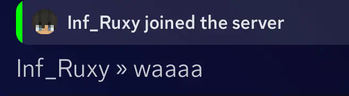
A modern message style like DiscordSRV will be reproduced as a Fabric version mod.
Screenshots

Über diese Mod
Fabricord


Fabricord is a server-side Fabric mod that connects Minecraft server chat and events with Discord.
It is designed as a Fabric alternative to DiscordSRV and does not need to be installed on players' clients.
Fabricord is not affiliated with the mod of the same name published on CurseForge.
Features
- Bidirectional chat between Minecraft and Discord
- Join, leave, death, and advancement notifications
- Minecraft and Discord account linking, lookup, and unlinking
- Discord mentions associated with linked Minecraft accounts
- Discord slash commands for server information and administration
- Configurable permissions for individual Discord commands
- Permission rules based on linked operators, Discord users, and Discord roles
- Discord role to Minecraft operator synchronization
- Optional Minecraft console relay
- Configurable message templates and placeholders
- English, Japanese, German, and French messages
Installation
Fabricord requires:
- Fabric Loader
- Fabric API
- Fabric Language Kotlin
To install Fabricord:
- Download the JAR matching the Minecraft version running on your server.
- Place Fabricord and its required dependencies in the server's
modsdirectory. - Start the server once to generate
fabricord/config.yml. - Configure
botToken,logChannels, and any optional integrations. - Restart the server.
Discord application setup guides are available on GitHub:
Supported Versions
Fabricord provides dedicated compatibility builds for Minecraft 1.14 through 1.21.11 and Minecraft 26.1 through 26.1.2.
Select the file whose supported game-version range matches the Minecraft version running on your server.
Fabricord includes SQLite native libraries for:
- 64-bit Windows
- 64-bit Linux using glibc or musl
- 64-bit macOS on Intel or Apple Silicon
Other operating systems and processor architectures are not currently supported.
Configuration
The main configuration file is generated at:
fabricord/config.yml
The configuration controls Discord channels, account linking, command permissions, role synchronization, message templates, console relay, and other integrations.
Language-specific configuration and message files are generated alongside the main configuration.
Support
Bug reports and feature requests can be submitted through GitHub Issues.
Source code and contribution information are available in the GitHub repository.
Release notes are published through GitHub Releases.
License
Fabricord is distributed under the Apache License 2.0.
Verfügbare Versionen
Fabricord auf dem Server installieren
Server bestellen
Bestelle einen Minecraft Java Server mit mindestens 3 GB RAM (4 GB empfohlen).
fabric Loader setzen
Wähle im Panel unter "Egg" den fabric-Loader und die passende Minecraft-Version (26.1.2).
Mod installieren
Öffne den Mod-Browser im Dashboard und suche nach "Fabricord". Klicke "Installieren" – fertig! Alternativ: Lade die .jar via SFTP in den /mods Ordner.
Kompatibilität
Mod-Loader
Minecraft-Versionen
26.1.2, 26.1.1, 26.1 (+43 weitere)
Server-seitig
✓ ErforderlichEmpfohlener RAM
4 GB(min. 3 GB)Häufige Fragen
Fabricord Server crasht beim Start – was tun?
Häufigste Ursache: falsche fabric-Version oder zu wenig RAM. Prüfe im Server-Log (latest.log), ob ein "OutOfMemoryError" oder "Mixin"-Fehler auftritt. Bei Mado Hosting: Stelle sicher, dass mindestens 3 GB RAM zugewiesen sind und der Loader zur Mod-Version passt (26.1.2). Über das Panel kannst du den Loader mit einem Klick wechseln.
Ist Fabricord mit fabric kompatibel?
Fabricord unterstützt offiziell fabric für Minecraft 26.1.2, 26.1.1, 26.1. Im Mado Dashboard werden inkompatible Loader-Kombinationen automatisch erkannt.
Server laggt mit Fabricord – wie optimiere ich die Performance?
Empfohlener RAM: 4 GB (+1 GB pro 8 Spieler). Prüfe mit /spark profiler, ob Fabricord den meisten Tick-Time verbraucht. Häufige Fixes: Server-View-Distance auf 8-10 reduzieren, bei Forge "performant" oder "starlight" als Zusatz-Mod installieren. Bei Mado Hosting läuft dein Server auf NVMe-SSDs mit dedizierten CPU-Kernen für minimale Latenz.
Ähnliche Mods






Modded Server mieten
Installiere Fabricord mit nur einem Klick auf deinem Server.