
FireHud
Customize the visuals of fire to your exact needs and beyond
Screenshots
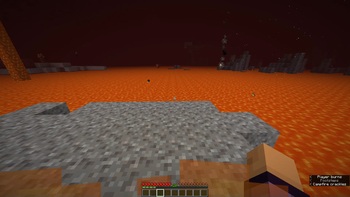
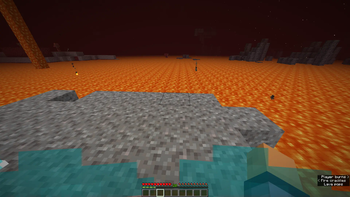
Über diese Mod
FireHud
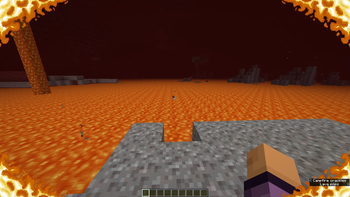
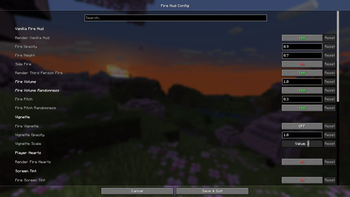
This is a client only mod which provides more settings than you'll ever need to customize the onscreen effect when on fire.
Everything is on vanilla settings by default
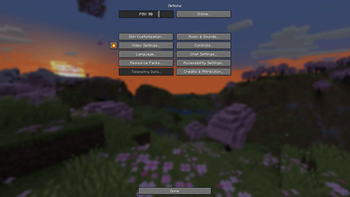
The config, made using Cloth Config, is accessable through either ModMenu or, I have added a button in the game options beside the videos settings button. This button is toggleable and you may move it around as well.
This mod was made as a passion project after I went netherite mining and remembered how annoying fire was.
You may also adjust the volume and pitch of fire blocks in the config.
Believe me when I say I have really gone overkill on customization. Chances are that I'll also add more features in the future. If you have any good ideas for additions to this mod, don't hesitate to go to the issues page on the github and make a suggestion. I will most likely read it and consider it.
Some features of note:
- Adjusting the position of vanilla fire.
- Adjusting the opactity of vanilla fire.
- Disabling vanilla fire entirely.
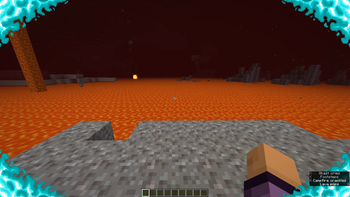
- Enabling other customizable redesigns of the hud.
- Adjusting the in-lava fog. Making it easier to see under lava.
- Player ignites on soul fire rather than normal, orange fire when in soul fire.
- And many other useful, but completely optional features.
Verfügbare Versionen
FireHud auf deinem Client installieren
Mod-Loader lokal installieren
Installiere fabric für deine lokale Minecraft-Version.
Passende Datei herunterladen
Wähle die FireHud-Datei für fabric und Minecraft 26.2.
Mod installieren
Lege die .jar-Datei in deinem lokalen .minecraft/mods-Ordner ab und starte Minecraft neu. Eine Installation auf dem Server ist nicht nötig.
Kompatibilität
Mod-Loader
Minecraft-Versionen
26.2, 1.21.11, 1.21.10 (+14 weitere)
Server-seitig
✗ Nicht unterstütztEmpfohlener RAM
4 GB(min. 3 GB)Häufige Fragen
Muss FireHud auf dem Minecraft Server installiert werden?
Nein. Modrinth kennzeichnet FireHud serverseitig als nicht unterstützt. Installiere die Mod nur im lokalen Minecraft-Mods-Ordner. Dein Server kann unverändert bleiben, sofern die Mod-Seite keine zusätzliche Abhängigkeit nennt.
Welche Version und welchen Loader braucht FireHud?
Nutze eine Datei für fabric und exakt deine Minecraft-Version. Unterstützte Versionen sind unter anderem 26.2, 1.21.11, 1.21.10. Loader-Dateien sind nicht untereinander austauschbar.
FireHud funktioniert nicht – was kann ich prüfen?
Prüfe zuerst Minecraft-Version, Loader-Version und erforderliche Abhängigkeiten. Lege die .jar-Datei im lokalen .minecraft/mods-Ordner ab und entferne ältere Duplikate. Da die Mod clientseitig ist, löst mehr Server-RAM dieses Problem nicht.
Ähnliche Mods






Minecraft Server für deine Gruppe
FireHud bleibt auf deinem Client. Hoste dazu eine kompatible Welt für deine Mitspieler.