
Frustrator
Dynamically show/hide areas within your world to improve performance, depending on if they should be visible or not.
Screenshots
Über diese Mod
Frustrator
Frustrator is a Minecraft Forge 1.7.10 mod inspired by old 90s 3D video games which employed trigger areas to hide/show certain parts of the game level. The goal always was to improve performance while not impacting gameplay, which this mod also strives for.
Features
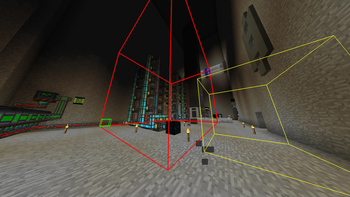
The mod adds two new items, namely the "Frustrator Main Area Tool" and "Frustrator Trigger Area Tool". The main tool is used to select/create a rendering area which should dynamically be rendered or hidden. The trigger tool can create additional areas which will interact with the corresponding main area, either showing or hiding it.
What does the project's name (Frustrator) mean?
When we started the project, we thought that it might be the best idea to use actual Frustums. But working with Frustums and also doing so efficiently was pretty frustrating, hence the name.
But there's a similar mod, RenHider, by AlexSocol. Why is this one special?
RenHider seems to be using a fairly inefficient way of switching between the "hidden" and "shown" state of zones (large zones either lag heavily or plainly kick you from the server when appearing). Thus we set out to create an alternative, written to be extremely scalable and (hopefully) reliable.
Verfügbare Versionen
Frustrator auf dem Server installieren
Server bestellen
Bestelle einen Minecraft Java Server mit mindestens 3 GB RAM (4 GB empfohlen).
forge Loader setzen
Wähle im Panel unter "Egg" den forge-Loader und die passende Minecraft-Version (1.7.10).
Mod installieren
Öffne den Mod-Browser im Dashboard und suche nach "Frustrator". Klicke "Installieren" – fertig! Alternativ: Lade die .jar via SFTP in den /mods Ordner.
Kompatibilität
Mod-Loader
Minecraft-Versionen
1.7.10
Server-seitig
✓ ErforderlichEmpfohlener RAM
4 GB(min. 3 GB)Häufige Fragen
Frustrator Server crasht beim Start – was tun?
Häufigste Ursache: falsche forge-Version oder zu wenig RAM. Prüfe im Server-Log (latest.log), ob ein "OutOfMemoryError" oder "Mixin"-Fehler auftritt. Bei Mado Hosting: Stelle sicher, dass mindestens 3 GB RAM zugewiesen sind und der Loader zur Mod-Version passt (1.7.10). Über das Panel kannst du den Loader mit einem Klick wechseln.
Ist Frustrator mit forge kompatibel?
Frustrator unterstützt offiziell forge für Minecraft 1.7.10. Im Mado Dashboard werden inkompatible Loader-Kombinationen automatisch erkannt.
Server laggt mit Frustrator – wie optimiere ich die Performance?
Empfohlener RAM: 4 GB (+1 GB pro 8 Spieler). Prüfe mit /spark profiler, ob Frustrator den meisten Tick-Time verbraucht. Häufige Fixes: Server-View-Distance auf 8-10 reduzieren, bei Forge "performant" oder "starlight" als Zusatz-Mod installieren. Bei Mado Hosting läuft dein Server auf NVMe-SSDs mit dedizierten CPU-Kernen für minimale Latenz.
Ähnliche Mods


Modded Server mieten
Installiere Frustrator mit nur einem Klick auf deinem Server.